


•Hamza Rashid• 8 min na basahin
Fortnite
Fortnite's proximity chat feature allows players to communicate with others based on their physical distance within the game world. When enabled, you can hear nearby players' voices at full volume, with the audio gradually fading as they move farther away until it disappears completely when they're out of range.
Similar to the in-game voice chat systems in Lethal Company and R.E.P.O., this communication system creates more immersive gameplay experiences, particularly in creative modes and custom maps where map creators have control over voice chat settings.
In this article, we'll explore how proximity chat works in Fortnite, the steps map creators need to follow to enable this feature, and how individual players can turn it off when needed.
Also Read: Can You Play Fortnite on MacBook? (Answered)
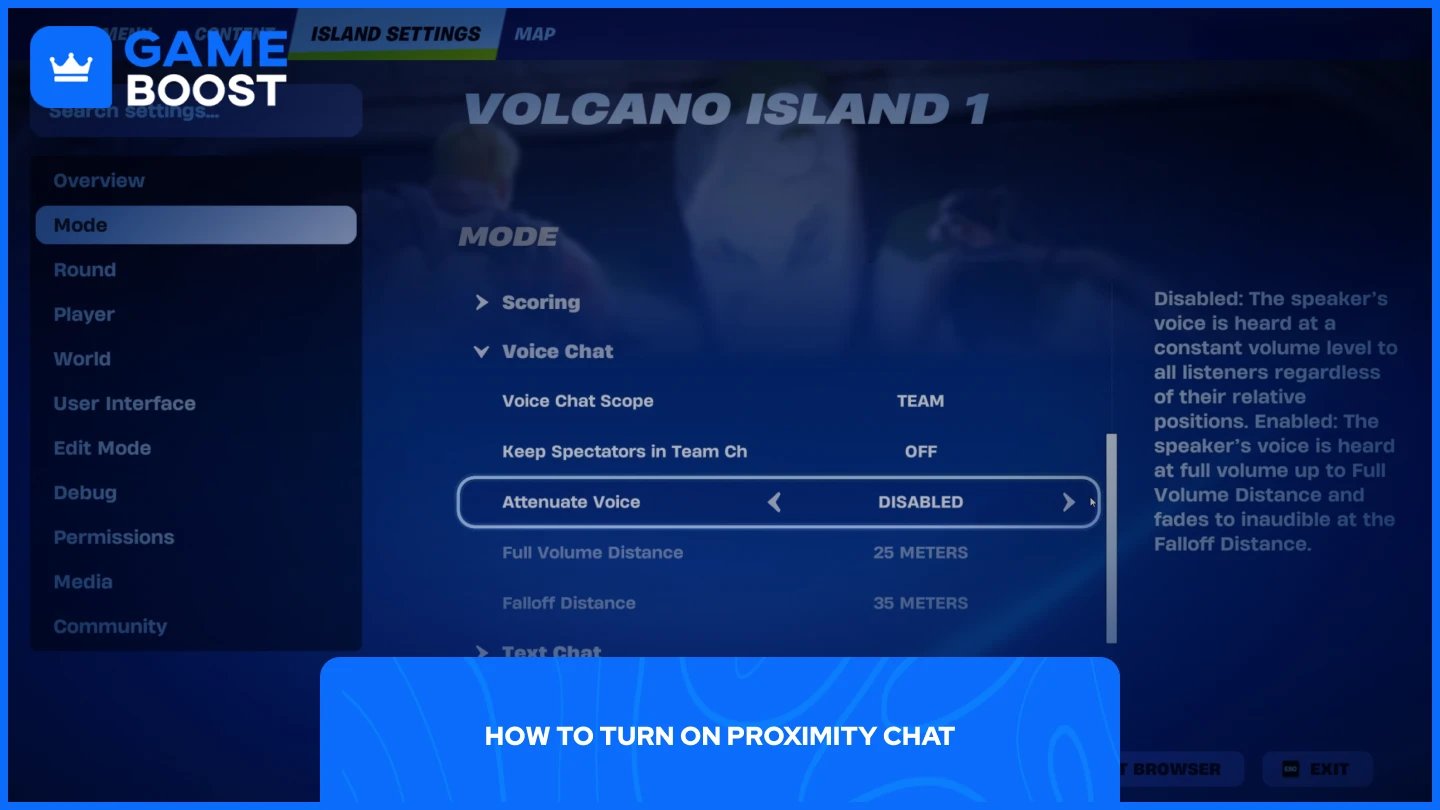
Proximity chat isn't a feature that regular players can simply toggle on or off in their settings. This functionality is exclusively available to map creators who want to enable it for their custom islands or maps in Creative mode.
To turn on proximity chat in your map:
Launch Fortnite, select Creative mode, and jump into your map
Click "M" to open the creative menu
Select "Mode" from the side panel
Scroll down until you find the "Voice Chat" option
Find "Attenuate Voice" and enable it (it's turned off by default)
Once enabled, you can customize additional settings to fine-tune the experience. The “Full Volume Distance” setting controls how loud voices fade as the distance between players increases. The “Falloff Distance” determines how far voices carry before disappearing completely, giving you control over the communication radius in your map.
Remember that proximity chat will only work if players joining your island have their voice chat settings configured appropriately. Their voice chat must be set to "Friends Only," "Everyone," or another suitable level that allows communication with other players in the match.
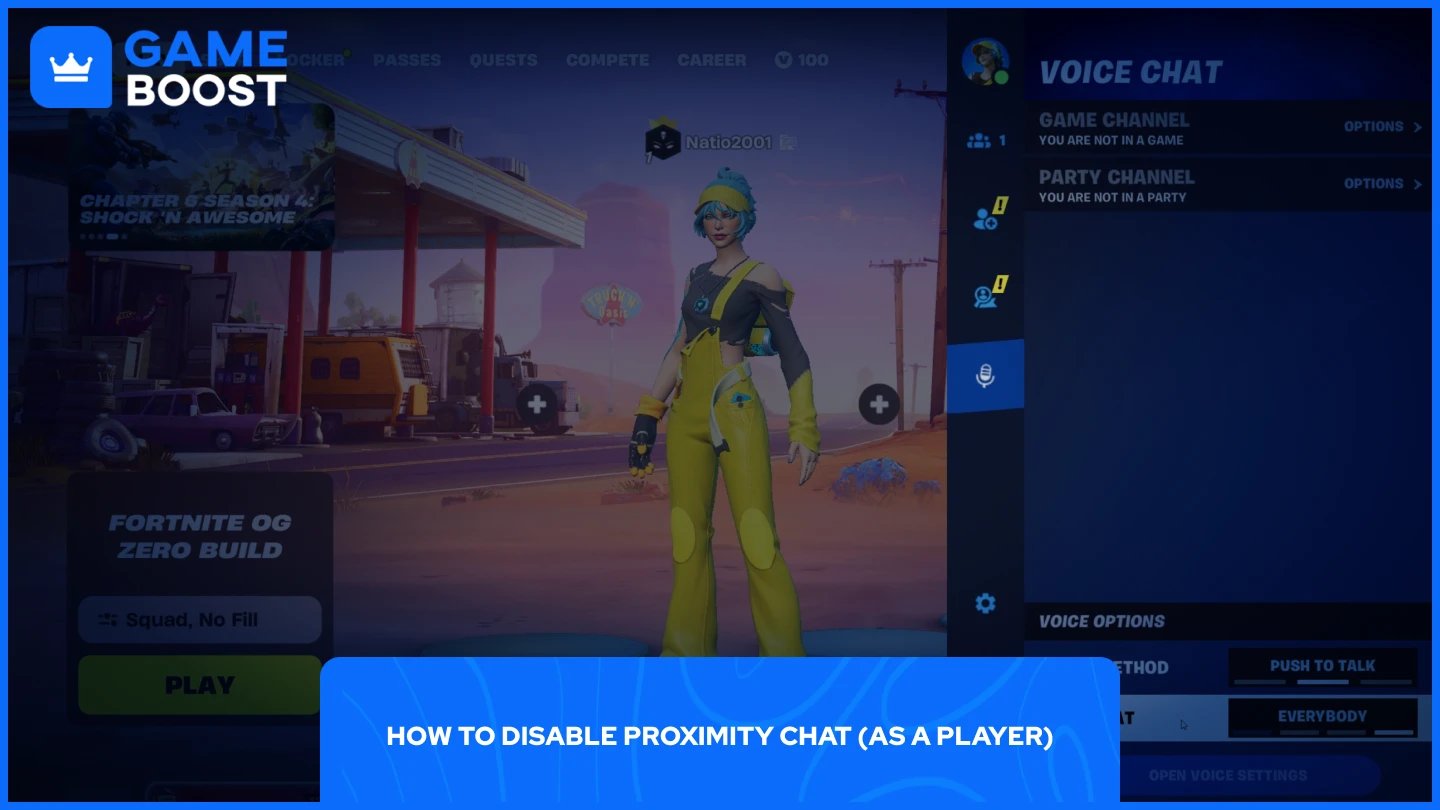
The process of disabling proximity chat is straightforward, but keep in mind that you'll need to disable voice chat entirely to turn off proximity features. There's no separate toggle specifically for proximity chat in the player settings.
To disable voice chat completely:
Launch Fortnite
I-click ang iyong profile sa kanang itaas na sulok
I-click ang icon ng mikropono
Mula doon, maaari mong baguhin ang mga setting ng "Voice Method" at "Voice Chat" availability. I-off ang mga ito upang ganap na huwag paganahin ang voice chat, na magpipigil din sa iyo na marinig ang proximity chat sa anumang creative maps na may tampok na ito.
Ibig sabihin nito, hindi mo rin magagamit ang voice communication sa iyong mga kasamahan, kaya isaalang-alang kung nais mong isakripisyo ang lahat ng voice features para lamang maiwasan ang proximity chat sa mga tiyak na mapa.
Basahin din: Kailan Magsisimula ang Fortnitemares? (2025)
Ang proximity chat sa Fortnite ay eksklusibong kinokontrol ng mga tagalikha ng mapa sa pamamagitan ng setting na "Attenuate Voice" sa Creative mode. Hindi maaaring i-enable ng mga manlalaro ang tampok na ito, ngunit maaari nilang i-disable ito sa pamamagitan ng pag-off ng voice chat sa kanilang profile settings.
Ang mga tagalikha ng mapa na nais magdagdag ng proximity chat sa kanilang mga isla ay kailangang ma-access ang Mode section ng Creative menu at manu-manong i-enable ang tampok. Ang mga manlalaro na mas gustong iwasan ang proximity communication ay kailangang isakripisyo ang lahat ng voice features upang gawin ito.
Bumili ng V-Bucks
Bumili ng Fortnite Items
Fortnite Accounts Para sa Benta
Tingnan ang lahat ng GameBoost Accounts
Tingnan ang lahat ng GameBoost Boosting Services
Tingnan ang lahat ng GameBoost Currencies
Tingnan ang lahat ng GameBoost Game Keys
Tingnan ang lahat ng GameBoost Gift Cards
Tingnan ang lahat ng GameBoost Top Ups
Tingnan ang lahat ng GameBoost Items
Bumili ng CS2 Skins
“ Mustafa Atteya has been writing about gaming and esports since 2023, specializing in competitive game content and player improvement guides. At 24, he brings both hands-on gaming experience and professional SEO writing expertise to the GameBoost team.”