
•Hamza Rashid• 6 นาทีในการอ่าน
Fortnite

ฟอร์ทไนท์'s proximity chat feature allows players to communicate with others based on their physical distance within the game world. When enabled, you can hear nearby players' voices at full volume, with the audio gradually fading as they move farther away until it disappears completely when they're out of range.
Similar to the in-game voice chat systems in Lethal Company and R.E.P.O., this communication system creates more immersive gameplay experiences, particularly in creative modes and custom maps where map creators have control over voice chat settings.
In this article, we'll explore how proximity chat works in Fortnite, the steps map creators need to follow to enable this feature, and how individual players can turn it off when needed.
Also Read: Can You Play Fortnite on MacBook? (Answered)
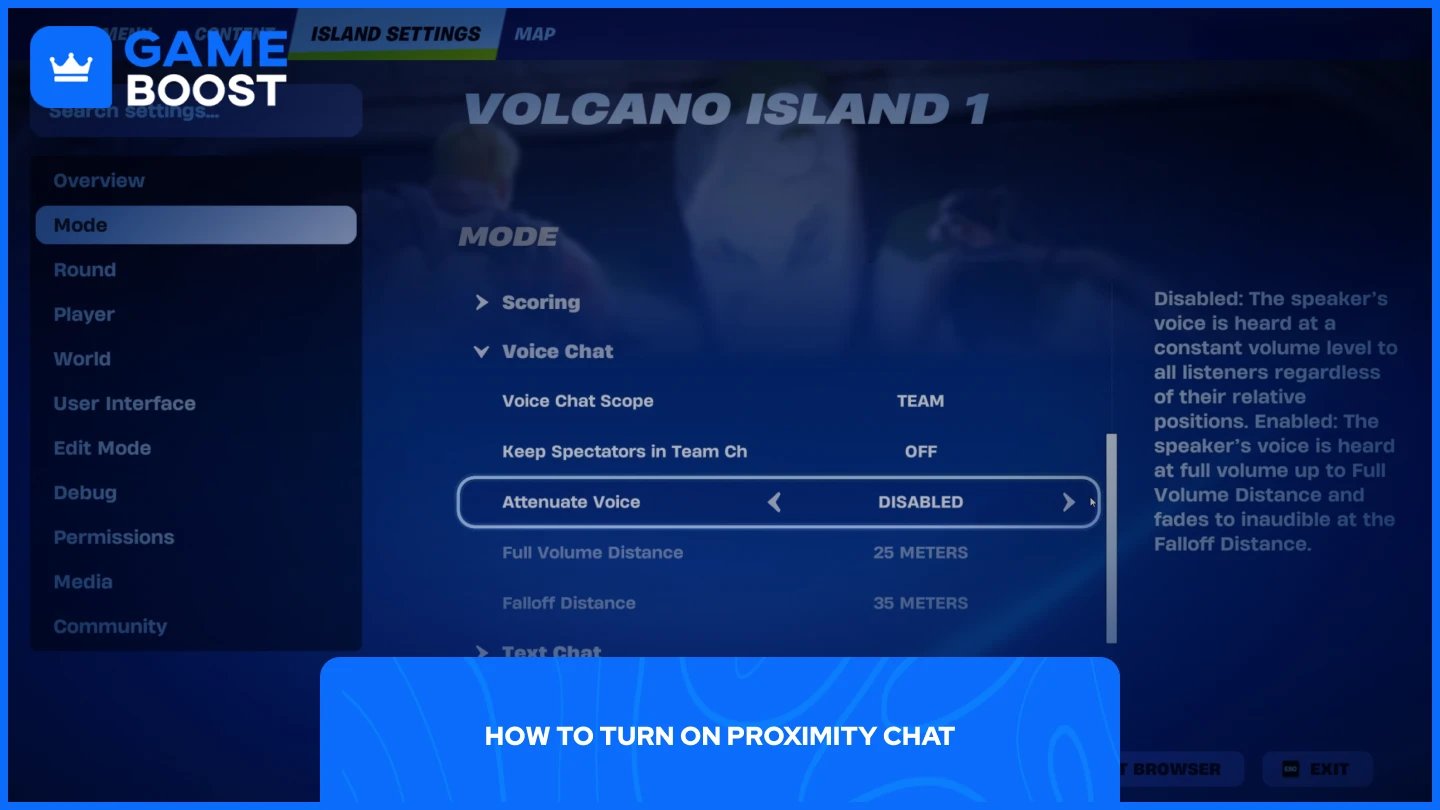
Proximity chat isn't a feature that regular players can simply toggle on or off in their settings. This functionality is exclusively available to map creators who want to enable it for their custom islands or maps in Creative mode.
To turn on proximity chat in your map:
Launch Fortnite, select Creative mode, and jump into your map
Click "M" to open the creative menu
Select "Mode" from the side panel
Scroll down until you find the "Voice Chat" option
Find "Attenuate Voice" and enable it (it's turned off by default)
Once enabled, you can customize additional settings to fine-tune the experience. The “Full Volume Distance” setting controls how loud voices fade as the distance between players increases. The “Falloff Distance” determines how far voices carry before disappearing completely, giving you control over the communication radius in your map.
Remember that proximity chat will only work if players joining your island have their voice chat settings configured appropriately. Their voice chat must be set to "Friends Only," "Everyone," or another suitable level that allows communication with other players in the match.
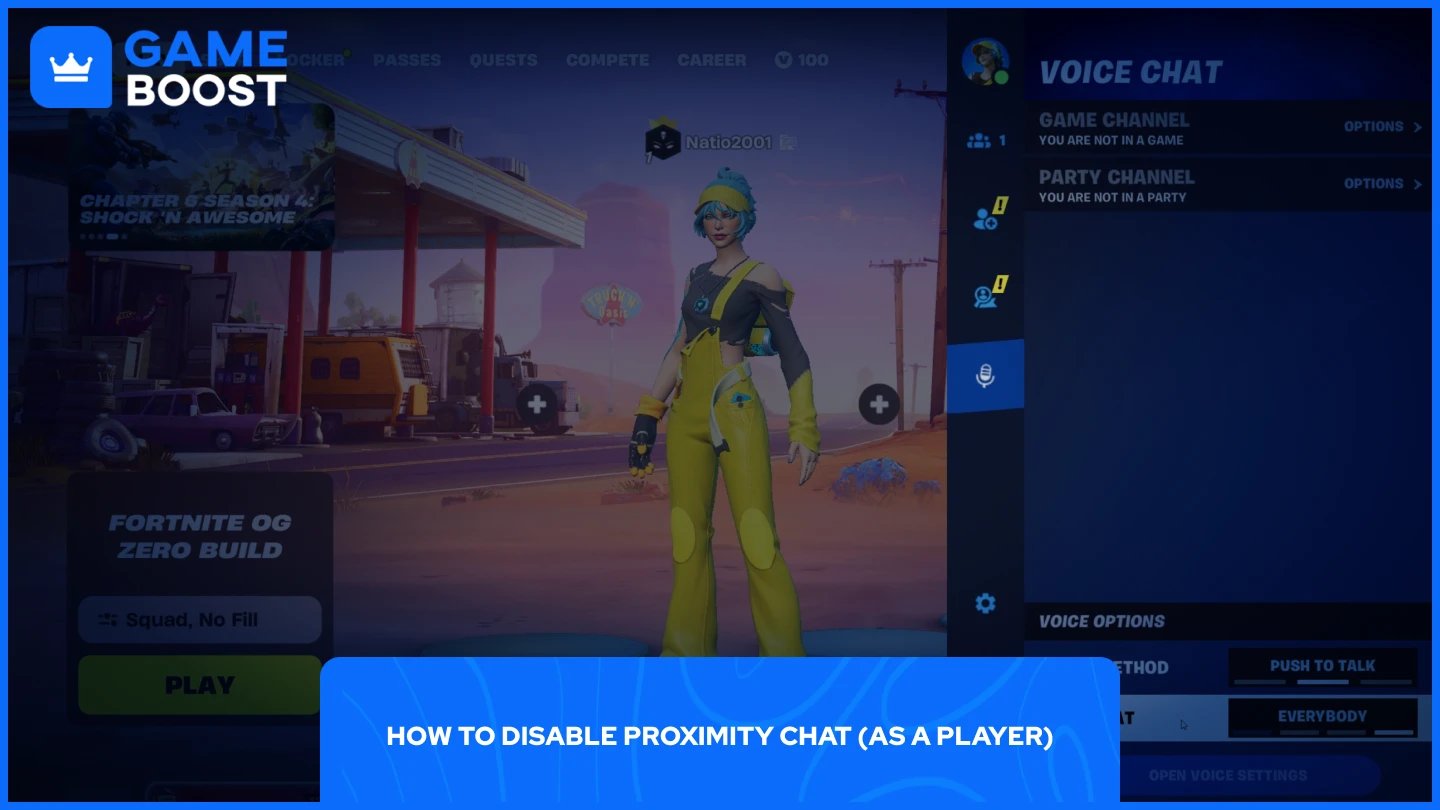
The process of disabling proximity chat is straightforward, but keep in mind that you'll need to disable voice chat entirely to turn off proximity features. There's no separate toggle specifically for proximity chat in the player settings.
To disable voice chat completely:
Launch Fortnite
คลิกที่โปรไฟล์ของคุณที่มุมขวาบน
คลิกที่ไอคอนไมโครโฟน
จากที่นั่น คุณสามารถเปลี่ยนการตั้งค่า "วิธีการเสียง" และ "การสนทนาเสียง" ได้ ปิดการใช้งานเพื่อปิดการสนทนาเสียงโดยสิ้นเชิง ซึ่งจะป้องกันไม่ให้คุณได้ยินการสนทนาใกล้ชิดในแผนที่สร้างสรรค์ที่มีฟีเจอร์นี้เปิดใช้งานอยู่
หมายความว่าคุณจะไม่สามารถใช้การสื่อสารด้วยเสียงกับสมาชิกในปาร์ตี้ของคุณได้เช่นกัน ดังนั้นพิจารณาว่าคุณต้องการสละฟีเจอร์เสียงทั้งหมดเพื่อหลีกเลี่ยงการสนทนาใกล้ชิดในแผนที่เฉพาะหรือไม่
อ่านเพิ่มเติม: Fortnitemares จะเริ่มเมื่อไหร่? (2025)
การสนทนาใกล้ชิดใน Fortnite ถูกควบคุมโดยผู้สร้างแผนที่ผ่านการตั้งค่า "ลดเสียง" ในโหมดสร้างสรรค์ ผู้เล่นไม่สามารถเปิดใช้งานฟีเจอร์นี้ได้ด้วยตนเอง แต่สามารถปิดการใช้งานได้โดยการปิดการสนทนาเสียงโดยสิ้นเชิงในการตั้งค่าโปรไฟล์ของพวกเขา
ผู้สร้างแผนที่ที่ต้องการเพิ่มการสนทนาใกล้ชิดในเกาะของตนต้องเข้าถึงส่วนโหมดในเมนูสร้างสรรค์และเปิดใช้งานฟีเจอร์นี้ด้วยตนเอง ผู้เล่นที่ต้องการหลีกเลี่ยงการสื่อสารใกล้ชิดจะต้องสละฟีเจอร์เสียงทั้งหมดเพื่อทำเช่นนั้น
ซื้อ V-Bucks
ซื้อไอเท็ม Fortnite
บัญชี Fortnite สำหรับขาย
ดูบัญชี GameBoost ทั้งหมด
ดูบริการ Boosting ของ GameBoost ทั้งหมด
ดูสกุลเงิน GameBoost ทั้งหมด
ดูคีย์เกม GameBoost ทั้งหมด
ดูบัตรของขวัญ GameBoost ทั้งหมด
ดูการเติมเงิน GameBoost ทั้งหมด
ดูไอเท็ม GameBoost ทั้งหมด
ซื้อสกิน CS2
“ Mustafa Atteya has been writing about gaming and esports since 2023, specializing in competitive game content and player improvement guides. At 24, he brings both hands-on gaming experience and professional SEO writing expertise to the GameBoost team.”