






•Mario Juričević• 7 นาทีในการอ่าน
Call of Duty
แพลตฟอร์ม
เลือก แพลตฟอร์ม ของคุณเพื่อดูตัวเลือกการเติมเงินที่มี
วิธีจัดส่ง
เลือกวิธีที่คุณต้องการให้การเติมเงินของคุณถูกส่ง
COD Points
Select an amount to view details and purchase
Game Passes
Select an amount to view details and purchase
ผู้ขายรายอื่น · 4

ได้รับความไว้วางใจจากนักเล่นเกมนับล้านทั่วโลก

ยอดเยี่ยม 4.9 จาก 5.0
ขึ้นอยู่กับคำสั่งซื้อ 358,459+ รายการ

El*****ey
United States
She is amazing I would 100000% recommend her!!!!
im*****98
Norway
Loved this, he was fast and im 100% ordering again :)
De*****rt
United States
took around 15 mins but i recived all
Mo*****77
Germany
I can‘t believe it, cheap vbucks!!!
Ga*****fy
United States
very professional and quick response i would very likely get again in future recommended 🙏
sk*****ie
Kyrgyzstan
best and fast service ill buy when i have more money

ซื้อ Call of Duty Points ราคาถูกกว่าราคาในร้านค้า ใช้ได้ใน MW4, BO7, BO6 และเกมอื่น ๆ จัดส่งรวดเร็ว ผู้ขายผ่านการตรวจสอบ พร้อมบริการช่วยเหลือตลอด 24 ชั่วโมงทุกวัน

การเล่นแมตช์ใน Call of Duty จะทำให้คุณได้รับ XP และอุปกรณ์ใหม่ แต่ไม่เคยได้แต้มเลย. แม้แต่ Battle Pass ฟรีก็ไม่มีแต้มให้ และให้รางวัลเพียงอาวุธพื้นฐานกับไอเทมตกแต่งไม่กี่ชิ้นเท่านั้น ดังนั้นเมื่อซีซันใหม่มาพร้อมบันเดิลโอเปอเรเตอร์หรือพาสพรีเมียม การจ่ายเงินจึงเป็นหนทางเดียวที่จะได้มา นั่นจึงเป็นเหตุผลที่ ผู้เล่นจำนวนมากซื้อ Call of Duty Points ก่อนเริ่มซีซัน, เพื่อให้มียอดแต้มพร้อมใช้ตั้งแต่วันเปิดซีซัน ส่วนคนอื่น ๆ ก็ไปไกลกว่านั้นด้วยการซื้อ บัญชี Call of Duty สำหรับขาย, ซึ่งมีโอเปอเรเตอร์และลายพรางหายากอยู่แล้ว
เมื่อแต้มเข้ายอดคงเหลือของคุณแล้ว คุณก็เลือกซื้อ Battle Pass พรีเมียม บันเดิลโอเปอเรเตอร์ และแบบแปลนอาวุธ ได้ทันทีที่วางจำหน่าย ยอดคงเหลือเดียวกันนี้ยัง ใช้ได้ทั้งใน Black Ops 7 และ Warzone, คุณจึงไม่ต้องมียอดแยกสำหรับแต่ละเกม
คุณจะพบ CoD Points สำหรับ ผู้เล่น Xbox, PS5 และ PC. ผู้ขายทุกรายจะเติมแต้มเข้า บัญชี Xbox ที่เชื่อมโยงกับ Activision, โดยมีวิธีใช้งานในแต่ละแพลตฟอร์มดังนี้:
Xbox: ยอดคงเหลือใหม่จะแสดงทันทีที่คุณเปิดเกมด้วยบัญชีนั้น
PS5 และ PC: ร้านค้าบน PlayStation หรือ PC ของคุณไม่สามารถมองเห็นแต้มในบัญชี Xbox ได้ ดังนั้นคุณจึงใช้แต้มผ่านเว็บไซต์ Call of Duty แทน ไม่ว่าคุณจะซื้ออะไรด้วยแต้มที่นั่น เช่น บันเดิลหรือ Battle Pass ไอเทมนั้นก็จะปลดล็อกในเกมบน PS5 หรือ PC ของคุณด้วย
Activision แยกยอดคงเหลือของแต่ละแพลตฟอร์มออกจากกัน และ CoD Points ใช้ได้เฉพาะบนแพลตฟอร์มที่เติมแต้มเข้าไปเท่านั้น. บันเดิลและ Battle Pass แตกต่างออกไป เพราะจะผูกกับบัญชี Activision ของคุณและใช้ได้ในทุกแพลตฟอร์มที่เชื่อมโยงไว้
ข้อเสนอเติมเงิน Call of Duty ส่วนใหญ่ดำเนินการผ่านบัญชี Xbox ของคุณด้วยวิธีใดวิธีหนึ่งจากสองวิธี คำอธิบายสินค้าแต่ละรายการจะระบุวิธีที่ใช้ก่อนที่คุณจะซื้อ:
เข้าสู่ระบบ Xbox: คุณแชร์อีเมลและรหัสผ่านของบัญชี Xbox ที่เชื่อมโยงไว้กับผู้ขาย ผู้ขายจะลงชื่อเข้าใช้ แลกคะแนนให้คุณ และส่งหลักฐานให้เมื่อเพิ่มคะแนนเรียบร้อยแล้ว
โค้ด CoD Points: คุณจะได้รับโค้ด Xbox 25 ตัวอักษรและนำไปแลกเอง วิธีนี้ช่วยให้คุณไม่ต้องแชร์รหัสผ่านกับใคร
หากคุณเล่นบน PlayStation หรือ PC คุณอาจยังไม่ได้เชื่อมโยงบัญชี Xbox การตั้งค่าบัญชีใช้เวลาประมาณสิบนาทีและไม่มีค่าใช้จ่าย:
ไปที่ xbox.com แล้วคลิก Sign in, จากนั้นเลือก Create one! เพื่อสร้างบัญชี Microsoft ฟรีด้วยอีเมลของคุณ
ตั้งรหัสผ่าน, เพิ่มชื่อและวันเกิด จากนั้นกรอกโค้ดที่ Microsoft ส่งให้ทางอีเมล
ลงชื่อเข้าใช้ที่ xbox.com ด้วยอีเมลดังกล่าว แล้วเลือก gamertag เพื่อสร้างบัญชี Xbox ให้เสร็จสมบูรณ์
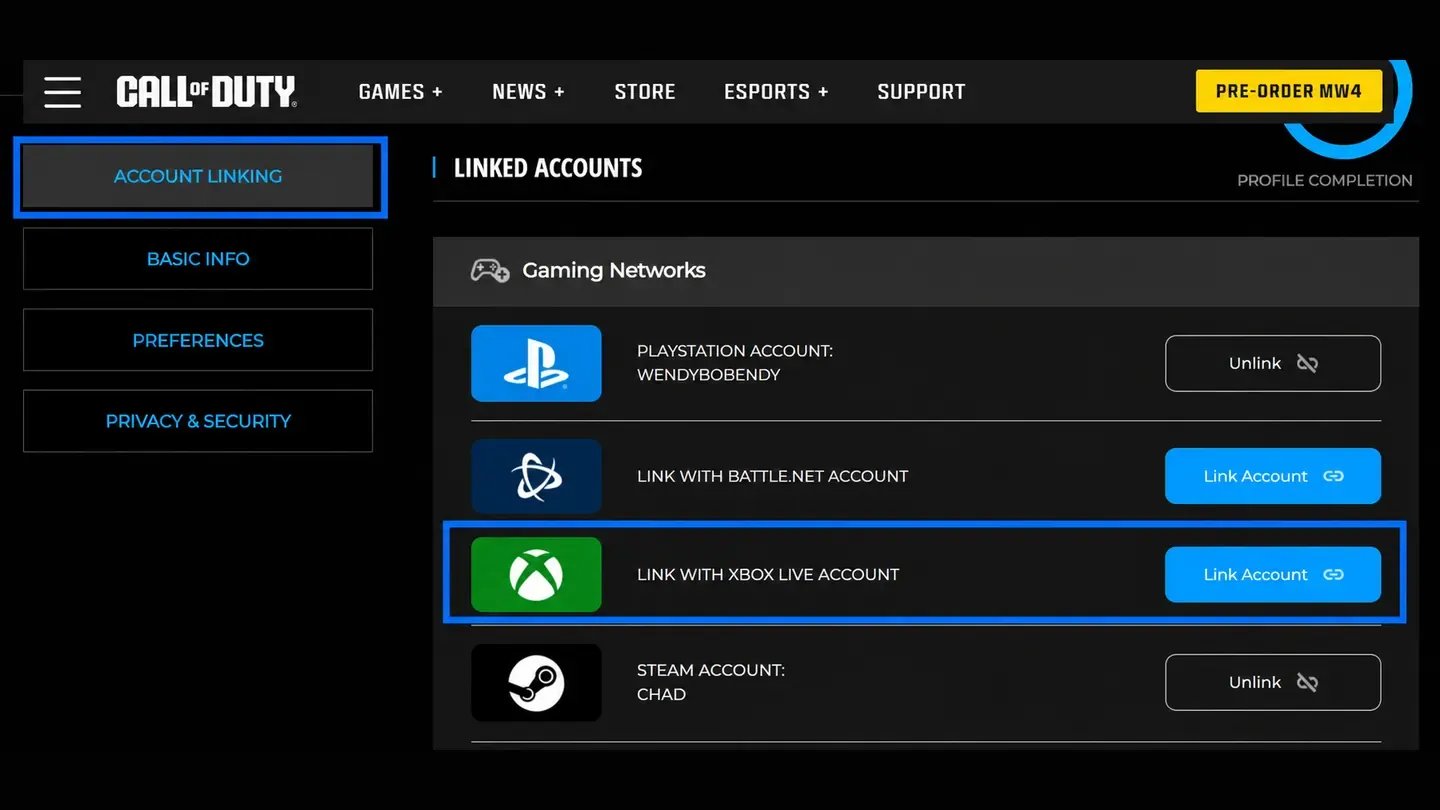
ลงชื่อเข้าใช้บัญชี Activision ของคุณ บนเว็บไซต์ Call of Duty ในเบราว์เซอร์เดียวกัน จากนั้นเปิดโปรไฟล์แล้ว ไปที่ Account Linking
คลิก Link Account ข้าง Link With Xbox Live Account, เลือก Send Code แล้วกรอกโค้ดที่ Activision ส่งให้ทางอีเมล
ลงชื่อเข้าใช้ด้วยบัญชี Xbox ของคุณ เมื่อระบบพาคุณไปยังหน้าของ Microsoft แล้วดำเนินการเชื่อมโยงให้เสร็จที่นั่น
เชื่อมโยงบัญชี Xbox กับ Activision ก่อนสั่งซื้อ, เพื่อให้ผู้ขายเพิ่มคะแนนให้ได้ทันทีที่คุณชำระเงิน
เลือกแพ็กที่มีคะแนนเพียงพอตามที่ต้องการ เช่น 1,100 คะแนนสำหรับ Battle Pass หรือ 2,400 คะแนนสำหรับ Battle Pass Bundle
หากคุณไม่มีเครื่อง Xbox ตรวจสอบรายละเอียดสินค้าเพื่อดูว่าผู้ขายจะส่งคะแนนให้คุณอย่างไร.
สำหรับข้อเสนอที่ต้องลงชื่อเข้าใช้ เปิดอีเมลของคุณไว้ เผื่อมีการส่งโค้ดลงชื่อเข้าใช้ไปที่นั่น.
ในเกม แพ็กทุกแพ็กมีราคาเท่ากับราคาในร้านค้าอย่างเป็นทางการ, และไม่มีทางเลี่ยงได้ ผู้ขายออนไลน์ทำงานต่างออกไป เพราะแต่ละรายกำหนดราคาเอง คุณจึงซื้อ CoD Points ราคาถูก ได้ ซึ่งมักมีราคาถูกกว่าแพ็กเดียวกันจาก Activision มาก
ก่อนสั่งซื้อ ให้ตรวจสอบว่าบัญชี Xbox ของคุณเชื่อมโยงกับโปรไฟล์ Activision เดียวกับที่คุณใช้เล่นเกม ลิงก์นี้เป็นสิ่งที่ทำให้แต้มถูกโอนมา และ แต้มที่เพิ่มเข้าบัญชี Xbox ที่ไม่ได้เชื่อมโยงจะไม่ไปถึงเกมของคุณ.
การซื้อ CoD Points ออนไลน์มี 4 ขั้นตอน:
เลือกข้อเสนอ สำหรับแพลตฟอร์มและวิธีจัดส่งของคุณ
เลือกจำนวน ที่ต้องการ
เพิ่มข้อมูลเข้าสู่ระบบ Xbox หากข้อเสนอนั้นกำหนดให้ต้องใช้
ชำระเงินเมื่อเช็กเอาต์ เพื่อสั่งซื้อ
หลังชำระเงิน ผู้ขายจะส่งโค้ดให้คุณนำไปแลก หรือเพิ่มแต้มลงในบัญชี Xbox ที่เชื่อมโยงไว้โดยตรง หากคุณเลือกข้อเสนอที่ต้องใช้ข้อมูลเข้าสู่ระบบ คุณสามารถเปลี่ยนรหัสผ่านได้หลังจากนั้น ลงชื่อเข้าใช้ที่ account.microsoft.com แล้วอัปเดตรหัสผ่านในส่วน Security โดยไอเทมและความคืบหน้าของคุณจะยังอยู่ที่เดิมทุกประการ
ข้อเสนอแบบโค้ดให้คุณทำขั้นตอนสุดท้ายเอง การแลกโค้ดผ่านบัญชี Xbox ที่เชื่อมโยงไว้ใช้เวลาเพียงนาทีเดียว:
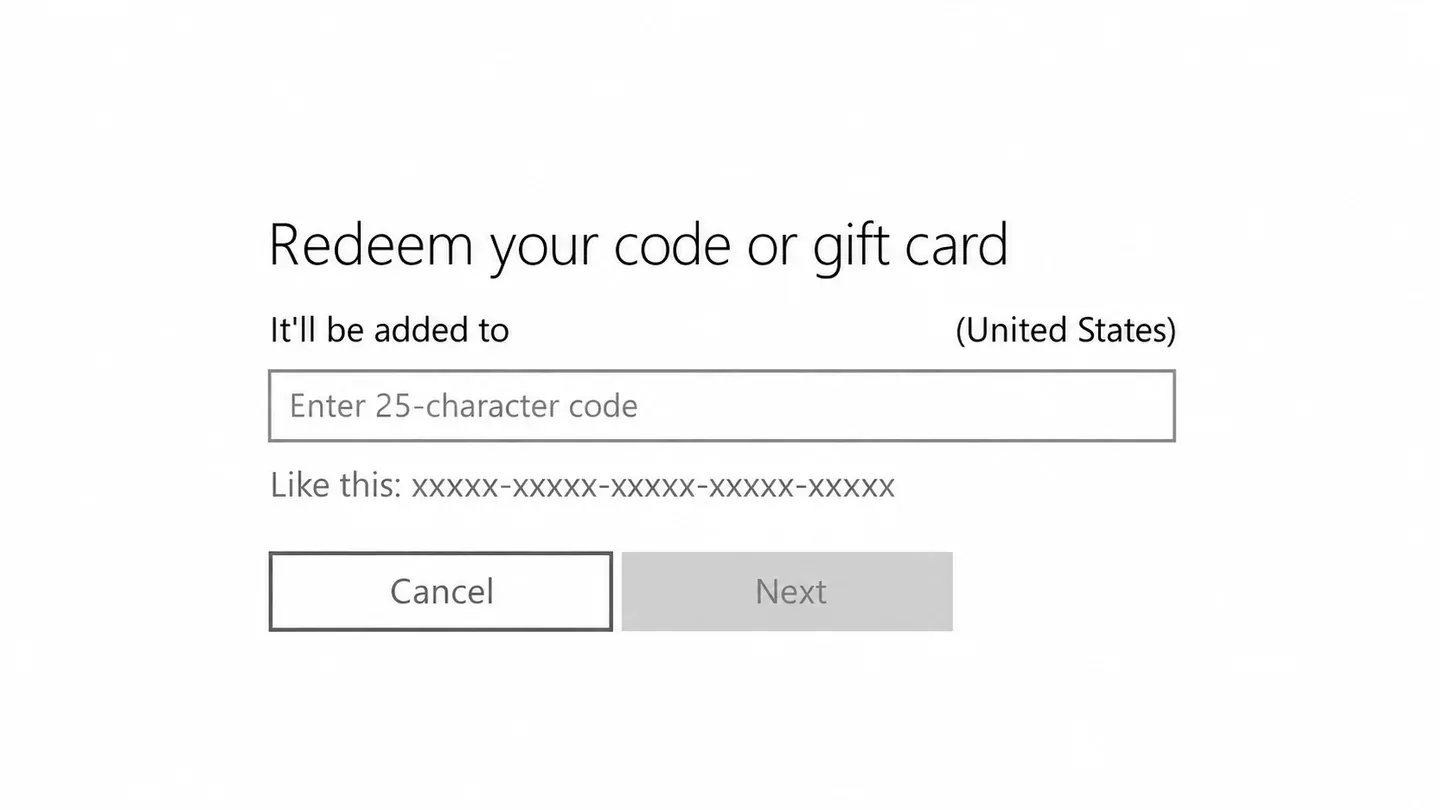
เปิดหน้าแลกโค้ด, ผ่าน Store > Redeem Code บนคอนโซล Xbox หรือไปที่ microsoft.com/redeem ในเบราว์เซอร์
กรอกรหัส 25 ตัวอักษร แล้วยืนยัน
เปิด Call of Duty บัญชี Xbox นั้น เพื่อให้ยอดคงเหลือใหม่แสดงขึ้นมา
สำหรับ Xbox แค่นี้ก็เรียบร้อยแล้ว ผู้เล่น PlayStation, Battle.net และ Steam ต้องทำอีกขั้นตอนหนึ่ง, เพราะต้องใช้ยอดคงเหลือผ่านเว็บสโตร์ของ Call of Duty:
เข้าสู่ระบบสโตร์ Call of Duty ด้วยบัญชี Activision ของคุณ
เลือกบันเดิลหรือ Battle Pass, จากนั้นเลือกบัญชี Xbox ที่เชื่อมโยงไว้จากเมนูดรอปดาวน์ของแต้ม
คลิก Buy Now, จากนั้นเปิดเกมบนแพลตฟอร์มของคุณเอง แล้วบันเดิลหรือ Battle Pass ที่ซื้อไว้ก็พร้อมใช้งาน
การซื้อ Battle Pass จะลงทะเบียนก็ต่อเมื่อคุณเข้าสู่ระบบเกมแล้วเท่านั้น หลังจากซื้อพาสบนเว็บสโตร์แล้ว ให้เปิด Black Ops 7 หรือ Warzone แล้วรางวัลพรีเมียมของคุณจะรออยู่
CoD Points คือสกุลเงินพรีเมียมใน Call of Duty, และร้านค้าต่าง ๆ ยังจำหน่ายในชื่อ Warzone Points ด้วย คุณใช้แต้มเหล่านี้ซื้ออะไรก็ได้ที่อยู่นอกเหนือจากรางวัลฟรี ในแต่ละซีซัน แต้มเหล่านี้ใช้กับ สองอย่าง ได้แก่ Battle Pass และบันเดิลในร้านค้า. บันเดิลมีไอเทมตกแต่งที่ผู้เล่นส่วนใหญ่ต้องการ เช่น สกินโอเปอเรเตอร์ พิมพ์เขียวอาวุธ การ์ดโทรศัพท์ และตราสัญลักษณ์ ไอเทมไม่มีขายแยกชิ้น ดังนั้นหากต้องการสกินหนึ่งชิ้นจากบันเดิล คุณต้องซื้อทั้งบันเดิล
ลายพราง Mastery อย่าง Singularity ทำงานต่างออกไป เพราะปลดล็อกได้จากการทำชาเลนจ์อาวุธ ไม่ใช่จากร้านค้า ผู้เล่นที่ต้องการไอเทมเหล่านี้โดยไม่ต้องฟาร์ม มักมองหา ไอเทม Call of Duty ที่วางขาย แทน
ในแต่ละซีซัน Black Ops 7 (BO7) และ Warzone จะใช้ Battle Pass ร่วมกัน โดยเป็นแทร็กรางวัลที่แบ่งออกเป็นหน้า ๆ และคุณจะปลดล็อกไปเรื่อย ๆ ด้วยการรับ XP จากแมตช์สาธารณะใดก็ได้ ทุกคนจะได้รับเวอร์ชันฟรี แต่มีเพียงอาวุธพื้นฐานและไอเทมตกแต่งไม่กี่ชิ้นเท่านั้น
ของดีส่วนใหญ่อยู่ในเวอร์ชันแบบเสียเงิน ซึ่งแต่ละเวอร์ชันมีสิ่งที่เพิ่มเข้ามาแตกต่างกัน:
Battle Pass (1,100 แต้ม): รางวัลกว่า 100 รายการ เช่น สกินโอเปอเรเตอร์และพิมพ์เขียวอาวุธ พร้อม รับแต้มคืนได้สูงสุด 1,100 แต้มเมื่อคุณเคลียร์หน้าต่าง ๆ จนหมด
ชุด Battle Pass (2,400 แต้ม): ทุกอย่างใน Battle Pass พร้อมข้ามระดับ 20 ระดับ ให้คุณเริ่มซีซันโดยนำหน้าไปสองสามหน้า
BlackCell (ชำระด้วยเงินจริง ไม่ใช่แต้ม): ทุกอย่างข้างต้น พร้อมโอเปอเรเตอร์และบลูพรินต์สุดพิเศษ นอกจากนี้ยังเพิ่ม 1,100 แต้มเข้ายอดคงเหลือของคุณทันที
แต้มที่ได้คืนมาคือเหตุผลที่ผู้เล่นหลายคนซื้อพาสทุกซีซัน เมื่อคุณเคลียร์หน้าต่าง ๆ พาสแบบชำระเงินจะคืนแต้มให้สูงสุด 1,100 แต้ม ซึ่งเท่ากับจำนวนที่คุณจ่ายไป เคลียร์ครบทุกหน้า แล้วคุณก็จะมีแต้มสะสมเพียงพอสำหรับซื้อพาสซีซันถัดไปโดยไม่ต้องจ่ายเงินเพิ่ม การซื้อเพียงครั้งเดียวจึงช่วยให้คุณเล่นต่อไปได้นาน ตราบใดที่คุณเล่นมากพอที่จะเคลียร์หน้าต่าง ๆ
ความคืบหน้าและรางวัล Battle Pass ของคุณจะติดตามบัญชี Activision ไปยังทุกแพลตฟอร์มที่เชื่อมโยงไว้ แต่แต้มที่ได้รับจากพาสจะไม่ตามไปด้วย เนื่องจาก แต้ม Battle Pass ใช้ได้เฉพาะบนแพลตฟอร์มที่คุณได้รับแต้มมาเท่านั้น.
Call of Duty: Mobile ก็แยกต่างหากเช่นกัน โดยมีสกุลเงินและร้านค้าของตัวเอง ดังนั้น CoD Points จึงใช้ใน Call of Duty: Mobile ไม่ได้.
การเล่นแมตช์ไม่ได้ให้แต้ม และ Battle Pass ฟรีก็เช่นกัน นั่นหมายความว่า ไม่มี CoD Points ฟรีหากไม่ซื้อ. แม้แต่แต้มที่คุณได้คืนจาก Battle Pass แบบชำระเงิน ก็จะได้รับหลังจากที่คุณจ่าย 1,100 แต้มแรกไปแล้วเท่านั้น
คุณสามารถซื้อ CoD Points ได้จากสี่ช่องทางนี้:
ร้านค้าในเกม: Activision จำหน่ายแพ็ก CoD Points ของ Call of Duty ภายใน Black Ops 7 และ Warzone ในราคาทางการ
ร้านค้าบนแพลตฟอร์ม: PlayStation, Xbox, Battle.net และ Steam ต่างจำหน่ายแพ็กสำหรับแพลตฟอร์มของตนเอง
บัตรของขวัญ:บัตรของขวัญ Xbox และบัตรของแพลตฟอร์มอื่น ๆ ใช้ได้เหมือนบัตรของขวัญ CoD Points โดยจะเพิ่มเครดิตเข้าร้านค้า ซึ่งคุณสามารถนำไปซื้อแพ็กได้
มาร์เก็ตเพลสออนไลน์: ผู้ขายจะเติมแต้มเข้าบัญชี Xbox ที่เชื่อมโยงไว้ หรือส่งโค้ดให้คุณ โดยปกติจะมีราคาถูกกว่าราคาทางการ
Battle Pass แต่ละชุดมีอายุเพียงหนึ่งซีซัน และ Activision จะไม่ขายพาสเก่าเมื่อซีซันสิ้นสุดลง หากคุณซื้อพาสช้า คุณก็จะมีเวลาเคลียร์หน้าและรับแต้มคืนเหลือน้อยลง การเติมแต้มล่วงหน้าหมายความว่า คุณจะได้รับพาสเมื่อเริ่มต้นซีซัน และมีเวลาตลอดทั้งสัปดาห์เพื่อเล่นให้จบ
การเติมเงิน Call of Duty ทุกแพ็กที่วางขายมาพร้อมสิทธิประโยชน์เหล่านี้:
ครอบคลุมทุกแพลตฟอร์ม: คุณจะพบ CoD Points ราคาถูกสำหรับ PS5, Xbox, Battle.net และ Steam
ผู้ขายที่ผ่านการยืนยัน KYC: ผู้ขายทุกรายที่ลงประกาศขายพอยต์ผ่านการตรวจสอบบัตรประจำตัวก่อนเริ่มขาย
ช่องทางชำระเงินหลากหลาย: คุณเลือกวิธีชำระเงินที่สะดวกได้ตอนชำระเงิน
แชตกับผู้ขาย: คุณส่งข้อความหาผู้ขายได้ทุกขั้นตอน ตั้งแต่ชำระเงินจนถึงจัดส่ง
รับเงินคืนเป็น GB Coins: คุณจะได้รับเงินคืน 3% จากทุกการซื้อ เพื่อนำไปใช้กับคำสั่งซื้อครั้งถัดไป
ผู้ขายกำหนดราคา CoD Points เอง และหลายข้อเสนอมีราคาต่ำกว่าร้านค้าอย่างเป็นทางการมาก เมื่อซื้อ Battle Pass และบันเดิลตลอดหลายซีซัน ส่วนต่างนี้ก็สะสมเป็นเงินจำนวนไม่น้อย นอกจากนี้ยังทำให้ Call of Duty Points ราคาถูก หาได้ง่ายสำหรับทุกแพลตฟอร์ม
ด้วยผู้ขายที่ผ่านการยืนยัน KYC และระบบชำระเงินที่ปลอดภัย GameBoost จึงเป็นที่ที่ปลอดภัยสำหรับซื้อ CoD Points. หากต้องการสอบถามทีมงานเมื่อใด ก็เปิด ตั๋วขอความช่วยเหลือ ได้เลย
CoD Points ทุกแพ็กที่วางขายใช้ขั้นตอนชำระเงินแบบเดียวกัน ตั้งแต่แพ็กเล็กที่สุดไปจนถึงแพ็กใหญ่ที่สุด ก่อนเริ่ม ให้เตรียมบัญชี Xbox ที่เชื่อมโยงไว้ให้พร้อม หากเลือกข้อเสนอแบบเข้าสู่ระบบ ให้เตรียมอีเมลและรหัสผ่านไว้ด้วย
จาก gameboost.com การสั่งซื้อ Call of Duty Points ของคุณมี 5 ขั้นตอน:
ค้นหา Call of Duty ในแถบค้นหา หรือเปิดเมนูเติมเงินจากเมนูหลัก
เปิดข้อเสนอ สำหรับแพลตฟอร์มของคุณ แล้วอ่านรายละเอียดสินค้า
เลือกจำนวน ที่ต้องการ
กรอกรายละเอียดต่าง ๆ ตามที่ระบุไว้ในรายละเอียดสินค้า
คลิกซื้อเลย, เลือกวิธีชำระเงิน แล้วคลิกชำระเงินเลย
เมื่อชำระเงินแล้ว ผู้ขายจะส่งรหัสให้หรือเติมคะแนนเข้าบัญชี Xbox ที่เชื่อมโยงไว้ คุณสามารถติดตามแต่ละขั้นตอนได้ในแชตคำสั่งซื้อ และ ยอดคงเหลือใหม่ จะแสดงในเกมเมื่อได้รับคะแนนแล้ว
ดูบริการ Boost ของ GameBoost ทั้งหมด
ดูสกุลเงินของ GameBoost ทั้งหมด
ดูกุญแจเกมของ GameBoost ทั้งหมด
ดูกิฟต์การ์ดของ GameBoost ทั้งหมด
ใช่ ยอดเงินเดียวกันนี้ใช้ได้ทั้งใน Black Ops 7 และ Warzone เนื่องจากทั้งสองเกมใช้ Battle Pass ร่วมกันในแต่ละซีซัน
ไม่ Call of Duty: Mobile ใช้สกุลเงินและร้านค้าของตัวเอง ดังนั้น CoD Points ที่ซื้อสำหรับคอนโซลหรือ PC จึงใช้ที่นั่นไม่ได้
ไม่ คะแนนเองไม่โอนย้าย แต่ละแพลตฟอร์มมียอดคงเหลือของตัวเอง ส่วนบันเดิลและความคืบหน้าของ Battle Pass จะโอนย้ายได้ เพราะข้อมูลเหล่านี้ผูกกับบัญชี Activision และใช้ได้กับทุกแพลตฟอร์มที่เชื่อมโยงไว้
ผู้ขายอาจส่งรหัส 25 ตัวอักษรให้คุณนำไปแลกเอง หรือเพิ่มคะแนนให้โดยตรงด้วยการลงชื่อเข้าใช้บัญชี Xbox ที่เชื่อมโยงไว้และแลกคะแนนให้คุณ
“GameBoost is not affiliated, endorsed, sponsored, or authorized by Activision, Inc., Call of Duty, or any of its subsidiaries or affiliates. Activision, Inc.’s official website can be found at: https://www.activision.com. The name Call of Duty, as well as related names, marks, emblems, and images are registered trademarks of their respective owners. Use of trademarks is covered by fair use principles under EU Regulation 2017/1001, Article 14.”