


•Hamza Rashid• 8 min read
Clash of Clans

Clash of Clans has been around since 2012, and many players have years of progress tied to their accounts. Losing access to all of that after switching devices, losing your linked email, or getting hacked is genuinely frustrating.
The good news is that Supercell has a recovery system in place, and depending on your situation, getting your account back can be as quick as a few taps. There are a few different methods available depending on how your account was originally set up and what platform you're on.
In this article, we'll walk you through every way to recover your Clash of Clans account, from using Supercell ID and Google Play to contacting support directly.
Also Read: How to Transfer a Clash of Clans Account to iPhone/Android
Supercell ID is the easiest and most reliable way to get your account back. It's an email-based login system that keeps your progress saved regardless of what device you're on. If your account was linked to one before you lost access, recovery is straightforward.
Open Clash of Clans on your new or current device.
Tap the settings icon.
Select "Supercell ID."
Enter the email address linked to your account.
Check your inbox for the verification code and enter it in the game.
Your village will load automatically once verified.
If you no longer have access to that email, you'll need to reach out to Supercell support directly, which is covered in the last section.
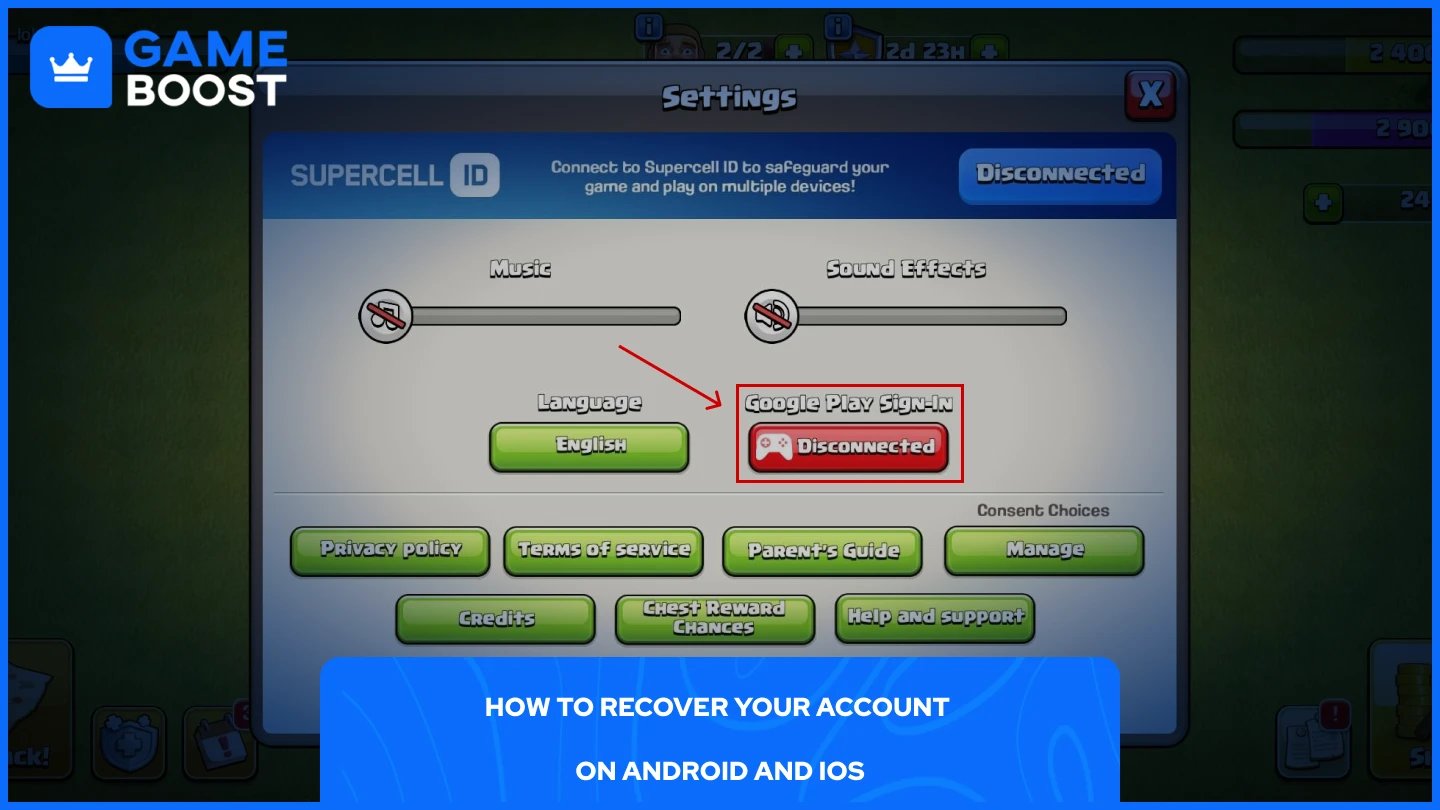
If your account wasn't linked to a Supercell ID but was connected to Google Play or Game Center, you can still recover it through those platforms.
On Android, install Clash of Clans and open the game. Go to settings and tap the "Disconnected" button next to Google Play Sign-In. Make sure the Gmail account tied to your old village is already logged into your phone, the game will detect the progress automatically and load it.
On iOS, the process goes through Game Center. Open the Settings app on your device and add the Apple ID that was originally linked to your Clash of Clans account. Once that's done, open Game Center, tap "Use Another Apple ID," and sign in. Launch the game, and your village should restore from there.
Also Read: Clash of Clans Single Player Campaign Rewards
If neither of the methods above works, contacting Supercell support is your last option. This is also the route to take if your account was hacked or you simply lost all access to the linked email and platform.
Install Clash of Clans and create or open a temporary account.
Go to Settings and tap "Help and Support."
Tap the blue chat icon in the top right corner.
Select "Lost Account" and fill in the requested details.
Describe your situation clearly and submit the request.
Supercell will ask you to verify ownership by providing details like your Town Hall level, player tag, clan name, and any past purchase receipts if available. Use a fresh email that was never tied to your old account when contacting them.
Response times can take anywhere from a few hours to several days, depending on the case. In the meantime, don't upgrade your Town Hall on the temporary account. Supercell advises not passing Town Hall level 4 on a new village, as it may cause complications in the recovery process.
Also Read: How to Get More Builders in Clash of Clans
Recovering a Clash of Clans account comes down to how it was set up in the first place. If it was linked to a Supercell ID, the process takes a few minutes. Google Play and Game Center work just as well if those were your original login methods.
Contacting support is slower, but it's still a solid option as long as you can provide enough account details to prove ownership. Going forward, linking your account to a Supercell ID is the safest way to make sure you never have to go through this again.
Buy CoC Account
CoC Clans For Sale
Clash of Clans Top Up
View all GameBoost Accounts
View all GameBoost Boosting Services
View all GameBoost Currencies
View all GameBoost Game Keys
View all GameBoost Gift Cards
View all GameBoost Top Ups
View all GameBoost Items
Counter-Strike 2 Skins
“ Mustafa Atteya has been writing about gaming and esports since 2023, specializing in competitive game content and player improvement guides. At 25, he brings both hands-on gaming experience and professional SEO writing expertise to the GameBoost team.”