Buy In-Game Items for 150+ Games
Trending Games




All Games











































Why Buy Game Items on GameBoost
Players buy in-game items on GameBoost to skip the grind for skins, rare drops, and collectibles that would otherwise take hours to earn through regular play. From Valorant skins to a rare drop of D2R Items or a listing to buy Arc Raiders items, every listing on GameBoost in-game items marketplace goes through the same layer of protection before it reaches you.
Every Seller Is Verified and Rated
Every seller on GameBoost goes through a verification process before they're allowed to list in-game items for sale, so you're not buying from someone who just signed up an hour ago. Each seller also builds a public rating from completed sales, giving you a track record to check before trusting them with a rare item, skin, or a full loadout.
Seller verification and customer reviews for each seller apply across whole in game items marketplace, so a listing from the Grow a Garden 2 shop or a listing to buy Brainrots goes through the same layer of protection as everything else.
Fast Item Delivery
Delivery timing for an item depends on the game and the item itself. A BO7 unlock all or a pickup from the MM2 shopcan sometimes be handed over within minutes after payment and trade confirmation, while other listings may need the seller to coordinate a specific delivery step first. If a delivery ends up taking longer than expected, 24/7 support is available to step in and help sort it out.
How Item Trading Works
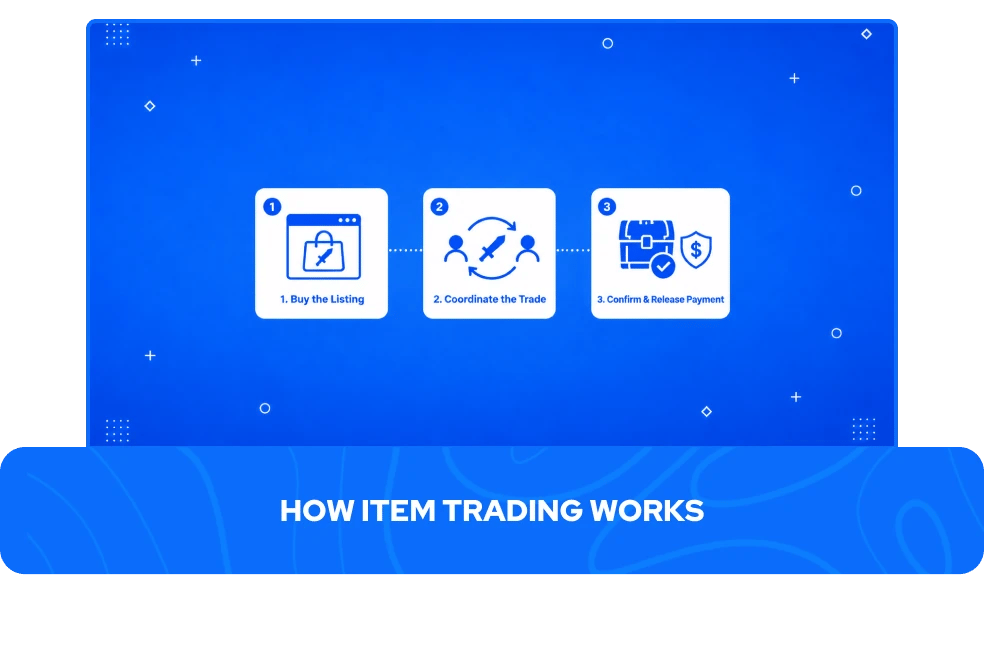
Buying in-game items for sale on GameBoost usually comes down to three steps, though the exact trade method depends on the game and the item itself.
Compare and buy the listing - Check the available offers side by side, including price and current stock, then pick the item you want, from a listing to buy WoW gear to a chance to buy OSRS items or a listing to buy D4 items, and complete payment.
Coordinate the trade in-game - The seller reaches out through the order chat to arrange delivery, which might mean a direct in-game trade, a scheduled meetup, or handing the item off through the game's own trading system, depending on what the listing specifies.
Confirm the delivered quantity - Your order tracks what has actually been delivered against what you bought, so you can see everything before you close the order.
This trade-based flow is part of why coordinating directly with the seller plays a bigger role here than on other services. It's also why every item order comes with dispute and refund support, covering items that go missing, turn out invalid, or do not match how the listing described them
Other GameBoost Products
View all GameBoost Boosting Services
View all GameBoost Currencies
View all GameBoost Game Keys
View all GameBoost Gift Cards
View all GameBoost Top Ups
View all GameBoost Accounts
Buy CS2 Skins
In-Game Items FAQs
GameBoost is a safe in-game items marketplace. Every seller is rated on their past completed sales, your order tracks how much was actually delivered against what you bought, and support is there to step in if anything about the order needs sorting out.
Delivery for in-game items for sale depends on the game and the item itself. Some, like Valorant skins or a listing to buy D4 items, are handed over within few minutes through the game's own trading system, while others require the seller to coordinate a specific meetup or drop with you through the order chat. The listing will state which method applies before you buy.
Yes, and selling your own items is one of the biggest parts of GameBoost in-game items marketplace, since most listings for virtual items come directly from individual sellers rather than a central stock GameBoost holds itself.
If you want to list your in-game items for sale instead of buying them, you can apply as a seller at jobs.gameboost.com and start creating listings once you're approved.