
•Filip Premuš• 6 min read
Gift Cards
Amazon gift cards are prepaid vouchers that let you shop for millions of products on Amazon.com. They work as an alternative payment method, storing value that automatically applies to your purchases.
Amazon offers three main types of gift cards to fit different situations. Physical gift cards arrive by mail in various designs, making them perfect for traditional gift-giving. Digital gift cards (also called eGift cards) deliver instantly via email or text message for last-minute needs. Print-at-home gift cards combine both worlds, giving you immediate digital access with the option to print and hand over a physical card.
Each card contains a unique claim code that unlocks its value. Physical cards hide this code under a scratch-off coating or peel-off sticker on the back, while digital cards include the code directly in your email or text message.
This guide walks you through everything you need to know about redeeming Amazon gift cards, checking your balance, and troubleshooting common issues.
Amazon gift cards do not charge any activation fees. Amazon's official terms and conditions clearly state that no fees apply to gift cards at any point during purchase, redemption, or use.
When you buy an Amazon gift card, you pay exactly the face value of the card. A $25 gift card costs $25, a $100 gift card costs $100, and so on. There are no hidden charges or additional costs added to the card's value.
Some retailers selling physical Amazon gift cards may charge their own handling or service fees at checkout. For example, certain grocery stores add a small purchase fee when you buy gift card products. This fee goes to the retailer, not Amazon, and doesn't affect the actual gift card balance. If you see a $6.95 fee when buying a physical card at a store, that's a one-time retail charge, not an activation fee.
Amazon gift cards also don't require separate activation like some prepaid credit cards do. The card is ready to use immediately after purchase. You simply redeem the claim code to add the full value to your account without any deductions or processing fees.
Physical cards purchased from Amazon.com ship with free one-day delivery when you select that option at checkout. Digital gift cards deliver instantly with no delivery charges. The entire value you pay goes directly onto the gift card with zero fees deducted.
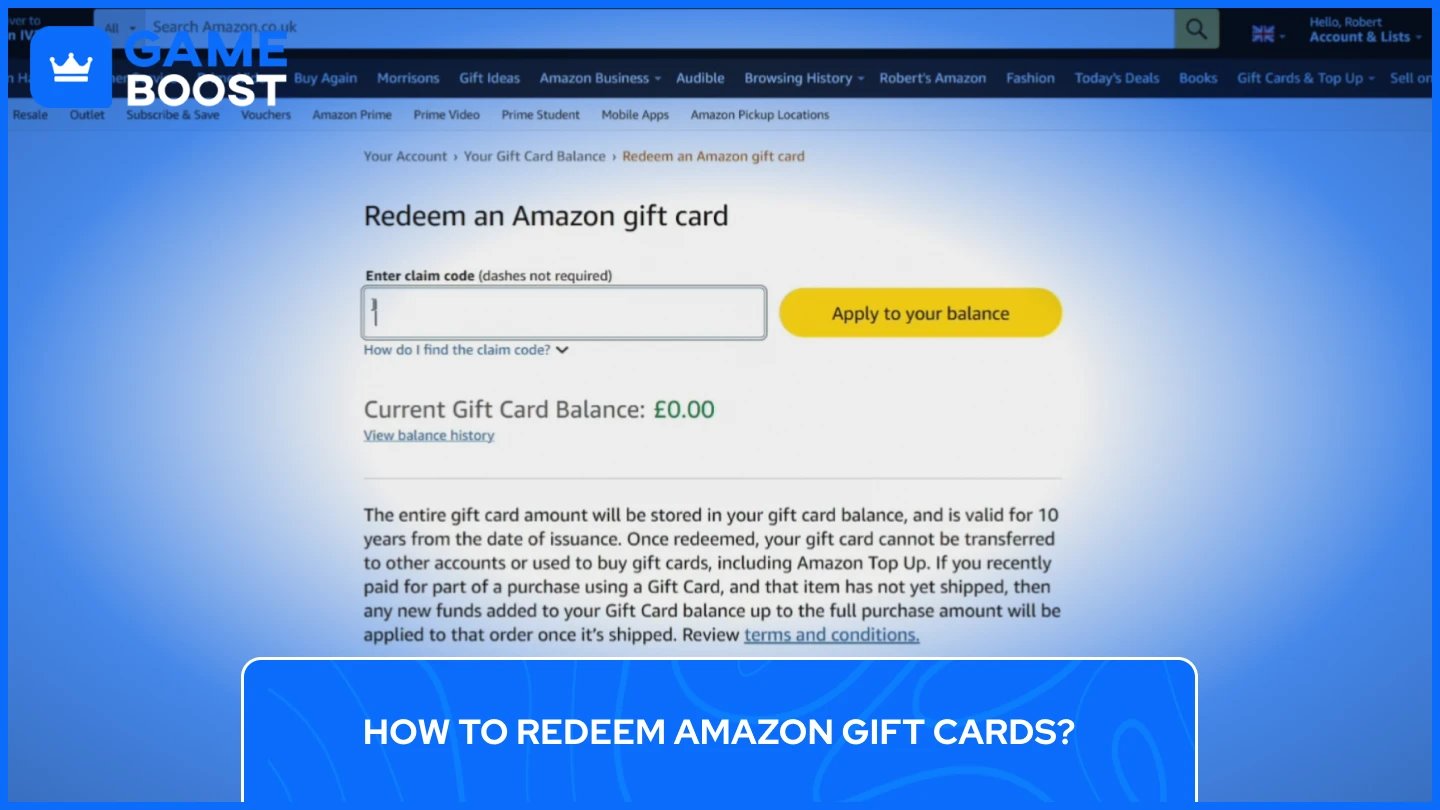
Redeeming an Amazon gift card adds the full balance to your account instantly. You can redeem your card through the Amazon website, mobile app, or during checkout. The process takes just a few minutes and works the same for both physical and digital cards.
The desktop redemption process gives you full control and works perfectly for physical cards with scratch-off codes. Start by making sure you're signed into the correct Amazon account, especially if you share your computer with multiple people.
Navigate to your gift card settings by following these steps:
Hover over "Account & Lists" in the top right corner and select "Your Account" from the dropdown menu
Click on "Gift Cards & Top Up" to access all your gift card options and current balance
Select "Redeem a Gift Card" to open the redemption page
Enter your 14 or 15-character claim code without dashes in the text field
Click "Apply to Your Balance" to complete the redemption
Amazon validates your code immediately and displays your updated balance at the top of the page. The funds remain in your account indefinitely and automatically apply to your next eligible purchase.
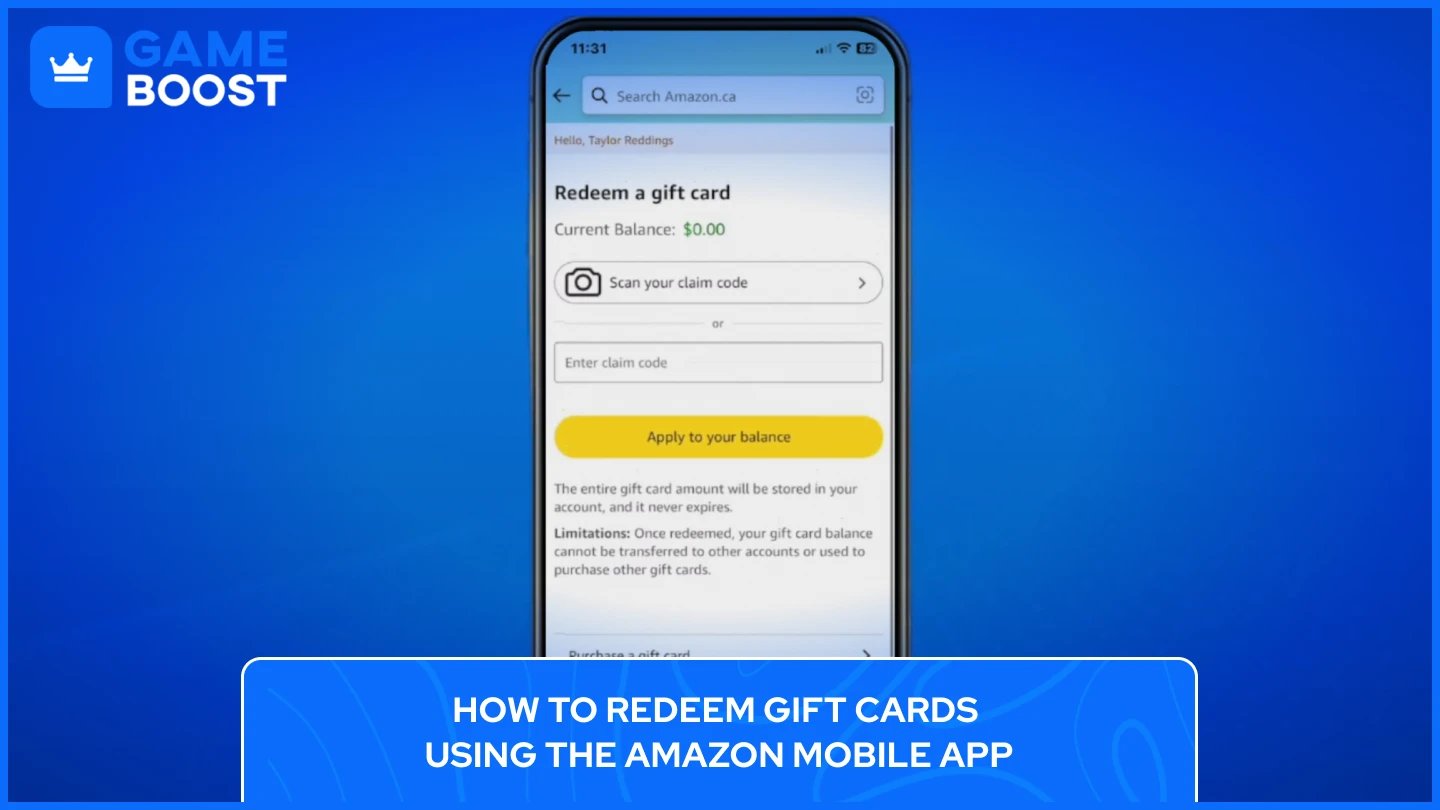
The mobile app offers the fastest redemption method with an added scanning feature that eliminates typing errors. This option works great when you're redeeming multiple cards or dealing with hard-to-read codes.
Follow these steps to redeem your Amazon Gift Card through the app:
Open the Amazon app and sign in to your account
Tap the menu icon (three horizontal lines) at the bottom right corner
Scroll down and tap "Your Account" from the available options
Select "Gift Cards" or "Manage gift card balance" under the payments section
Tap "Redeem a Gift Card" and choose to either enter the code manually or scan it
Tap "Apply to Your Balance" to finalize the redemption
Your balance updates instantly and becomes available for immediate use. The scanning feature proves especially helpful for physical cards where the printed code might be small or smudged.
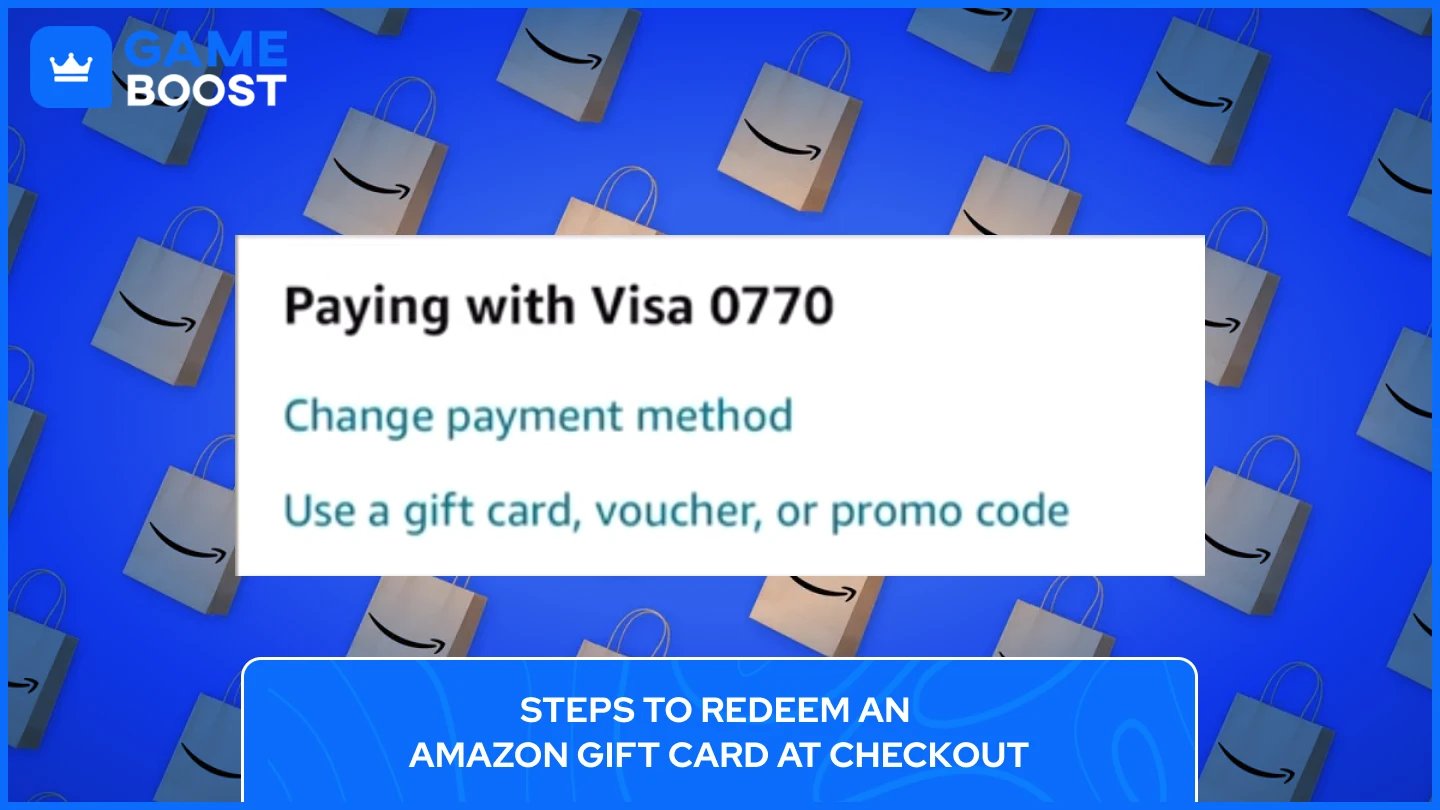
Redeeming during checkout lets you apply a gift card directly to your current order without adding it to your account first. This method works well when you receive a gift card specifically for a planned purchase.
Apply your Amazon gift card at checkout using these steps:
Add all desired items to your shopping cart
Click "Proceed to Checkout" and continue through the delivery address page
Look for "Gift Cards & Promotional Codes" on the payment selection page
Enter your claim code in the designated text field
Click "Apply" to deduct the gift card amount from your order total
If your gift card covers the entire purchase, you can complete the order without another payment method. When your order total exceeds the gift card value, Amazon automatically charges the difference to your default payment method.
Also Read: Where to Buy Amazon Gift Cards - Online and In Stores
Amazon stores your gift card balance in your account and automatically applies it to eligible purchases. You can check your current balance anytime through the website or mobile app, and Amazon provides a full transaction history showing when you redeemed cards and used funds.
Checking your balance helps you plan purchases and avoid checkout surprises. Amazon displays your total combined balance from all redeemed gift cards in one place.
To check your Amazon Gift Card Balance on Desktop:
Sign in to your Amazon account and hover over "Account & Lists" in the top right corner
Click "Your Account" from the dropdown menu
Select "Gift Cards" to open your gift card management page
Your current balance appears at the top in bold text
Scroll down to view your complete transaction history, including redemption dates and purchase amounts
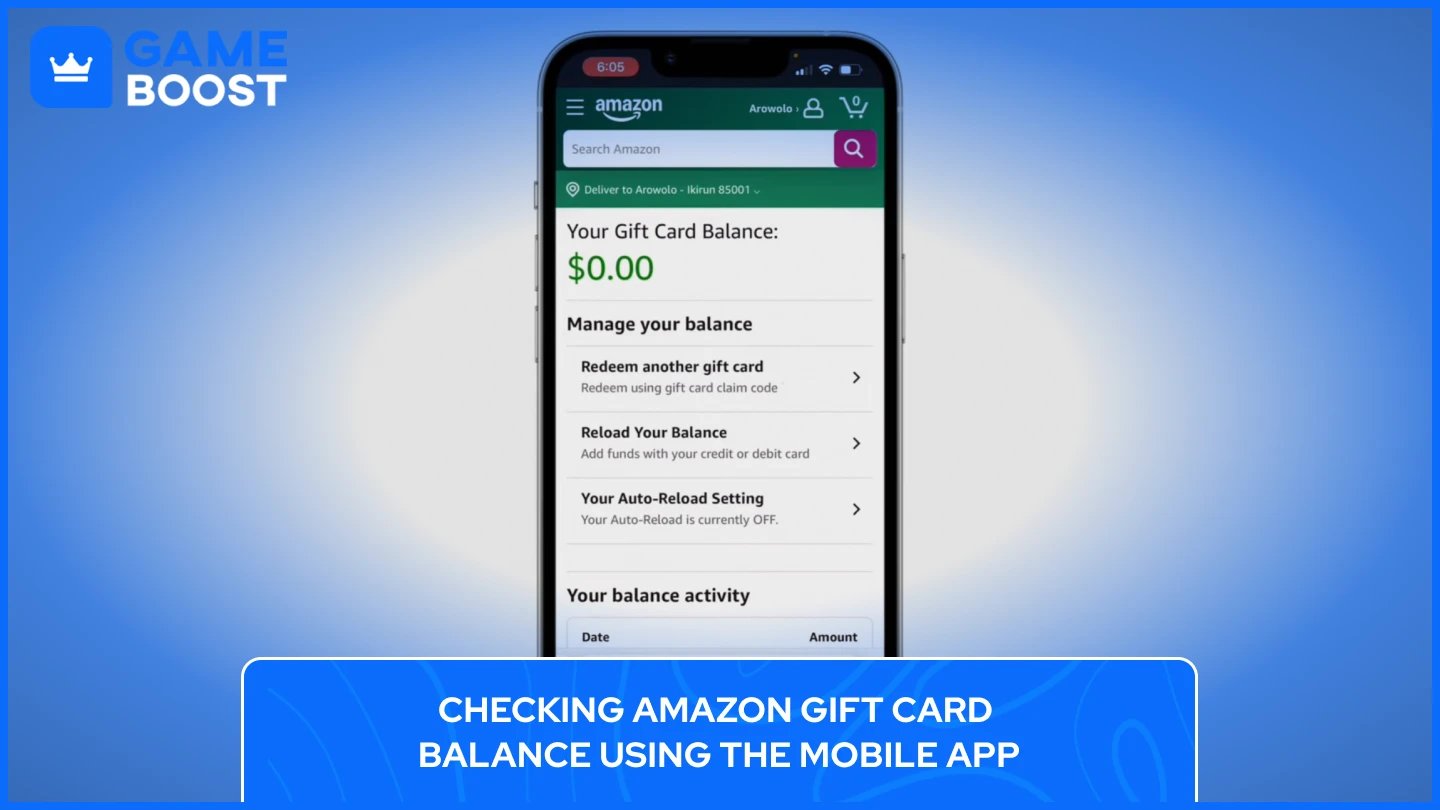
Checking Amazon Gift Card Balance using the Mobile App:
Open the Amazon app and tap your profile icon at the bottom of the screen
Select "Your Account" from the menu options
Scroll to the "Gift Card Balance" section to see your available funds
Tap "Manage gift card balance" for detailed transaction history and redemption options
Your balance includes all gift cards you've redeemed but excludes promotional credits or certificates, which appear separately during checkout.
Amazon doesn't allow you to check an unredeemed gift card balance through their website or app. This security measure prevents scammers from using automated tools to guess valid codes.
You can also redeem the card to check its value. Once redeemed, the balance stays in your account indefinitely. Amazon gift cards never expire, so there's no risk in redeeming early.
Also Read: How to Redeem eBay Gift Cards: Step-by-Step Guide
Amazon gift cards purchased after October 1, 2005, never expire. The balance remains in your account permanently, giving you complete freedom to shop whenever you want without worrying about losing funds.
Once you redeem a gift card, the funds become part of your Amazon account balance. This balance never expires, regardless of when you use it. You can hold the money in your account for years, and it remains available for future purchases.
Amazon's official terms confirm that gift cards carry no fees and no expiration dates. This policy applies to both physical and digital cards purchased directly from Amazon or authorized retailers.
Several problems can prevent you from redeeming your Amazon gift card successfully. Knowing how to identify and fix these problems saves time and frustration.
Invalid code errors usually happen when you mistype the claim code or confuse similar-looking characters. The number "0" looks identical to the letter "O", and the number "1" resembles the letter "I". Double-check each character carefully before submitting.
Physical cards can develop readability issues if you scratch off the protective coating too aggressively. Always scratch gently using a coin edge to reveal the code without damaging the numbers underneath.
If you enter an incorrect code multiple times quickly, Amazon temporarily locks the claim code as a security measure. Wait several hours before trying again with the correct code.
Contact Amazon customer service if your code remains invalid after verification. Provide the 16-digit serial number from the card's back or your order number for digital cards.
When you see an "already redeemed" message, check your gift card balance first. The card may already be applied to your account. Visit Your Account, select Gift Cards, and review your balance.
If the balance doesn't appear, someone else may have accessed and redeemed your code. Once redeemed to any account, the balance cannot be transferred or reversed.
Check that you're logged into the correct Amazon account before reporting fraud. Cards permanently attach to the first account that redeems them. Report suspected theft to Amazon customer service immediately with your purchase receipt.
Also Read: Walmart Gift Card: How to Use and Where to Buy
If the code gets damaged during removal, contact Amazon customer service. Provide your card's 16-digit serial number, order number, or purchase receipt. Amazon may verify ownership and issue a new claim code if the card hasn't been redeemed.
Amazon sometimes requires additional identity verification before allowing redemption, especially for new accounts or high-value cards. You may need to verify your email, phone number, or add a payment method. Clear your browser cache and try a different browser or device if problems persist.
Amazon gift cards come with several important restrictions that limit how you can use and transfer your balance. Understanding these limitations helps avoid confusion and ensures you use your gift card properly.
Once you redeem a gift card, the balance cannot be transferred to another Amazon account. This restriction exists as a security measure to prevent fraud and money laundering. When you enter a claim code, the funds become permanently tied to that specific account.
If you accidentally redeem a gift card on the wrong account, contact Amazon customer service immediately. They may assist you on a case-by-case basis, but Amazon explicitly warns users to verify they're logged into the correct account before redeeming. There's no guarantee they'll reverse the redemption.
You also cannot send gift card balances to other users or receive balances from other Amazon customers. The only way to give someone a gift card is by providing the unredeemed claim code before it gets added to any account.
Your Amazon gift card balance cannot be used to purchase other Amazon gift cards or third-party gift cards. This includes digital gift cards for retailers like Starbucks, Apple, Netflix, or any other brands sold on Amazon.
You also cannot use gift card funds to buy prepaid open loop cards like Visa or Mastercard gift cards. Amazon made this restriction to prevent gift card reselling and other prohibited activities.
Also Read: How to Redeem Netflix Gift Cards: Complete Guide
Amazon gift cards cannot be redeemed for cash except where required by law. You cannot withdraw funds to your bank account, transfer money to PayPal, or convert the balance to any other payment service like Cash App or Venmo.
The balance exists exclusively for purchases on Amazon.com and select affiliated properties. While third-party sites offer to buy gift cards for cash, selling your Amazon gift card violates Amazon's terms and conditions. The company prohibits customers from reselling gift cards for any reason.
Gift cards purchased on Amazon.com only work on Amazon.com. You cannot use a U.S. gift card on Amazon.ca, Amazon.co.uk, or any other international Amazon site. Each country's Amazon marketplace operates independently with separate gift card systems.
Balances cannot be combined across countries even if you have accounts on multiple Amazon sites. A gift card must be redeemed and spent on the same regional site where it was originally purchased.
No. Amazon gift cards purchased after October 1, 2005 never expire. Once redeemed, the balance stays in your account permanently and remains available for future purchases.
No. Amazon gift cards have no activation fees. You pay exactly the face value with no hidden charges. Some retailers may add their own handling fees at checkout, but this doesn't affect your gift card balance.
No. Amazon doesn't allow balance checks on unredeemed cards through their website or app. Contact Amazon customer service at 888-280-4331 to verify the balance, or redeem the card to check its value.
Amazon might block your gift card for several reasons: you entered the wrong account, the card was already redeemed, you're trying to buy restricted items like other gift cards, or the card is region-locked. Check your gift card balance first to verify if it's already on your account.
No. Amazon gift cards cannot be redeemed for cash, transferred to your bank account, or converted to PayPal, Cash App, or any other payment service except where required by law.
No. Gift cards are region-specific. A card purchased on Amazon.com only works on Amazon.com and cannot be used on Amazon.ca, Amazon.co.uk, or other international Amazon sites.
Amazon gift cards offer a flexible way to shop across millions of products without using credit cards or cash. The redemption process takes just minutes through the website, mobile app, or checkout page, and your balance never expires once added to your account.
Remember to redeem cards on the correct regional Amazon site and keep your claim codes secure until you're ready to use them. If you run into issues like invalid codes or redemption errors, Amazon customer service can help verify your card and resolve most problems quickly.
The key restrictions to keep in mind are that balances can't move between accounts, can't purchase other gift cards, and can't convert to cash. These rules protect both you and Amazon from fraud while keeping the gift card system secure for everyone.
How to Redeem GameStop Gift Cards
Where to Buy Amazon Gift Cards?
View all Entertainment Gift Cards
“ Kristina joined GameBoost in 2024 as an SEO specialist and quickly became the go-to writer for third-person shooter and competitive games. She covers titles like Fortnite, Valorant, League of Legends, GTA 5, and Roblox, focusing on how-to guides, practical tips, and updates.”