
•Hamza Rashid• 7 min read
Genshin Impact
Keeping track of what you've spent on Genshin Impact isn't as straightforward as it should be. Between Genesis Crystals, Welkin Moon subscriptions, and Battle Passes, purchases pile up across different platforms and payment methods with no single place to review them all.
Disputing a charge, auditing your spending, or tracking down a specific transaction all require knowing where to look, depending on the platform you play on. In this article, we'll explore how to check your Genshin Impact purchase history on PC, iOS, Android, PlayStation, and Xbox.
Also Read: How to Gift Genesis Crystals in Genshin Impact

Genshin Impact has no official purchase history system, so tracking your spending requires checking manually through your platform or payment method.
The in-game Currency Record (Paimon Menu > Feedback > Self-Service > Currency Record) shows Genesis Crystals top-up history for the last six months, but does not include full payment receipts.
PC players can find transaction records by searching their email or online banking for keywords like "miHoYo," "HoYoverse," or "Genshin Impact."
iOS players can view purchase history through Settings > your name > Media and Purchases > Purchase History.
Android players can find transactions in the Google Play Store under Payments and Subscriptions > Budget and History.
PlayStation players can check their billing history through Account Management > Transaction History.
Xbox players can view Genshin Impact transactions by logging into account.microsoft.com and checking Order History.
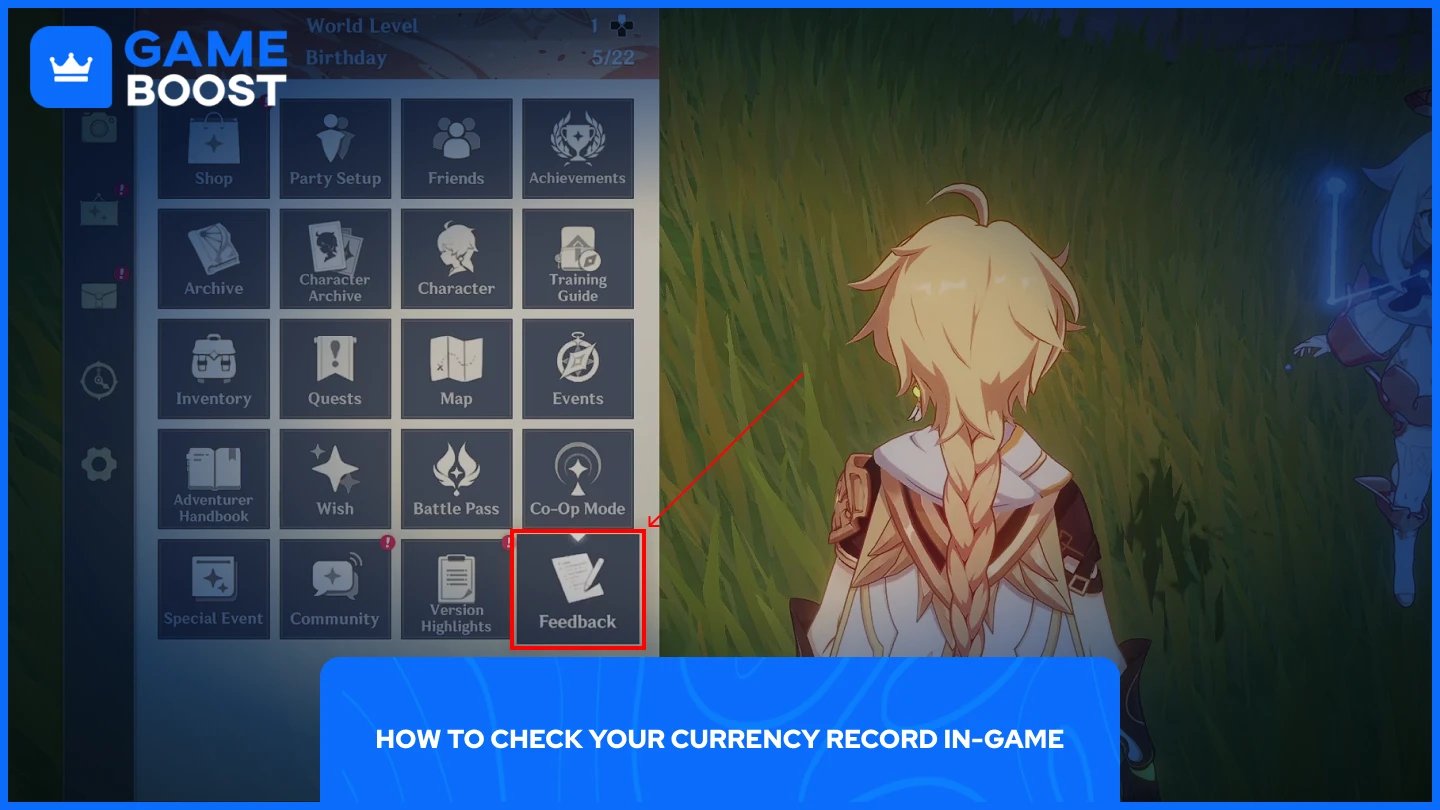
Genshin Impact includes a Currency Record tool that lets you view your Genesis Crystals top-up history directly from the game. It covers the last six months of transactions and is the quickest starting point if you want a general overview of your in-game purchases.
To access it, follow these steps:
Open the Paimon Menu.
Select Feedback.
Go to Self-Service.
Tap Currency Record.
Keep in mind that this only shows Genesis Crystals received, not full payment receipts or invoices. For a complete transaction record, you'll need to check your platform's purchase history instead.
Also Read: Is It Safe to Buy Accounts for Genshin Impact?
Genshin Impact has no official purchase history system, so there's no single place to see everything you've spent. You'll need to check manually through the platform you used to make the purchase.
PC players who buy Genesis Crystals through the official HoYoverse top-up site or a third-party service should check their email inbox. Search for keywords like "miHoYo," "HoYoverse," or "Genshin Impact" to pull up purchase confirmation emails. Credit or debit card users can also log into their online banking and run the same keyword search in their transaction history.
Open Settings on your iPhone.
Tap your name at the top.
Select Media and Purchases.
Tap Purchase History.
Adjust the date range to find the transactions you need.
Open the Google Play Store.
Tap your profile icon in the top right corner.
Go to Payments and Subscriptions.
Select Budget and History.
Look for Genshin Impact transactions.
For PlayStation, log in to your PSN account, go to Account Management, then select Transaction History. All Genesis Crystal purchases made through the PS Store will appear there.
For Xbox, go to your account settings, sign in, then select Payment & billing, followed by Order history. From there, you can filter by date range and locate any Genshin Impact transactions made through the Microsoft Store.
Also Read: How to Gift Welkin in Genshin Impact: Step-by-Step Guide
Checking your Genshin Impact purchase history takes a bit more effort than it should, but the options are there depending on your platform. The in-game Currency Record covers the last six months for a quick overview, while your platform store or bank records give you the full picture. If you ever need to dispute a charge or just want to keep tabs on your spending, the methods above will get you what you need.
Genshin Impact Accounts
Genshin Impact Top Up
View all GameBoost Accounts
View all GameBoost Boosting Services
View all GameBoost Currencies
View all GameBoost Game Keys
View all GameBoost Gift Cards
View all GameBoost Top Ups
View all GameBoost Items
Buy CS2 Skins
“ Mustafa Atteya has been writing about gaming and esports since 2023, specializing in competitive game content and player improvement guides. At 25, he brings both hands-on gaming experience and professional SEO writing expertise to the GameBoost team.”