


•Filip Premuš• 6 min read
Gift Cards
Uber is a technology company that provides ride-hailing services and delivery solutions. Users request rides through the Uber mobile app, get picked up by nearby drivers, and pay directly through the app or other payment methods.
Like many major companies, Uber offers gift cards as prepaid credit vouchers that can be redeemed in the Uber or Uber Eats app for rides, food delivery, and other eligible services. These cards make practical gifts and provide a direct way to add credit to your account without linking a credit card.
The redemption process is straightforward, but first-time users might need guidance on where to enter their gift card code and how the credit applies to their account. In this article, we'll explore how to redeem Uber gift card codes and where you can purchase these gift cards.
Also Read: How to Redeem Binance Gift Cards: Everything to Know
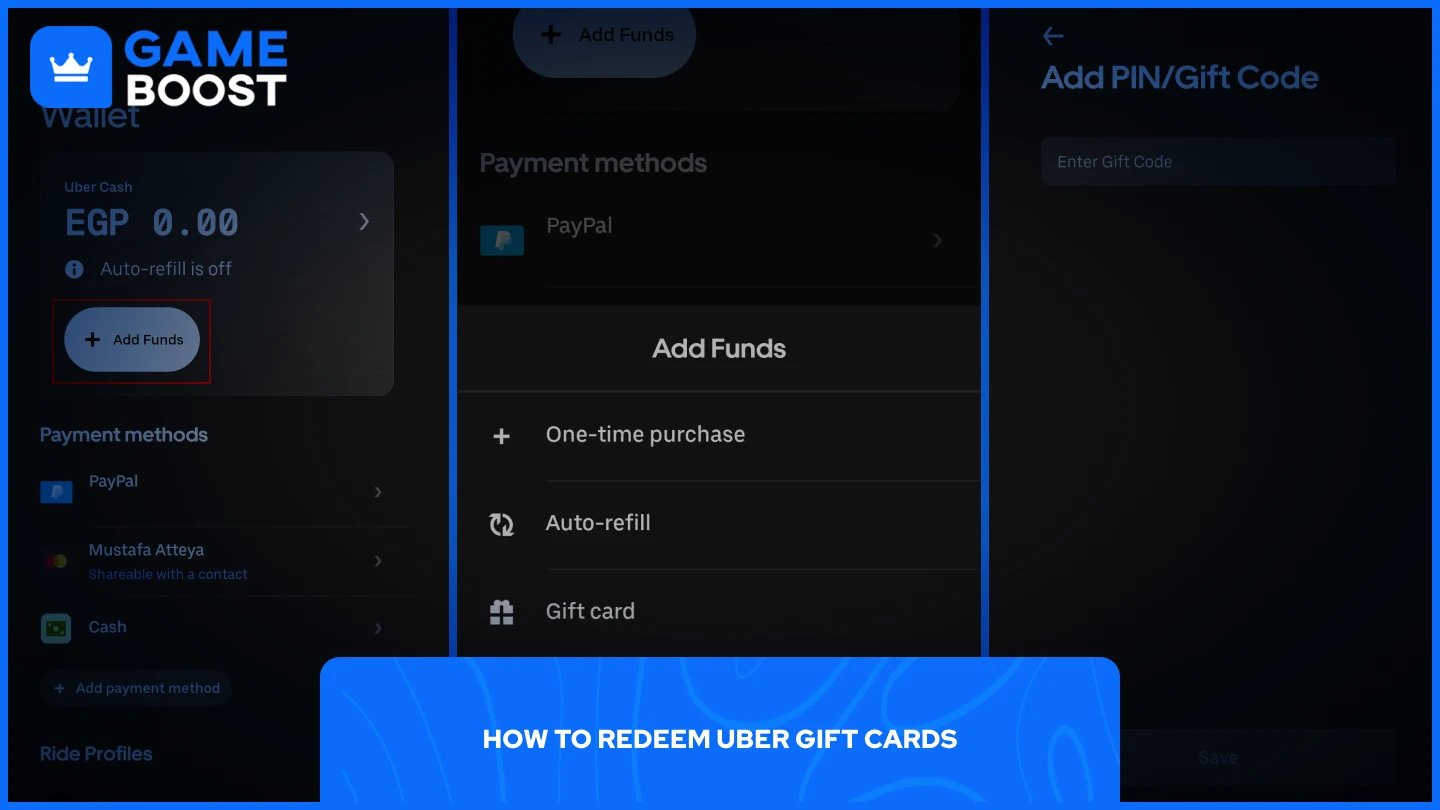
Redeeming an Uber gift card adds credit to your Uber Cash or Uber credits balance, which you can then use for rides or food orders. The process takes just a few minutes and works identically for both the Uber and Uber Eats apps.
Follow these steps to redeem your gift card:
Open the Uber or Uber Eats app.
Go to “Account”
Select "Wallet" from the menu.
Tap “+ Add Funds”
Select "Gift Card" from the options.
Enter the gift card code exactly as it appears, with no spaces.
Tap "Save" to complete the redemption.
The credit appears in your account immediately after redemption. When you request a ride or place a food order, the app will automatically use your Uber Cash balance as the primary payment method. If the ride or order costs more than your available balance, the app charges the difference to your linked credit card or other backup payment method.
Also Read: How to Redeem Nike Gift Cards: Complete Guide
Walmart sells Uber gift cards both in-store and online through their website, with options for email delivery. Best Buy carries Uber gift cards in both digital and physical formats. Costco offers Uber gift card bundles, such as two $50 cards for $100, though these typically come with purchase limits per membership.
For digital purchases, the Uber app itself provides the most direct option. Open the Account section in the Uber or Uber Eats app and select "Send a gift" to purchase and send gift cards instantly to friends or family. The recipient receives the gift card directly in their app, eliminating the need for physical cards or email codes.
Third-party marketplaces like GameBoost offer Uber gift cards in various denominations. These Digital cards are delivered instantly after purchase. When purchasing from third-party retailers or online marketplaces, verify that you're buying from legitimate sources. Stick to established retailers and official platforms to avoid gift card scams or inactive codes.
Also Read: How to Redeem Google Play Cards: Step-by-Step Guide
Redeeming Uber gift cards takes just a few taps through the Wallet section of your app. The credit applies automatically to your next ride or order, with any remaining balance carrying over for future use. Physical cards are available at major retailers like Walmart, while digital cards can be purchased through the Uber app or third-party marketplaces for instant delivery. Keep your backup payment method linked to your account even when using gift card credit, as Uber requires this for all transactions.
How to Redeem Just Eat Gift Cards
How to Redeem Amazon Gift Cards
View all Entertainment Gift Cards
“ Mustafa Atteya has been writing about gaming and esports since 2023, specializing in competitive game content and player improvement guides. At 25, he brings both hands-on gaming experience and professional SEO writing expertise to the GameBoost team.”