
.png)

•Patrik Mršnik• 16 min read
Games

Deadlock is Valve's third-person hero shooter, where two teams push lanes, fight over objectives, and build heroes through item shopping. The game ships with a developer console, and Deadlock console commands give players direct control over heroes, bots, currency, and the HUD.
The full command list is extremely long, and many entries have no description at all. Sorting the useful commands from the engine debugging entries takes real effort. Setup steps, working syntax, cheat commands, bot tools, custom game hosting, HUD tweaks, and key binds all follow with exact values.
F7 opens the developer console once the Dev console option or the -console launch option turns it on.
Cheat-flagged commands run in the Hideout, the Sandbox, and custom games where sv_cheats true is active.
Health, damage, and speed commands such as god, buddha, citadel_dps_multiplier, and noclip all need cheats.
Currency and shop commands such as citadel_give_gold, kingme, and citadel_allow_purchasing_anywhere speed up item testing.
Hero and bot commands such as selecthero, citadel_create_unit, and bot_kick_all build a practice space on demand.
Custom games start with map dl_midtown, and joining players connect through the host's status ID.
HUD and performance commands such as citadel_hud_visible, cl_showfps, and fps_max carry no cheat flag.
An autoexec.cfg file plus the -console -exec autoexec launch option runs chosen commands at every launch.
cvarlist, find, and help search the built-in command list from inside the console.
Buy Deadlock Accounts on Gameboost
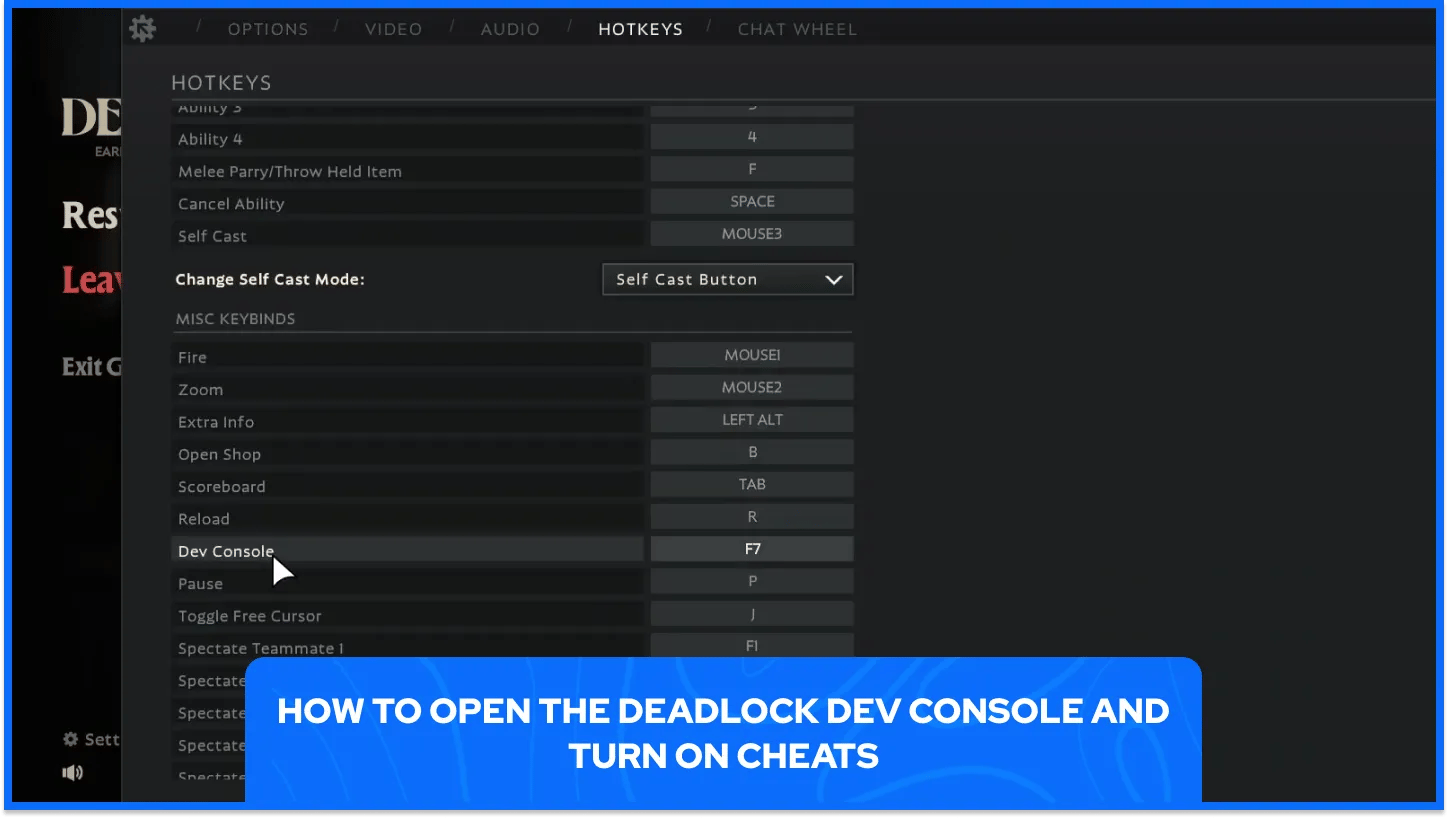
The console stays hidden until a setting switches it on. Two routes work, and both lead to the same F7 shortcut.
Console access and cheat access each need their own steps.
The Dev console option sits in Settings: Players open Settings, move to Keybinds, then Miscellaneous, and switch the Dev console option on.
A launch option keeps the console available: Players right-click Deadlock in the Steam Library, open Properties, and add -console to Launch Options for permanent access.
F7 brings up the console: Pressing F7 after either route opens the developer console, ready for typed commands.
The sv_cheats variable switches cheats on: The host of a custom lobby runs sv_cheats true, and cheat-flagged commands then run normally.
Supported modes decide exactly where console commands work. The console accepts input in the Hideout, the Sandbox, and custom games with cheats on, and standard multiplayer matches reject any command flagged as a cheat.
Commands and variables share one prompt in the console. Toggle variables take true or false, with 1 and 0 working as shorthand, and numeric variables accept any number, including values far above 2. Valve can remove or hide commands as the game changes, so the in-game command list stays the final reference.
Testing a hero build means controlling damage taken, damage dealt, and movement speed. Every command in this group requires cheats.
Survival, damage, ammo, and speed commands appear together here.
Command | Values | What it does |
|---|---|---|
| Toggle, 0, or 1 | Makes the player invulnerable, with 0 turning the mode off and 1 turning it on. |
| true or false | Lets the player take damage without ever dying. |
| None | Turns invincibility on or off, with health never dropping below 1. |
| Health amount | Heals the player by the amount typed after the command. |
| 0 to 100 | Sets health to the given percentage of maximum health. |
| Health amount | Deals damage to the player, using 10 damage when no value follows. |
| Health amount | Hurts the enemy standing directly in front of the player. |
| NPC or player name | Kills the NPC or player named after the command. |
| None | Kills the player with explosive damage instead of generic damage. |
| None | Turns unlimited ammo on or off for the player. |
| None | Drops every ability cooldown to 2 seconds, or restores normal cooldowns. |
| None | Makes stamina regenerate very fast, or restores normal regeneration. |
| Number, default 1.0 | Multiplies all player damage, including weapon and ability damage. |
| Number, default 1.0 | Multiplies weapon damage only and leaves ability damage unchanged. |
| Number, default 1.0 | Scales movement speed so players move faster or slower. |
| None | Lets the player fly around the map and pass through walls. |
| Number, default 1 | Scales the game clock by the amount typed after the command. |
Health commands work best when players combine them. Setting healthpct 25 drops health to a quarter of the maximum, and healme with a value brings it back up in one step.
Multiplier values act as plain scale factors, so 2 doubles the stat and 0.5 halves it. Typing the default value back in restores normal behavior after any experiment.

Item testing stalls when currency runs short or the shop sits far from the action. Currency, shop access, and slot commands remove both limits for any testing session.
Gold, shop access, item purchases, and slot commands share this group.
Command | Values | What it does |
|---|---|---|
| Gold amount | Gives the chosen gold amount to all players at once. |
| Player name, gold amount | Gives the chosen gold amount to one named player. |
| None | Grants 1.2 million in currency and levels up every ability. |
| true or false, default false | Gives players infinite currency and ability points. |
| true or false | Allows item purchases anywhere on the map instead of only at shops. |
| true or false, default false | Makes every purchased or drafted item enhanced once set to true. |
| Team number, optional | Opens every flex slot for one team, or for both teams when no number follows. |
| None | Buys the next item in the quickbuy queue. |
Most commands here need cheats, yet citadel_hero_testing_infinite_money and citadel_purchase_quickbuy carry no cheat flag in Valve's command list. The quickbuy command also suits key binds, since it buys the next queued item with a single key press.
Direct payouts and infinite currency solve different problems. A payout sets a fixed starting point for a test, and the infinite setting removes spending limits entirely.
Practice sessions need heroes to test and targets to hit. Deadlock's console supplies both through hero swaps, dummy spawns, and forced bot behavior.
Hero, bot, and trooper commands sit side by side here.
Command | Values | What it does |
|---|---|---|
| true or false, default false | Brings up the Testing Tools menu from the Hero Sandbox, and using it needs cheats. |
| None | Adds the hero testing tools to the interface and needs cheats. |
| None | Lists the internal names of every available hero and needs cheats. |
| Hero name from | Switches heroes on the hero selection screen, or with |
| Hero name, or | Spawns an allied dummy bot of that hero in front of the player. |
| None | Spawns every hero as a bot in a line in front of the player. |
| Player name, optional | Takes control of the pawn under the crosshair, or of the named one. |
| None | Allows or blocks several players picking the same hero. |
| None | Kicks every bot out of the game. |
| 0, 1, or 2 | Forces bots to fire continuously, with 1 for scoped and 2 for unscoped shooting. |
| 0, 1, or 2 | Forces bots to melee continuously, with 1 for light and 2 for heavy attacks. |
| Number | Sends bots moving side to side for positive values and back and forth for negative values. |
| true or false | Forces bots to parry continuously during fights. |
| None | Kills all non-neutral troopers and every guardian that has no shield. |
| None | Kills all non-neutral troopers on the map. |
| None | Respawns neutral camps within roughly 20 meters of the player. |
Internal hero names carry a hero_ prefix, as hero_inferno shows, so dump_hero_names is the first command to run before selecthero or citadel_create_unit.
Spawning a hero with citadel_create_unit and then running citadel_assume_pawn_control on it lets a player test another hero's kit. Bot behavior values stay set until changed back, so one command keeps every bot repeating its action across fights.
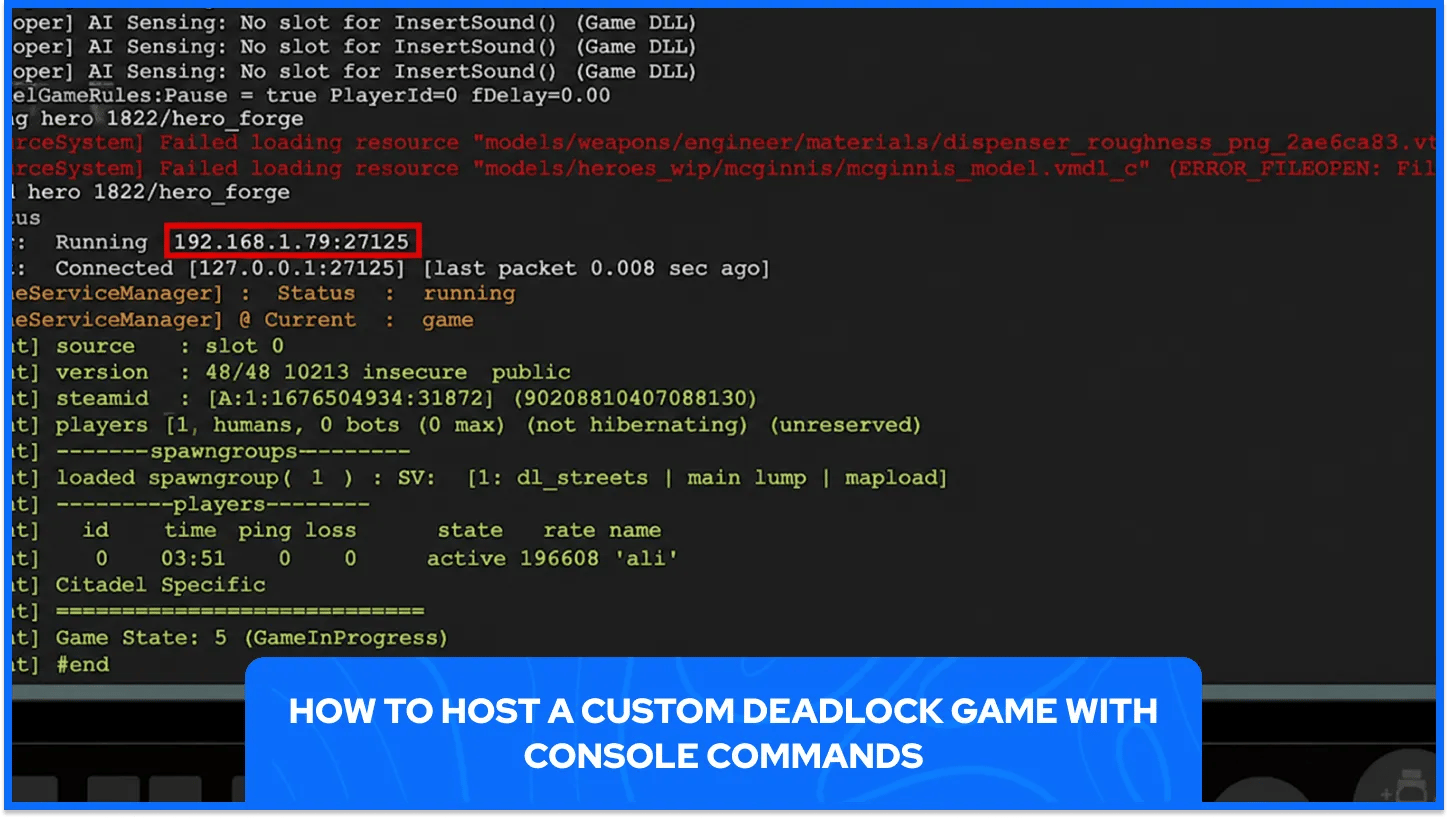
Custom games give the host control over the map, the roster, and the pace of the match. Hosts and joining players follow different steps, and bots can fill any empty slots.
Hosting, joining, and bot setup follow a fixed order.
The host loads the bot config first for matches with bots: From the main menu, the host runs exec citadel_botmatch_practice_6v6, then citadel_spawn_practice_bots false, then citadel_spawn_practice_bots_count 12 so bots can fill every remaining slot.
The host loads the map: Running map dl_midtown starts the lobby, and pressing P pauses the match to give other players time to join.
The host finds the lobby ID: Running status prints a green steamid line, and the host copies the part in square brackets, such as [A:1:XXXXXXXXXX:XXXXX], with the brackets included.
The host shares the ID: The host sends that copied ID to every player who plans to join.
Players connect from their own consoles: Each player runs connect followed by the copied ID, for example connect [A:1:XXXXXXXXXX:XXXXX].
Players pick a team and hero: The selection menu appears on joining, and changeteam 0 reopens it at any time.
The host fills the bot slots: After every human player picks a team and hero, the host runs citadel_spawn_practice_bots true and presses P to unpause.
The host restarts the lobby: Running changelevel dl_midtown restarts the game without sending players back to the menu.
Pause control keeps a lobby organized during setup. citadel_pause pauses the match from the console, citadel_pregame_duration changes the pregame countdown before the match starts, and citadel_unpause_countdown sets the seconds of countdown after unpausing. Selecting a team can unpause the game automatically, so the host presses P again afterward.
Team and map values need exact spelling. changeteam accepts 1 for spectators, 2 for The Hidden King, and 3 for The Archmother. dl_midtown is the main multiplayer map, dl_streets is the four-lane map, and new_player_basics is the Hero Sandbox map. The maps command lists every available map, and disconnect leaves the match.
Display and diagnostic commands matter most for recording footage, tuning frame rate, and reading position data. Several of them carry no cheat flag, so they work in regular matches.
Display, camera, and diagnostic commands live in this group.
Command | Values | What it does |
|---|---|---|
| true or false | Shows or hides the HUD, which suits clean screenshots and replays. |
| true or false | Displays live DPS next to the crosshair and needs cheats. |
| 0 or 1 | Draws position data at the top of the screen and needs cheats. |
| None | Print position and angles to the console, and the second also copies them to the clipboard. |
| 0 to 4 | Draws an FPS meter, with 1 for FPS, 2 for smoothed FPS, 3 for server MS, and 4 for FPS plus file logging. |
| Number, 0 for no limit | Caps the frame rate, with a default limit of 400. |
| Number, default 75 | Sets the base FOV angle for the player camera. |
| Number, default 3 | Adjusts the gap between crosshair pips, and values below 0 work. |
| Seconds | Shows lag compensated hitboxes, with green for client and red for server. |
| 1 | Locks the camera in place and needs cheats. |
| None | Toggles muting and unmuting of the audio. |
Recording clean footage needs only a few commands. Hiding the HUD with citadel_hud_visible false covers the visuals, and the mute toggle covers audio, so a recording stays free of interface clutter and stray sound.
Crosshair and FOV settings stay local to the client, so changing them leaves everyone else in the lobby untouched. Position and hitbox tools target testers more than players, since exact coordinates make spawns repeatable.
Repeating the same commands every session adds up fast. A startup file and a few key binds remove that routine.
Autoexec setup follows a short fixed order.
The cfg folder holds the file: Players open steamapps\common\Deadlock\game\citadel\cfg inside the install path and create a text file named autoexec.cfg.
Each command gets its own line: Players add one console command per line and save the file.
Steam Properties holds the launch options: Players right-click Deadlock in the Steam Library and open Properties.
The launch option points to the file: Players type -console -exec autoexec into the Launch Options box.
Built-in search tools make finding the right command quicker. cvarlist prints the command list, find searches command names and help text, and help shows details for one command. The console shows a limited number of lines, so a letter filter such as cvarlist a gives a complete view of one section.
Key binds use bind with a key name and a command, so bind f8 citadel_toggle_mute attaches the mute toggle to F8. unbind removes a binding, and key_listboundkeys lists every key with its binding.
The console turns Deadlock into a practice environment where results repeat on demand. A fixed starting hero, a set amount of gold, and a bot with one forced behavior give every test the same conditions, which makes cause and effect easy to read.
Command behavior can differ as the game changes, so the best habit is checking the in-game list before trusting any saved config. Keeping startup files short and well sorted makes that check quick, and testing in a private lobby keeps every experiment away from standard matches.
Buy Deadlock Accounts on GameBoost
View all GameBoost Game Keys
View all GameBoost Accounts
View all GameBoost Boosting Services
View all GameBoost Currencies
View all GameBoost Gift Cards
View all GameBoost Top Ups
View all GameBoost Items
“ Hamza is your average video game enthusiast who’s always looking for his next game to play. Whether he’s diving into a competitive multiplayer match, exploring a massive open world, or getting completely hooked on a new release, gaming has always been one of his favorite ways to spend his time. Over the years, his love for games has grown into a passion for understanding and sharing everything about them. Through his articles, Hamza aims to help gamers discover new games, improve their skills, stay up to date with the latest gaming news, and get the most out of their favorite titles.”