.webp?v=1790584042)
.png)

•Hamza Rashid• 9 min read
FC 27
With the EA FC 27 release just around the corner, concerns about cross-platform play are real, especially for squads split across PS5, Xbox, and PC.
The short answer is that cross-play in FC 27 lets you play with or against friends on any console or PC, as long as you're both on the same platform generation (Nintendo excluded). It's turned on the moment you launch the game; it touches almost every online mode, and it's one of the biggest quality-of-life upgrades the series has carried over from past years.
In this guide, we'll cover the different generation groups, mode-by-mode differences, and a couple of platforms that sit outside the system entirely.
Cross-play is on by default the first time you launch FC 27, and it spans most online modes across Ultimate Team, Clubs, and Online Seasons
Platforms are split into two generation groups: PS5, Xbox Series X|S, and PC form one group; PS4 and Xbox One form another. The two groups cannot play each other
Nintendo Switch and Switch 2 sit outside cross-play entirely, only matching with other players on the same Nintendo system
The Ultimate Team Transfer Market is shared between PlayStation and Xbox, while PC, Switch, and Switch 2 each keep their own separate market
You can toggle cross-play on or off, but how you do it depends on your platform: in-game settings on PS5 and PC, console system settings on Xbox
Clubs supports cross-play between PS5, Xbox Series X|S, and PC, but it's not available at all on PS4, Xbox One, or either Nintendo Switch model
Turning cross-play off doesn't ban you from online play; it just shrinks your matchmaking pool to your own platform
All friend management, whether cross-platform or not, runs through EA Connect, the overlay menu inside FC 27
Cross-play lets players using different hardware, say a PS5 and a gaming PC, land in the same match without either side changing how the game plays. It's not a separate mode or a special playlist. It's baked into matchmaking itself, so once it's on, the game simply widens the pool of opponents it searches when you queue up.
The upside of it is that bigger player pools restult faster matches and more consistent skill-based matchmaking, since the system isn't fishing from a smaller platform-locked group. It also means you don't need to own the same console as your friends to build a Club or run Seasons together.
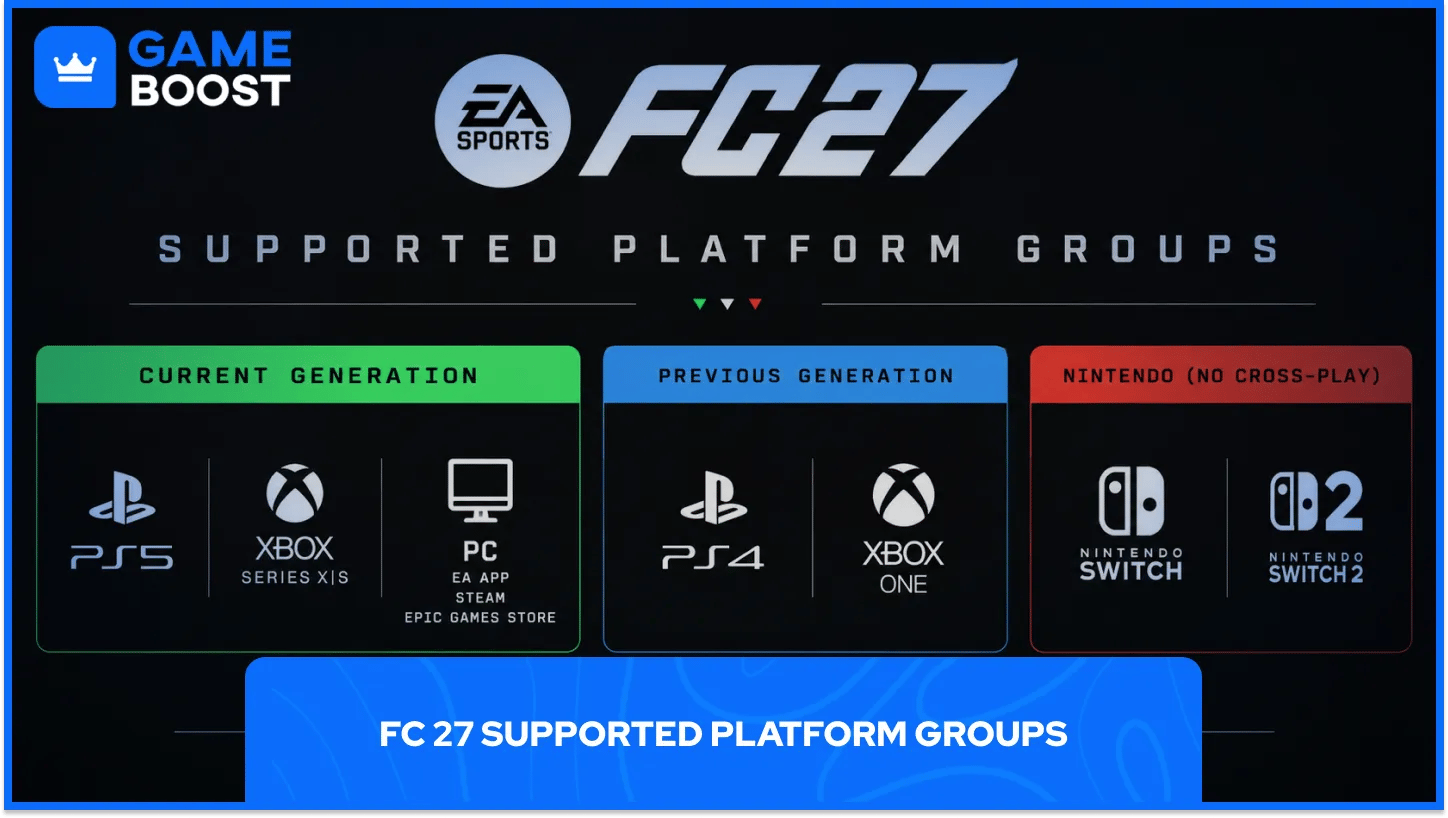
Cross-play in FC 27 is split by hardware generation, and only players within the same group can meet in a match:
Group | Platforms Included |
Current generation | PlayStation 5, Xbox Series X|S, PC (EA App, Steam, Epic Games Store) |
Previous generation | PlayStation 4, Xbox One |
Nintendo (no cross-play) | Nintendo Switch, Nintendo Switch 2 |
A PS5 player and an Xbox Series X player can match up without issue. A PS5 player and a PS4 player cannot play together, even though they're both technically on PlayStation. Nintendo systems don't connect to any other platform at all, including each other's generation gap; a Switch player only ever matches with other Switch players, and Switch 2 works the same way.
Also Read: FC 27 System Requirements (Install Size & Platforms)
Cross-play covers most of the online side of FC 27, but not all FC 27 modes. It applies to:
Ultimate Team: Rivals, Champions, Challengers, Online Draft, Play a Friend, Rush, and the co-op versions of Squad Battles, Rivals, and Friendlies
The Grounds: Clubs (League, Playoff, Friendly, and Drop-In matches), Kickabouts, and 1v1
Outside Ultimate Team: Co-Op Seasons, Online Friendlies, and Online Seasons
Offline and single-player modes, like Career Mode, Kick Off against the AI, or Practice Arena, don't involve matchmaking at all, so cross-play has nothing to interact with there.
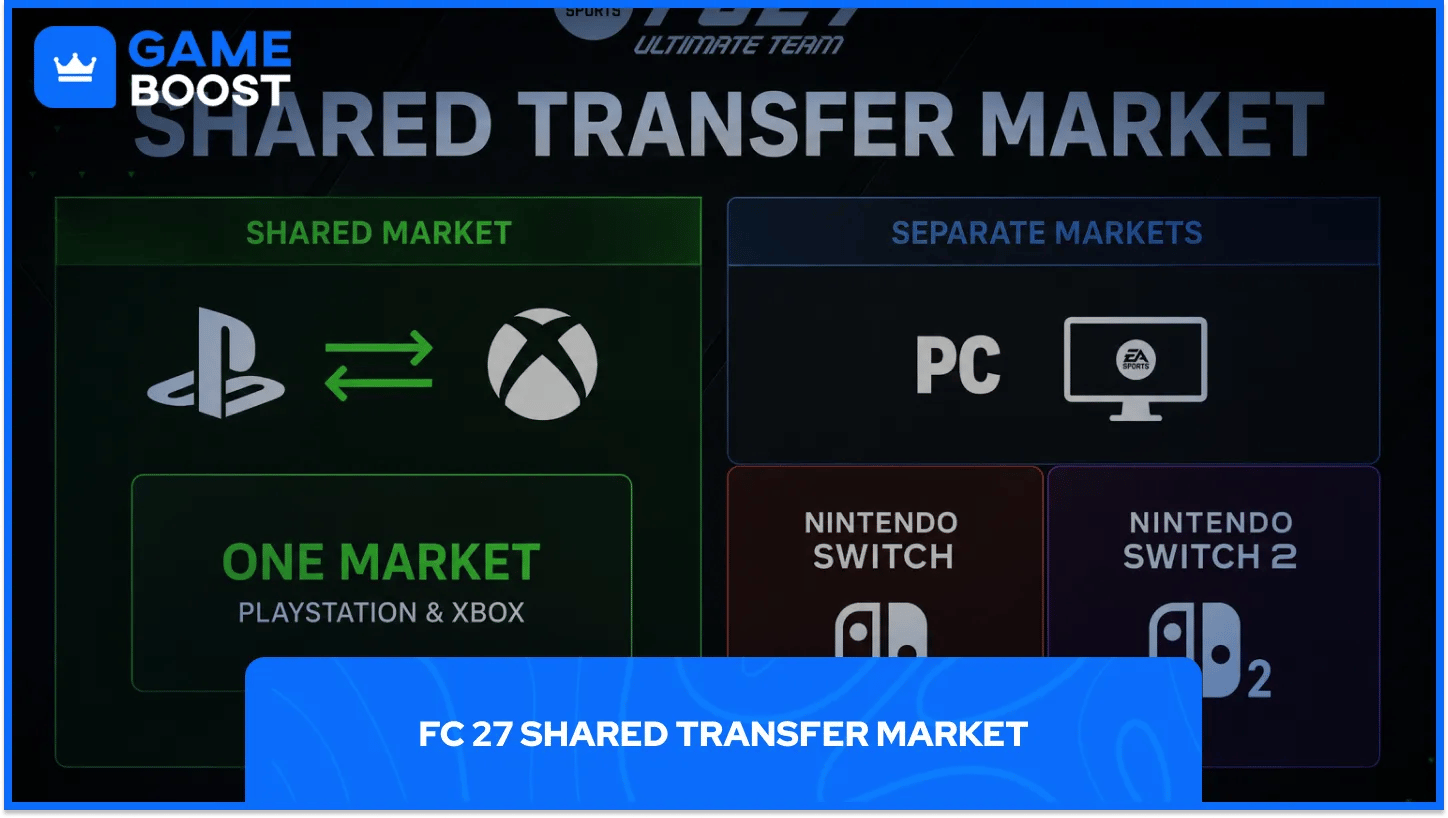
FC 27 Cross-play also changes how the Ultimate Team economy works, not just who you play against. PlayStation and Xbox share a single Transfer Market, which means Player Items, prices, and overall availability are pooled between the two ecosystems. PC, Nintendo Switch, and Nintendo Switch 2 each run their own separate market instead of joining that shared pool.
A combined market tends to smooth out price swings and keeps more items in circulation, which matters most on platforms that would otherwise have a thinner pool of listings on their own.
Also Read: FC 27 Editions & Prices (Standard, Ultimate and Plus)
Cross-play is enabled automatically the first time you start FC 27, and adjusting it depends on where you're playing:
In Ultimate Team: Open the main UT menu, press R1 or RB to reach Settings, then press R1 or RB again to get to Matchmaking Options. Set Cross-Play Opt-in/Opt-out to Yes or No.
Through EA Connect: Open the EA Connect widget from the icon in the bottom-right corner of the FC 27 main menu, then set Cross-Play Enabled to Yes or No from there.
On PS5 and PC: These settings live inside the game's own settings menu, under the Cross-Play tab.
On Xbox Series X|S: Cross-play is controlled at the console level through system settings rather than inside the game itself, so you'll need to back out to your dashboard to change it.
Turning it off doesn't lock you out of online modes. It just narrows matchmaking down to players on your own platform, which can mean longer queues but a more familiar pool of opponents.
Clubs works a little differently from standard matchmaking. If you want a specific Clubs match to stay within your own platform instead of pulling in cross-play opponents, disable cross-play in your settings and make sure you're the first player to enter the match lobby.
That restriction sticks for the whole lobby, but only until everyone leaves it, so it has to be reset for each new session if you want to keep it platform-only.
All of the social side of FC 27 cross-play runs through EA Connect, the same overlay used to manage cross-play settings. From there, you can search for other players using their EA ID or their platform-specific identifier, whether that's a PSN ID, Xbox Gamertag, or a PC username on Steam or Epic.
EA Connect also handles friend requests, game invitations, party creation, and moderation tools like muting, blocking, or reporting other players, so you don't need separate platform friend systems to coordinate a match.
A few things worth clearing up, since cross-play in FC 27 has real limits:
It doesn't unify PS4/Xbox One players with the PS5/Xbox Series X|S/PC group. Those two generations stay separate no matter what settings you change.
It doesn't bring Nintendo Switch or Switch 2 into the fold with any other platform, including each other.
It doesn't merge the Transfer Market across every platform. Only PlayStation and Xbox share one.
It doesn't apply to offline or single-player content, since there's no matchmaking involved there in the first place.
A: Yes. It's enabled automatically the first time you launch FC 27, and you can switch it off afterward if you'd rather stay within your own platform.
A: No. Cross-play groups are generation-locked in FC 27, so PS5 stays with Xbox Series X|S and PC, while PS4 stays with Xbox One.
A: No. Neither Switch nor Switch 2 connects to any other platform through cross-play in FC 27, and the two Nintendo systems don't match with each other either.
A: No. It only limits matchmaking to your own platform. There's no penalty for playing with it off.
A: Only between PlayStation and Xbox. PC, Switch, and Switch 2 each run a separate Transfer Market.
Cross-play in FC 27 makes it far easier to keep playing with friends regardless of what they own, but it's worth knowing where the boundaries sit before you go looking for someone in the wrong generation group.
Stick to current-gen platforms for the widest pool, keep in mind that Nintendo systems play in their own lane, and use EA Connect as your one stop for settings, friends, and match invites. Once you know the groupings, the rest of it runs quietly in the background exactly the way it's meant to.
FC 27 Accounts For Sale
Cheap FC 27 Coins
Buy FC 27 Points
Buy FC 26 Items
Buy FC 26 Coins
FC 26 Accounts For Sale
View all GameBoost Accounts
View all GameBoost Boosting Services
View all GameBoost Currencies
View all GameBoost Game Keys
View all GameBoost Gift Cards
View all GameBoost Top Ups
View all GameBoost Items
“ Hamza is your average video game enthusiast who’s always looking for his next game to play. Whether he’s diving into a competitive multiplayer match, exploring a massive open world, or getting completely hooked on a new release, gaming has always been one of his favorite ways to spend his time. Over the years, his love for games has grown into a passion for understanding and sharing everything about them. Through his articles, Hamza aims to help gamers discover new games, improve their skills, stay up to date with the latest gaming news, and get the most out of their favorite titles.”