


•Mustafa Atteya• 4 min read
Clash Royale

Most Clash Royale players set their name during the initial setup without giving it much thought. As you invest more time into the game, climb the ladder, and join clans, that early name can start to feel like a poor fit.
Changing it isn't complicated, but there are a few conditions and costs involved that are worth knowing before you go ahead. In this article, we'll explore how to change your name in Clash Royale and everything you need to know before making the switch.
Also Read: Is Account Sharing Allowed in Clash Royale?

You need to reach King Level 5 before the name change option becomes available in settings.
Your first name change is free. Every change after that costs Gems, starting at 500 and increasing by 500 each time.
To change your name, tap the three-line menu in the top-right corner, go to Settings, and select Change Name.
Names must be between 3 and 16 characters.
Offensive or inappropriate names can be reset by Supercell without a Gem refund.
Also Read: Where to Buy Clash Royale Accounts
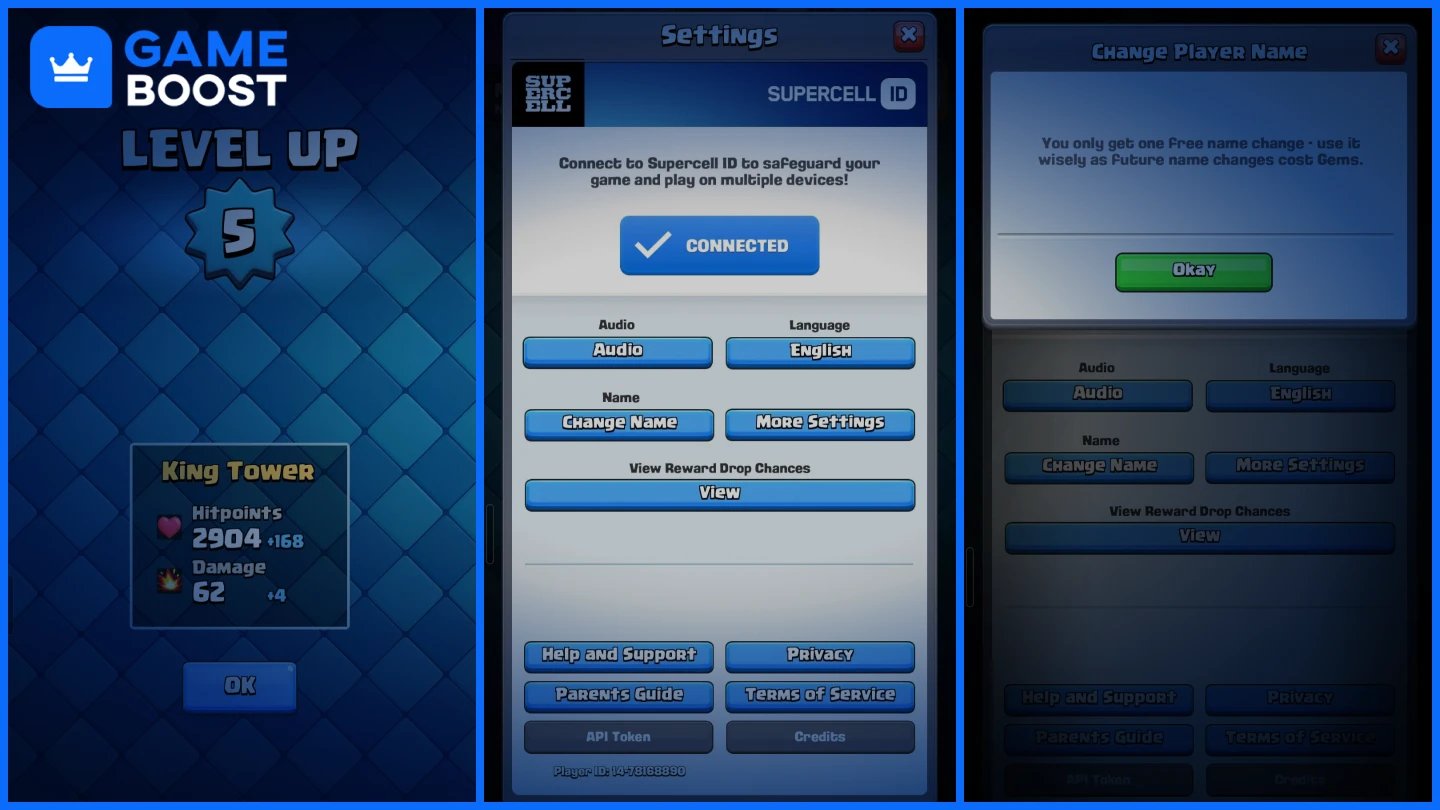
You need to reach King Level 5 before the name change option becomes available. Once you're there, follow these steps:
Open Clash Royale and go to the home screen.
Tap the three horizontal lines in the top-right corner, just below your Gems count.
Select Settings from the pop-up menu.
Tap the Change Name button near the top of the settings page.
Enter your new name in the text box.
Re-enter the name to confirm it matches exactly.
Type confirm when prompted, then press Okay to finalize the change.
If you make a mistake, you will have to wait a minimum of 6 hours before you can change your name again.
Clash Royale Accounts for Sale
Names must be between 2 and 16 characters long and can include letters and numbers. Offensive, vulgar, or inappropriate language is strictly prohibited. Supercell actively monitors name changes, and violations may result in disciplinary actions such as renaming or account suspension. If that happens after a paid name change, you won't get your Gems back.
Also Read: How to Protect Your Account in Clash Royale
The first name change is free. After that, it costs 500 Gems and increases by 500 with each additional change, so the third change costs 1,000 Gems, the fourth costs 1,500, and so on. Given the escalating cost, it's worth taking some time to settle on a name you're happy with before confirming the change.
Also Read: Clash Royale: How to Transfer Your Account to iPhone/Android
Changing your name in Clash Royale is a simple process, but the gem costs make it worth thinking through before you commit. Your first free change becomes available at King Level 5, and every change after that costs at least 500 Gems.
Pick a name you're confident about, follow Supercell's naming guidelines, and you won't have any issues getting it approved. If your name does get flagged or reset by Supercell, you'll need to spend Gems to set a new one with no refund for what you already spent.
Buy Clash Royale Gems
Clash Royale Accounts For Sale
View all GameBoost Accounts
View all GameBoost Boosting Services
View all GameBoost Currencies
View all GameBoost Game Keys
View all GameBoost Gift Cards
View all GameBoost Top Ups
View all GameBoost Items
Buy CS2 Skins
“ Mustafa Atteya has been writing about gaming and esports since 2023, specializing in competitive game content and player improvement guides. At 25, he brings both hands-on gaming experience and professional SEO writing expertise to the GameBoost team.”