

•Filip Premuš• 4 min read
GTA 5
Your Rockstar Games account is tied to an email address from the moment you create it. That email handles everything from login verification to security notifications, so keeping it up to date matters. People switch email providers, lose access to old accounts, or simply want to move to a more active inbox, all valid reasons to make the change.
Rockstar does allow you to update the linked email address, though the process comes with a few security steps you need to be aware of, and things get more complicated if you've lost access to the original email entirely.
In this article, we'll explore how to change the email on your Rockstar Games account, what to do if you no longer have access to the old address, and how to contact Rockstar Support when the standard method doesn't work.
Also Read: Where to Buy GTA 5 Accounts?
Changing the email on your Rockstar Games account isn't a simple swap with no consequences. Before you proceed, there are a couple of things worth knowing:
Your Rockstar Games TV videos and all previous support tickets are permanently tied to your current email address. Once you change it, you lose access to both. Your GTA 5 account progress, other games’ progress, friends list, and account data are not affected, but anything connected to the support side of your account will be gone.
Rockstar also sends a recovery link to your old email address every time an email change is made. This is a security measure that lets you roll back the change if something goes wrong. If you no longer have access to that old address, rolling back won't be possible, so make sure the new email you're switching to is one you fully control.
Also Read: How to Link Your Social Club Account With Steam, Xbox, and PS
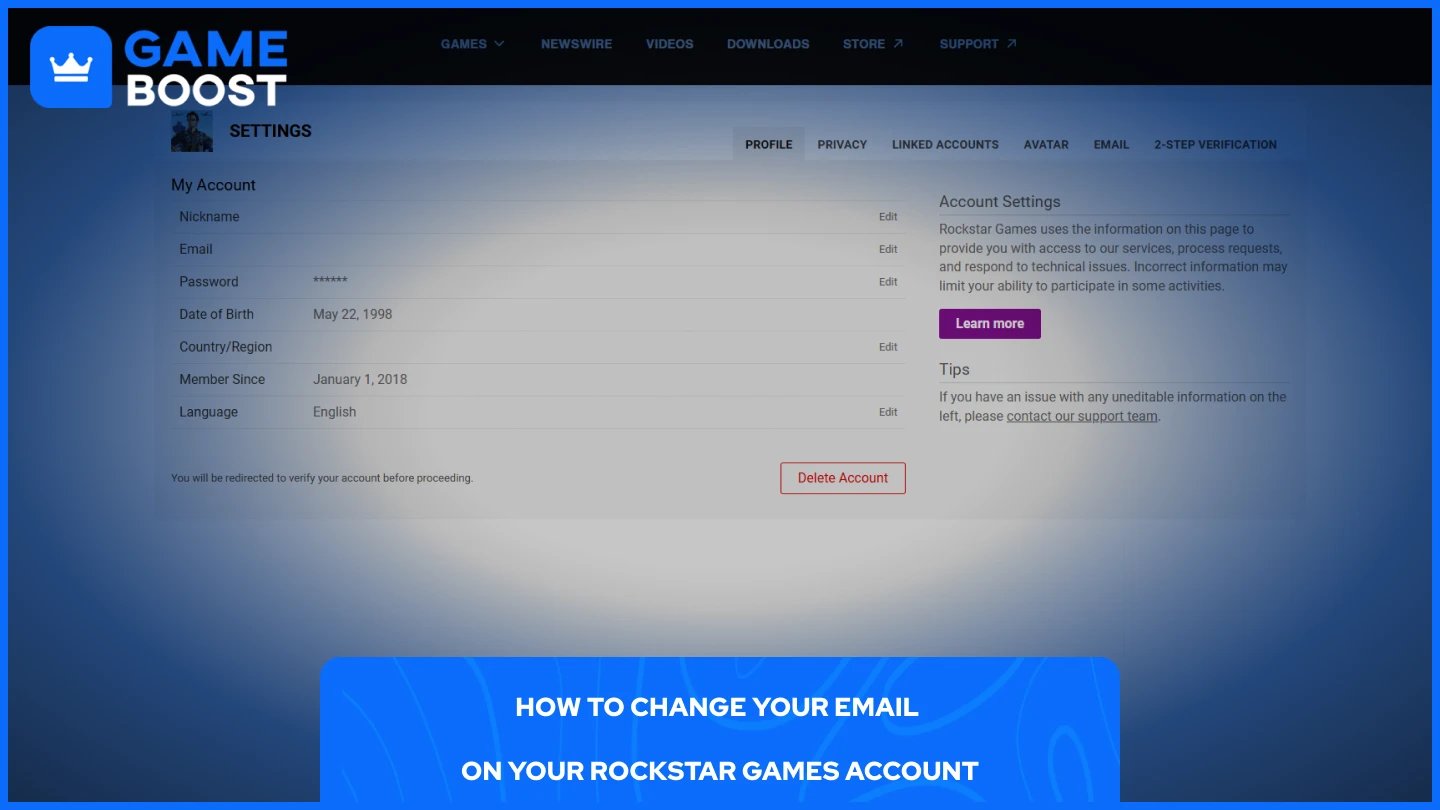
If you're logged in and still have access to the current email linked to your account, the process is straightforward. Here's how to do it:
Log in to your Rockstar Games account at socialclub.rockstargames.com.
Click your profile name in the top right corner and select Settings.
Under the Profile tab, click Edit next to your email address.
Enter your new email address and your account password.
Click Submit Change Request.
Open your new email inbox and click the verification link Rockstar sends to confirm the change.
Check your spam folder if the email doesn't show up within a few minutes. The change only takes effect once the verification link is clicked.
Also Read: Is It Safe to Buy Accounts For GTA 5?
This is where things get more complicated. If you've lost access to the email address tied to your Rockstar account, you can't complete the standard process. Your first move should be trying to recover the old email account through your email provider. Google, Microsoft, and Yahoo all have account recovery options that can restore access even without the original password. If that works, you can proceed with the standard steps above.
If recovering the old email isn't an option, you'll need to contact Rockstar Support directly. Submit a request through support.rockstargames.com and explain the situation. Rockstar may be able to revert the account to a previously linked email address, but only if you submit the request from an email that was at some point connected to the account.
Requests from completely unrecognized email addresses will be declined for security reasons, so be prepared to prove ownership through any linked console accounts or purchase history you have on file.
Changing the email on your Rockstar Games account is simple enough if you still have access to the old address. Lose that access, and the process becomes significantly more painful. Rockstar's support can be hit or miss, so your best bet is to keep your account email up to date before you ever lose access to it, and make sure 2-Step Verification is tied to something you actively use.
GTA 5 Key
GTA 5 Enhanced Key
Buy GTA 5 Items
GTA 5 Accounts For Sale
View all GameBoost Accounts
View all GameBoost Boosting Services
View all GameBoost Currencies
View all GameBoost Game Keys
View all GameBoost Gift Cards
View all GameBoost Top Ups
View all GameBoost Items
Counter-Strike 2 Skins
“ Mustafa Atteya has been writing about gaming and esports since 2023, specializing in competitive game content and player improvement guides. At 25, he brings both hands-on gaming experience and professional SEO writing expertise to the GameBoost team.”