


•Mustafa Atteya• 3 min read
Rocket League

Rocket League removed player-to-player trading in December 2023, and with it went the most direct way players had to share items with friends. Since then, the question of how to get an item to someone else has come up regularly, and the options are more limited than most people expect.
There's no dedicated gifting feature built into the game, but a few methods can still get the job done depending on your platform and situation. In this article, we'll explore how to gift items in Rocket League, what each method involves, and what you should know before trying any of them.
Also Read: Can You Get Free Credits in Rocket League?

Rocket League has no native gifting feature, and player-to-player trading was permanently removed in December 2023
The only way to gift a specific item is through Fortnite, using its built-in gifting system, but only for items tagged "Purchasing this item will also make it available in Rocket League."
To gift via Fortnite, the sender needs 2FA enabled and a Level 2+ account, and must have been Epic friends with the recipient for at least 48 hours
Fortnite gifting is capped at five gifts per 24 hours, is non-refundable, and only works on items currently in the Fortnite Item Shop
Platform gift cards (Epic Games Store, PlayStation, Xbox, Nintendo eShop) let a friend fund their own Credits purchase in Rocket League
GameBoost is another option, allowing you to buy Credits directly on a friend's account
Rocket League does not have a native gifting feature. There is no option within the game to send items directly to another player's account, and player-to-player trading was permanently removed on December 5, 2023. That removal covered all forms of item transfer between accounts, with no exceptions.
Epic Games does have a gifting feature on its store, but it only applies to full game purchases and certain DLC bundles. It doesn't extend to in-game Rocket League items or Credits. So even with that feature available on the platform level, it doesn't solve the problem for individual cosmetics.
Also Read: Can You Gift Credits in Rocket League?
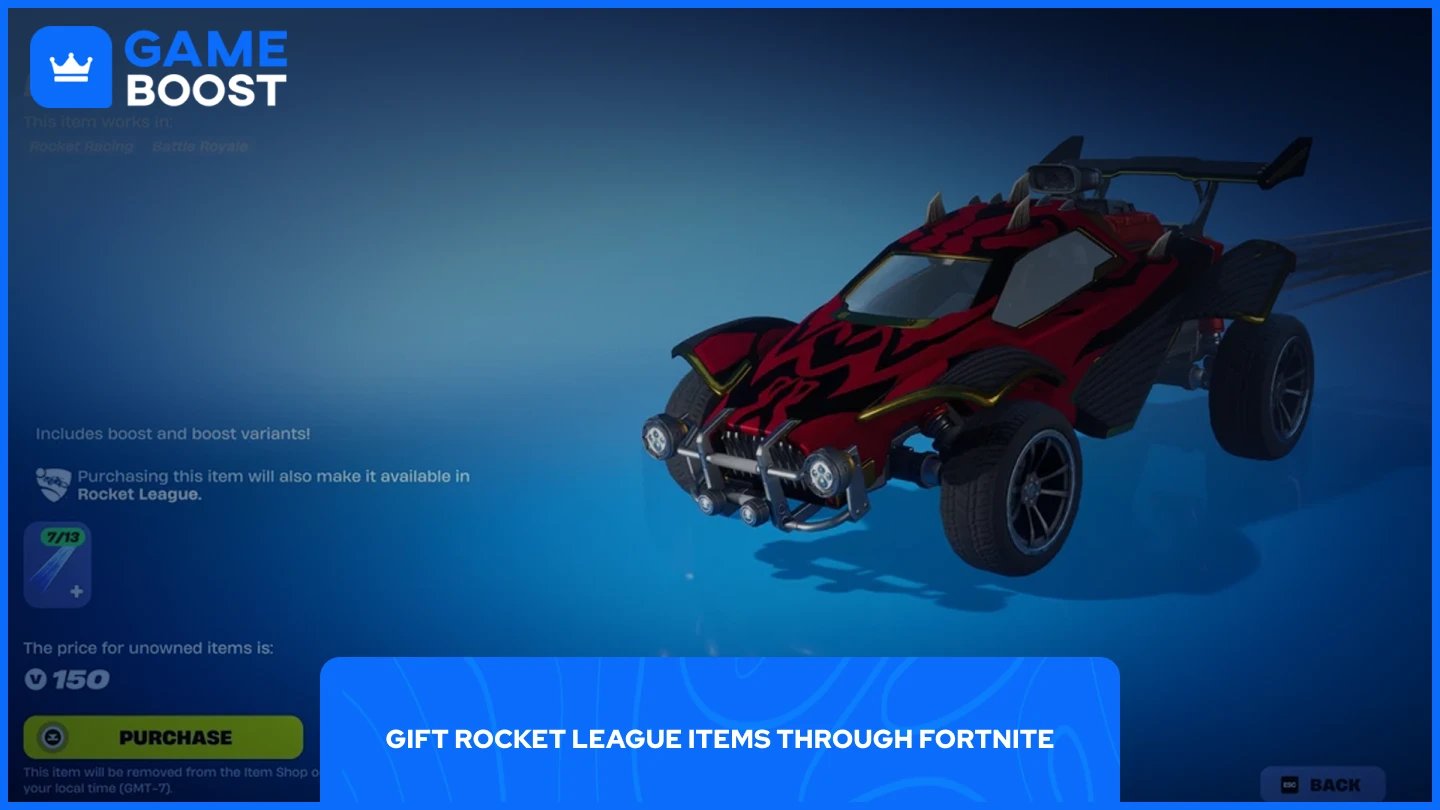
When Rocket Racing launched inside Fortnite in December 2023, Epic Games introduced cross-game ownership between Fortnite and Rocket League. This means that certain car bodies, decals, and wheels are shared across both titles under the same Epic Games account. If you own a cross-compatible item in Rocket League, it shows up in Fortnite automatically, and the same applies in reverse.
Fortnite has had a working gifting system since 2018. If a cross-compatible item is currently available in Fortnite's Item Shop, you can purchase it as a gift for a friend through Fortnite. Once they receive it, the item will appear in their Fortnite locker and, if it's cross-compatible, also in their Rocket League inventory.
Before you can gift through Fortnite, both you and the recipient need to meet a few requirements:
Sender requirements:
Two-factor authentication (2FA) enabled on your Epic Games account
Account must be at least Level 2 in Fortnite
You must have sufficient V-Bucks to cover the item cost
Recipient requirements:
Added as an Epic Games friend for at least 48 hours
Once both sides meet the requirements, here's how to send the gift:
Open Fortnite and head to the Item Shop.
Find the cross-compatible Rocket League item you want to send.
Select the item and click "Gift" instead of the standard buy option.
Choose the recipient from your friends list.
Select a gift box design and confirm the purchase.
The recipient will receive a notification when they next log into Fortnite. The item will appear in their locker, and if it supports cross-game ownership, it will also be available in Rocket League.
To identify which items are cross-compatible, look for the "Purchasing this item will also make it available in Rocket League" tag on the item's page in the Fortnite Item Shop. If that tag isn't there, the item won't carry over to Rocket League.
For players who want to help a friend get items that aren't cross-compatible with Fortnite, platform gift cards are the most practical option. These add funds to the recipient's platform wallet, which they can then use to purchase Credits and spend them in Rocket League themselves.
Gift cards are available for all major platforms Rocket League supports:
Another option is buying Credits directly on a friend's account through GameBoost. If your friend is short on Credits for a specific item, you can cover the purchase for them without going through gift cards or waiting on the Fortnite Item Shop rotation.
This method gives the recipient full control over what they buy with the balance. None of these options is as clean as a direct in-game gifting feature, but they cover most situations where you'd want to get an item to another player.
Also Read: How to Get Credits in Rocket League
Gifting items in Rocket League isn't straightforward, and the options available today are a direct result of trading being removed. The Fortnite method works, but it's limited to cross-compatible items that happen to be in the shop at the right time. Platform gift cards and GameBoost fill the gap for everything else. Until Psyonix adds a proper gifting feature, these are the tools you have to work with.
Buy Rocket League Credits
Rocket League Boosting
Buy Rocket League Items
Rocket League Accounts For Sale
View all GameBoost Accounts
View all GameBoost Boosting Services
View all GameBoost Currencies
View all GameBoost Game Keys
View all GameBoost Gift Cards
View all GameBoost Top Ups
View all GameBoost Items
Counter-Strike 2 Skins
“ Mustafa Atteya has been writing about gaming and esports since 2023, specializing in competitive game content and player improvement guides. At 25, he brings both hands-on gaming experience and professional SEO writing expertise to the GameBoost team.”