


•Kristina Horvat• 7 min read
Fortnite

MacBook owners asking can you play Fortnite on Mac usually find the game missing from the App Store and the Epic Games Launcher for macOS. Epic stopped supporting Fortnite on Mac after its dispute with Apple, and no native Mac version has come back since, even after the game returned to iPhone in the US.
Playing on a Mac is still possible, though. Epic officially supports Fortnite on Mac through cloud gaming, where the game runs on a remote server and streams to a browser or app. Older Intel Macs have one more option, since they can run Windows and install the PC version directly.
Fortnite has no native Mac version, and the old Mac client left on some computers can't join current matches.
Epic lists Xbox Cloud Gaming, GeForce NOW and Amazon Luna as the ways to play Fortnite on a Mac.
Xbox Cloud Gaming runs Fortnite for free in a browser, with no Game Pass subscription needed.
Cloud gaming needs a stable connection of at least 25 Mbps to avoid lag and blurry video.
Boot Camp only works on Intel Macs, so MacBooks with M-series chips can't install Windows that way.
Virtual machines like Parallels can't run Fortnite, since its anti-cheat blocks them from starting the game.
Fortnite can't be installed and played natively on a Mac, but it can be played on one. Epic's Fortnite on Mac help page confirms there's no Mac version and points players to cloud gaming through Xbox Cloud Gaming, GeForce NOW or Amazon Luna.
The old Fortnite Mac client still exists on some computers, but it's frozen on Chapter 2 Season 3, version 13.40. Since that build gets no updates, it can't connect to the matches everyone else is playing.
Fortnite isn't on Mac because of a fight between Epic Games and Apple over App Store payments. Fortnite's exit from Mac happened in a few steps:
In August 2020, Epic added its own way to buy V-Bucks inside the iPhone version, so players could pay Epic directly and skip Apple's 30% fee.
Apple removed Fortnite from the App Store within hours, since the direct payment option broke its rules.
Apple then closed Epic's developer account, which Epic needed to sign and update its Mac software.
Without a way to ship updates, Epic ended Fortnite support on Mac later in 2020, leaving the Mac version stuck on Chapter 2 Season 3.
Fortnite returned to the iPhone App Store in the US in May 2025 after court rulings went Epic's way, but that return didn't include Mac.
Epic hasn't announced any plan to bring Fortnite back to macOS, so cloud gaming is still the official way to play on a Mac.
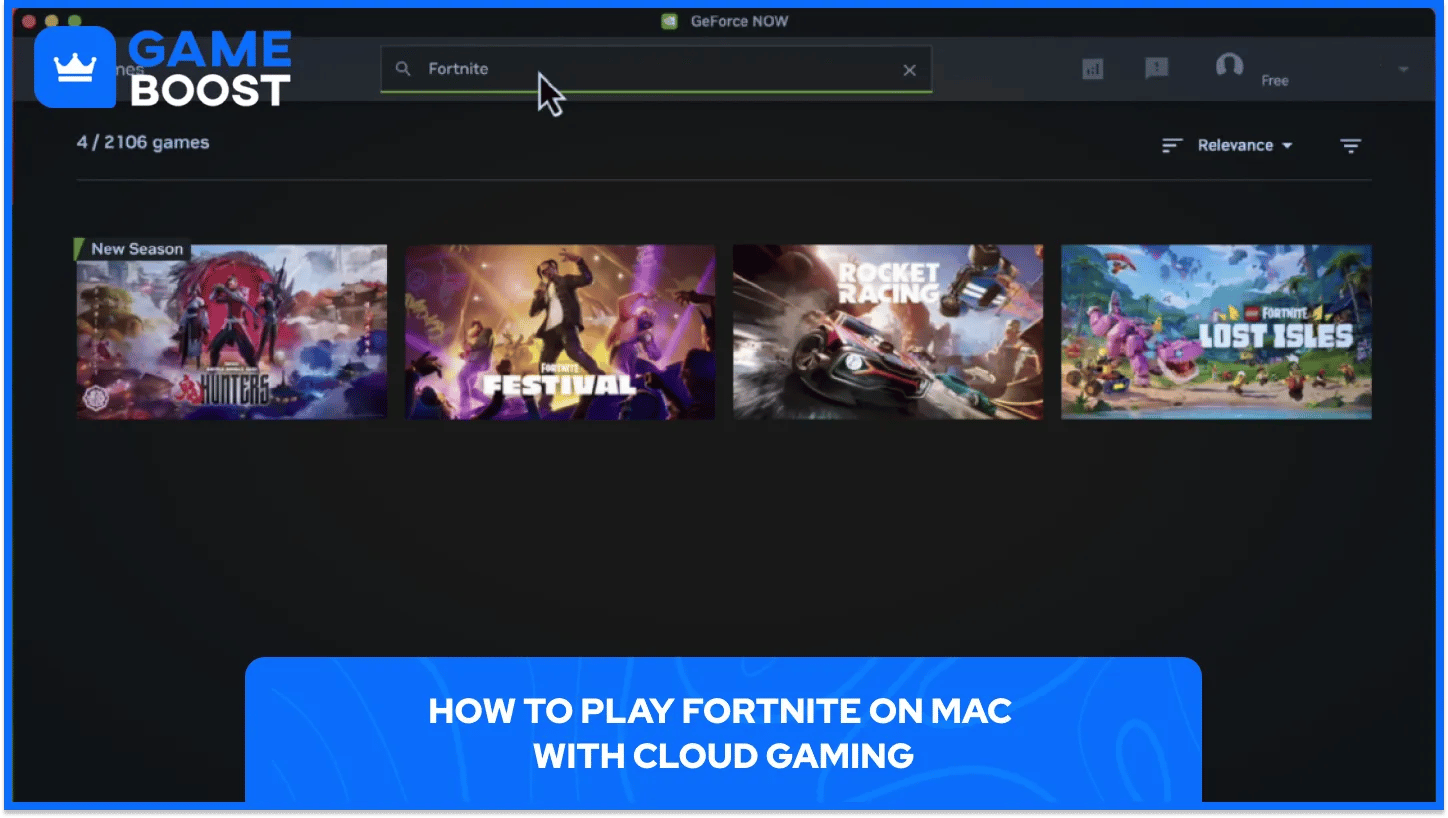
Cloud gaming runs the full PC version of Fortnite on a powerful server and streams the picture to the Mac, with every button press sent back over the internet. It works on both Apple Silicon and Intel Macs, including a basic MacBook Air, since the Mac only has to show the video.
Epic's three supported services compare like this:
Service | Cost for Fortnite | Where It Runs on Mac | Best For |
|---|---|---|---|
Xbox Cloud Gaming | Free, no Game Pass needed | Safari, Chrome or Edge | Quick setup with no download |
GeForce NOW | Free tier, paid tiers for longer sessions and higher frame rates | Mac app or browser | Smoother picture and lower delay |
Amazon Luna | Amazon Prime or Luna+ | Chrome | Players who already pay for Prime |
Xbox Cloud Gaming is the fastest way to start. Playing Fortnite through Xbox Cloud Gaming on a Mac takes these steps:
Open xbox.com/play in Safari, Chrome or Edge and sign in with a free Microsoft account.
Search for Fortnite and click Play to start the stream.
Sign in with the Epic Games account when Fortnite asks, so all skins and progress load.
Connect a controller or use mouse and keyboard, which Xbox Cloud Gaming supports in the browser.
GeForce NOW works in a similar way. Players install the GeForce NOW app for macOS or open it in a browser, create an NVIDIA account, pick Fortnite and link their Epic Games account before playing.
Connection matters more than the Mac itself. Cloud services need at least 25 Mbps, and a wired Ethernet connection gives steadier results than Wi-Fi, since any drop in speed shows up as lag or a blurry picture.
Boot Camp only works on Macs with Intel processors. Apple's Boot Camp Assistant installs Windows next to macOS, so the Mac can start into either system. MacBooks with M1, M2, M3 or newer chips don't support Boot Camp, so this method is off the table for them.
On an Intel Mac, installing Windows for Fortnite takes these steps:
Open Boot Camp Assistant from Applications, then Utilities.
Choose a Windows ISO file downloaded from Microsoft's website.
Set how much disk space Windows gets, leaving room for Fortnite's download size on top of Windows itself.
Let Boot Camp partition the drive and restart into Windows setup, then finish installing Windows.
Install the Epic Games Launcher in Windows and download Fortnite like any PC player.
Once Windows is set up, holding Option (⌥) during startup lets players pick between macOS and Windows. Fortnite runs on the Mac's own hardware this way, so performance depends on the Mac's graphics chip, and lowering a few Fortnite graphics settings helps older MacBooks keep a steady frame rate.
A few methods come up in searches but don't get players into current matches. Mac players can skip these:
Virtual machines like Parallels can't run Fortnite, since its anti-cheat blocks the game from starting in a virtual environment.
The old Mac client from the Epic Games Launcher stays stuck on Chapter 2 Season 3, so it can't join matches with current players.
Unofficial tools that sideload the mobile version onto Apple Silicon Macs aren't supported by Epic, and Fortnite updates keep breaking them.
Cloud gaming and Boot Camp both run the regular PC version, so players sign in with the same Epic Games account they use everywhere else. Every Fortnite skin and emote on the account shows up, along with Battle Pass progress and the account's level.
Crossplay works the same way. Mac players on cloud gaming join the same matches as PC, console and mobile players, and they can party up with friends on any of those platforms. Anyone switching to a Mac keeps their V-Bucks balance too, as long as they sign in with the same Epic account.
Fortnite on Mac comes down to cloud gaming for almost every MacBook owner. Xbox Cloud Gaming is free and runs in a browser, GeForce NOW gives a smoother picture with its paid tiers, and Amazon Luna suits players who already have Prime. All three need a fast, steady connection more than a powerful Mac.
Intel Mac owners can still go the Boot Camp route for a local Windows install, but Apple Silicon Macs are limited to the cloud. Virtual machines and the old Mac client are dead ends, so skipping them saves time, and signing in with the same Epic account keeps every skin and V-Buck in place on any of these setups.
“ Mustafa Atteya has been writing about gaming and esports since 2023, specializing in competitive game content and player improvement guides. At 25, he brings both hands-on gaming experience and professional SEO writing expertise to the GameBoost team.”