

•Filip Premuš• 6 min read
Gift Cards
PUBG Mobile is a free online multiplayer shooter game built for mobile phones. It is the mobile version of PlayerUnknown's Battlegrounds and uses the same battle royale style of gameplay made popular by the original game on PC and consoles. Players drop onto a map, search for weapons and gear, and fight to be the last person or team standing.
Unlike the standard PUBG experience, PUBG Mobile features an in-game currency called UC. This currency lets you purchase various in-game items. While UC can be bought directly through the game, gift cards offer an alternative payment method that many players prefer for convenience or security reasons.
In this article, we'll explore how to redeem PUBG gift cards to top up your UC balance through a step-by-step guide and break down what you can purchase with UC in PUBG Mobile.
Also Read: How to Redeem Minecraft Gift Cards: Complete Guide
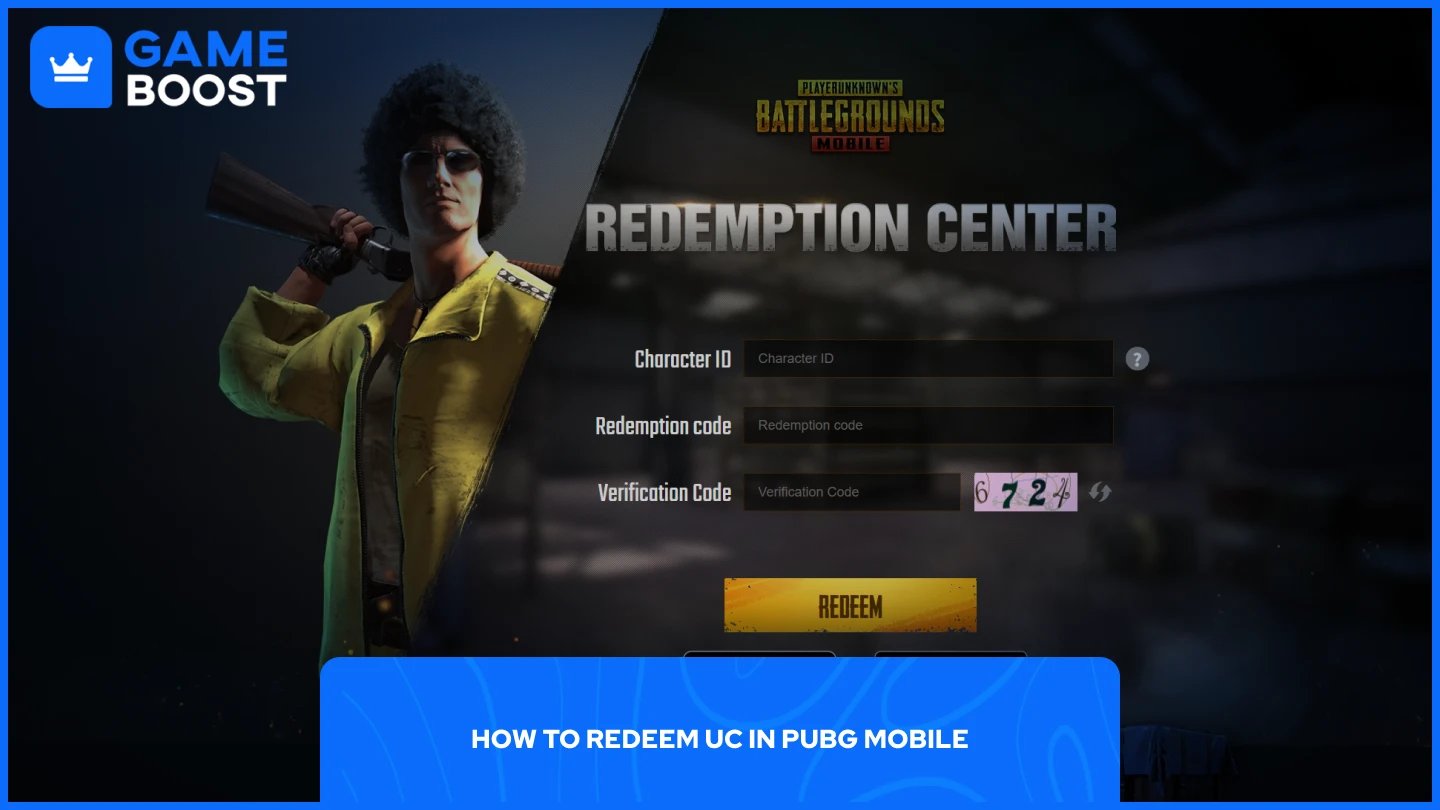
The process of redeeming PUBG Mobile gift cards is straightforward. Follow these steps to add UC to your account:
Go to the PUBG Mobile Redemption Page.
Enter your character ID
Enter your gift card code
Enter the verification code. Type the random numbers and letters shown in the image on the redemption page.
Click "Redeem."
Note: You can find this by opening PUBG Mobile, tapping your profile icon, and copying the ID displayed under your username.
Once you click redeem, the UC will be added to your account instantly. You'll receive a confirmation message on the redemption page, and the new balance will appear in your PUBG Mobile account immediately. Make sure you're logged into the correct account before redeeming, as gift card codes can only be used once and cannot be transferred between accounts.
Also Read: How to Redeem GameStop Gift Cards: Step-by-Step Guide
UC is the premium currency for purchasing exclusive content and customization options in PUBG Mobile. The currency unlocks access to items that can't be obtained through regular gameplay.
You can use UC to buy:
Royale Pass (Elite Pass and Elite Pass Plus): Unlocks premium missions, exclusive rewards, and seasonal content
Character outfits and cosmetic sets
Weapon skins
Vehicle skins
Parachute skins
Crates and Lucky Spins
Emotes
Rename Cards
Bundle deals
UC purchases are purely cosmetic and don't provide any tactical advantages in matches. The items you buy with UC let you personalize your experience and stand out from other players, but they won't affect your performance or give you gameplay benefits over others.
Also Read: How to Redeem Google Play Cards: Step-by-Step Guide
Redeeming PUBG Mobile gift cards is a straightforward process that takes just a few steps through the official redemption page. Once you've added UC to your account, you can start purchasing exclusive cosmetic items, seasonal passes, and customization options that enhance your gaming experience. Just make sure to enter your correct character ID before redeeming, as codes can only be used once and can't be transferred between accounts.
How to Redeem Fortnite Gift Cards
How to Redeem League of Legends Gift Cards
How to Redeem Minecraft Gift Cards
Where to Buy Roblox Gift Cards
View all Entertainment Gift Cards
“ Mustafa Atteya has been writing about gaming and esports since 2023, specializing in competitive game content and player improvement guides. At 25, he brings both hands-on gaming experience and professional SEO writing expertise to the GameBoost team.”