


•Mustafa Atteya• 4 min read
Clash Royale

Clash Royale has been one of Supercell's most popular mobile titles since its release in 2016, but not every player sticks around forever. Some quit after hitting a wall, others want a clean break, and some are done with the game entirely.
Unlike most apps, deleting Clash Royale from your device does not remove your account. Since accounts are tied to a Supercell ID, your data stays on Supercell's servers until you actively request its removal, and the process is permanent once completed.
In this article, we'll explore exactly how to delete your Clash Royale account, what happens during the deletion period, and what you should consider before going through with it.
Also Read: How to Get 67 Emote in Clash Royale

Deleting your Clash Royale account is permanent and cannot be undone after the 30-day deletion period ends
All progress, cards, gems, gold, purchases, and cosmetics are wiped and not refunded
The process is done through Help and Support inside the app, not through a direct delete button
After confirming with a Supercell representative, your account is locked for 30 days before final removal
You can cancel the deletion by contacting support any time within the 30-day window
If starting fresh is the goal, creating a new Supercell ID is an alternative that lets you keep your original account
Also Read: Where to Buy Clash Royale Accounts
Deleting your Clash Royale account is permanent. Once the process is complete, Supercell cannot recover your data under any circumstances, so it is worth understanding exactly what you are giving up before proceeding.
Everything tied to your account is gone for good. This includes your:
Card collection
Trophies
Gems
Gold
Tower skins
Emotes
Any purchases you have ever made (Paid content is not refunded)
Your Clash Royale account is linked to your Supercell ID, which may also be connected to other Supercell games like Clash of Clans or Brawl Stars. Deleting your Clash Royale data does not automatically delete those accounts, but you should verify what gets affected before confirming anything.
If you are only looking for a fresh start rather than a full exit, Clash Royale supports multiple accounts under separate Supercell IDs. You can create a new account and keep your original one without losing any progress.
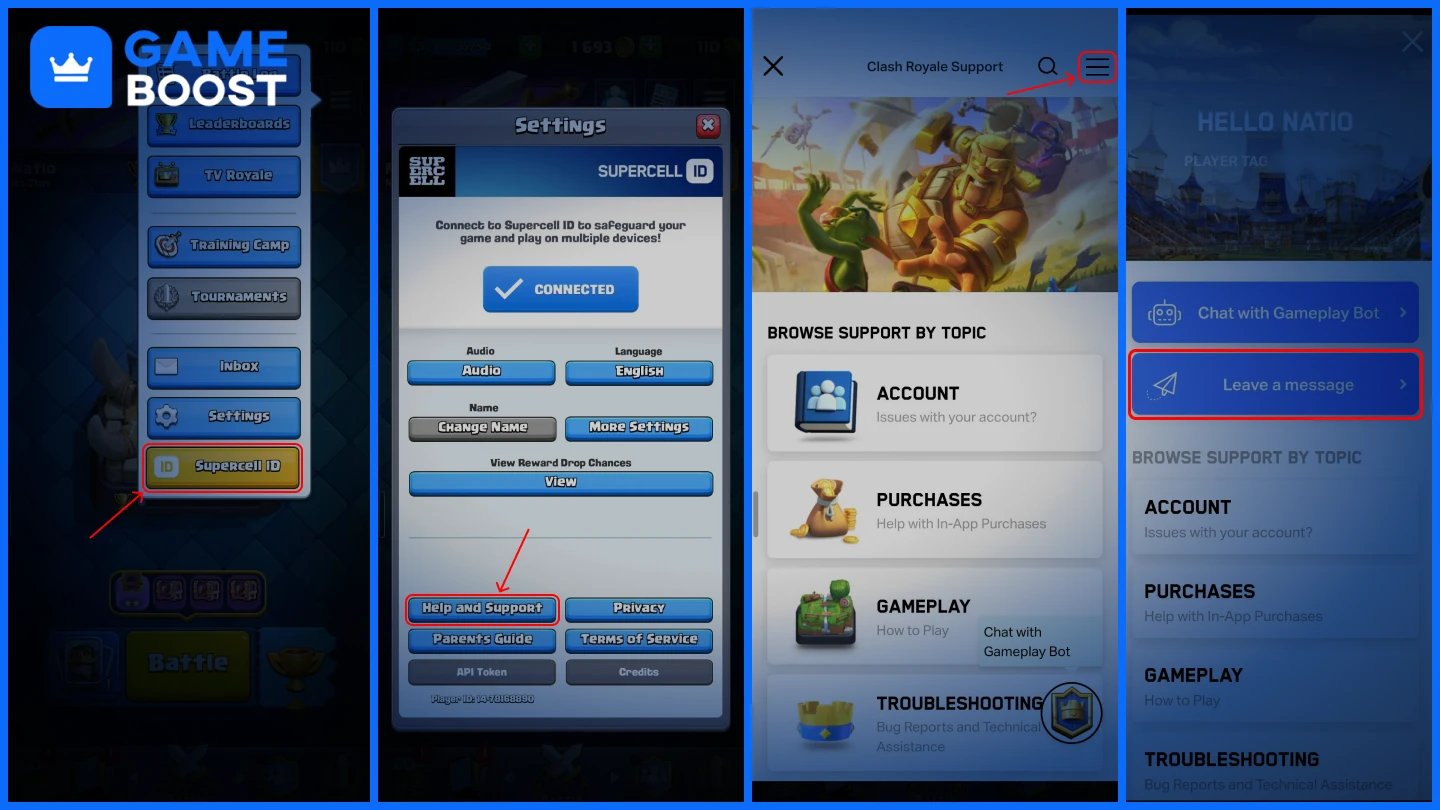
Clash Royale does not have a direct delete account button. The process goes through Supercell's support system inside the app. Follow these steps:
Open Clash Royale and tap the menu icon.
Select “Supercell ID” from the dropdown.
Select Help and Support.
Open the sidebar (≡ icon), then select Leave a message.
In the “Select your problem” section, choose “Request or Delete My Data.”
Choose Delete My Data.
Confirm that you want to proceed with the deletion.
After confirmation, your account enters a 30-day deletion period. It will be permanently removed once that window closes.
Also Read: How to Get Heroes in Clash Royale
Once you confirm the deletion request, your account is immediately locked. You will not be able to log in or play Clash Royale on that account for the entire 30-day period.
The 30 days serve as a buffer in case you change your mind. You can cancel the deletion by contacting Supercell support before the countdown ends. After 30 days, the deletion becomes final, and there is no way to reverse it. Your Supercell ID itself is not deleted. If it is linked to other games, those accounts remain active unless you separately request their removal.
Also Read: How to Upgrade King Tower in Clash Royale
No. Once the 30-day deletion period ends, your account is permanently erased from Supercell's servers. Contacting support after that point will not help, as there is nothing left to recover.
The only window you have is during those 30 days after submitting the request. If you act within that time and reach out to Supercell support, they can cancel the deletion and restore your access. If your account was deleted without your knowledge or you believe it was done without your consent, contacting Supercell support is still worth attempting, but recovery is not guaranteed.
Deleting your Clash Royale account is a straightforward process, but it is not one you can undo once the 30-day window passes. Make sure you have considered the alternatives, checked your linked Supercell games, and are fully certain before confirming anything with support.
Buy Clash Royale Gems
Clash Royale Accounts For Sale
View all GameBoost Accounts
View all GameBoost Boosting Services
View all GameBoost Currencies
View all GameBoost Game Keys
View all GameBoost Gift Cards
View all GameBoost Top Ups
View all GameBoost Items
Buy CS2 Skins
“ Mustafa Atteya has been writing about gaming and esports since 2023, specializing in competitive game content and player improvement guides. At 25, he brings both hands-on gaming experience and professional SEO writing expertise to the GameBoost team.”