
•Hamza Rashid• 8 min read
Roblox

UPDATE (November 4, 2026): All four checked codes have expired. No active codes confirmed.
The Forge codes can give you free Race Rerolls and Resurrection Stones, but no active codes were confirmed during our November 4, 2026 check. GOATEDCOMMUNITY, HALLOWEEN26, GUILDS, and CRIMSONSAKURA all returned expired messages.
New promotions can offer extra rolls without spending on them. If you're comparing The Forge items, check official announcements for available freebies too. Code rewards vary between promotions, and each offer can end before you get around to claiming it.
Below, you'll find the expired and unavailable codes, what their messages mean, and the redemption steps for future releases. The code box sits inside Mail, accessible through the three-line menu at the top left.
No active codes were confirmed during our November 4, 2026 check
GOATEDCOMMUNITY, HALLOWEEN26, GUILDS, and CRIMSONSAKURA returned expired messages
Previous rewards included Race Rerolls and Resurrection Stones
Open the top-left three-line menu → Mail, enter your code at the bottom left, and click Redeem
FIRE had reached its redemption limit
Follow official announcements for new promotions
There are currently no confirmed active The Forge codes. GOATEDCOMMUNITY, HALLOWEEN26, GUILDS, and CRIMSONSAKURA all returned expired messages during our November 4, 2026 check.
Check back for new additions and watch developer announcements for future promotions. When another code arrives, enter it through the Mail menu and read the confirmation message before checking your rewards.
The four codes checked on November 4 returned expired messages. RAIDUPDSOON and FIRE also remain unavailable based on their earlier results.
Code | Result |
|---|---|
GOATEDCOMMUNITY | Expired |
HALLOWEEN26 | Expired |
GUILDS | Expired |
CRIMSONSAKURA | Expired |
RAIDUPDSOON | Expired |
FIRE | Redemption limit reached |
FIRE reached its maximum claim limit, so additional players could no longer collect its reward.
GUILD also failed our check. It is a different entry from GUILDS, which has now expired. Copy future codes in full, including any final letters or punctuation.
This section covers the unsuccessful codes we checked directly. It doesn't list every retired code from the game's history.
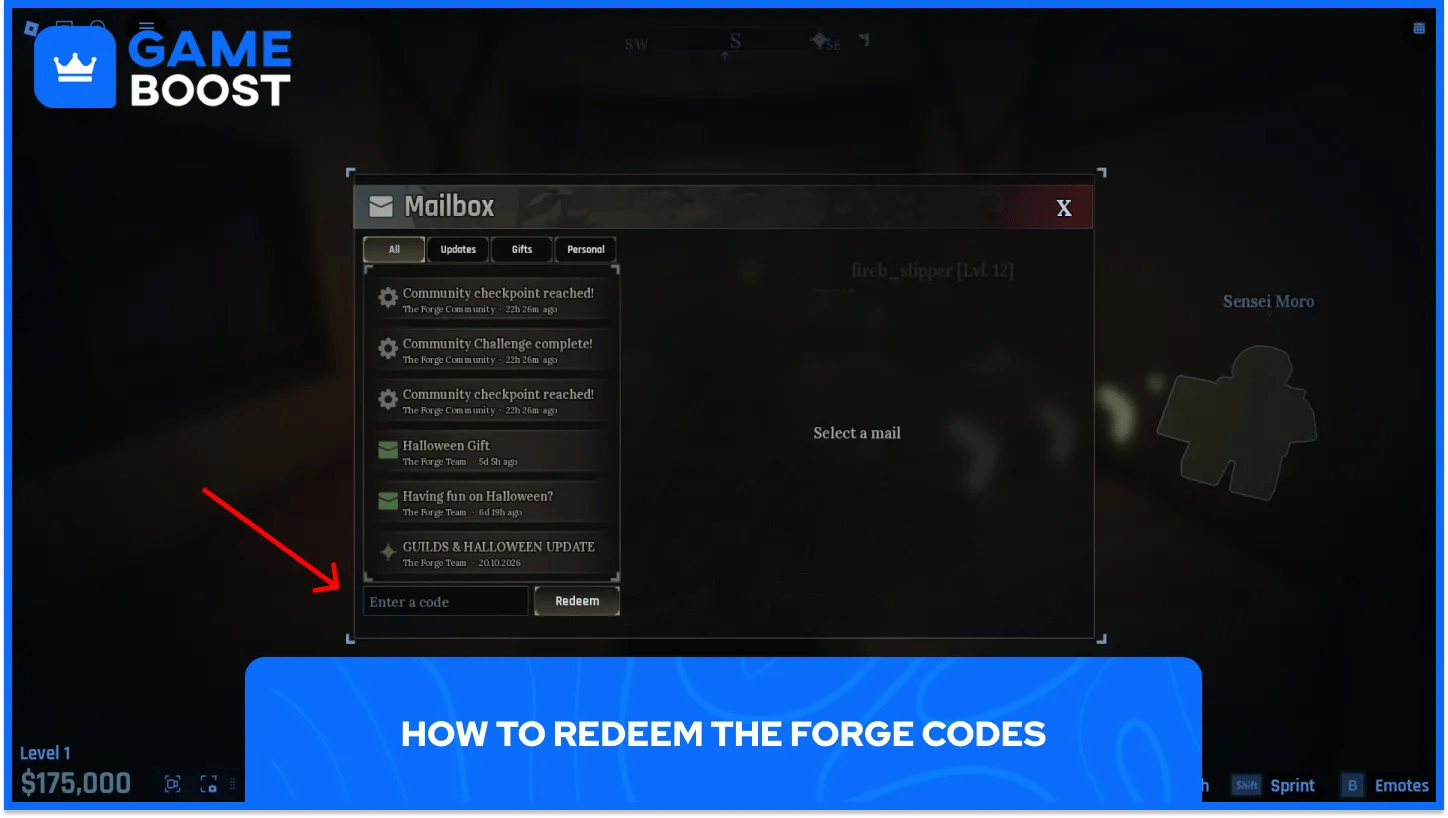
The current code box is inside the Mailbox window. Here's the route we used in-game:
Launch The Forge on Roblox and load into the game.
Click the three-line menu in the top-left corner of the screen.
Select Mail from the menu.
Find the Enter a code box at the bottom left of the Mailbox window.
Paste a working code and click Redeem.
Repeat for the remaining codes.
The input box sits beneath the list of messages. You can enter your code there without searching through individual emails.
If you're following an older guide that sends you to Settings or a top-right Mailbox icon, use the steps above. Our screenshots and redemption checks show the top-left menu route.
Check the spelling and remove extra spaces before trying again. GUILD and GUILDS are different entries, but neither currently offers a confirmed reward. GUILDS returned an expired message during our November 4 check.
Next, read the result the game displays. An expired code has ended, and a code with a maximum redemption limit can stop accepting claims once players use up that allowance. Our FIRE test hit that limit.
If you've already used a code, check your existing rewards before expecting another payout. Re-entering it isn't a way to collect the same reward repeatedly.
For an unexpected failure, rejoin the game and try a fresh copy of the code. If the game still rejects it, record the message rather than treating every failure as an expiry. That distinction helps identify a typo, an account-specific result, or a code that's no longer available.
Follow the developer's announcements through the game's official Roblox page and linked community channels. Those are useful places to check when an update, event, or community milestone arrives.
The Mail menu is also worth opening between sessions. In our check, it contained update announcements and gift messages alongside the code input. Mail gifts have their own claim buttons, so read each message before assuming its contents are part of a code reward.
No active The Forge codes were confirmed during our November 4 check. Skip the expired entries and watch for new promotions before planning around free rerolls. When comparing The Forge accounts, focus on the character’s race, level, and gear rather than assuming old codes will provide extra rewards.
The redemption route remains straightforward: open the top-left menu, select Mail, and find the code input at the bottom left. Check your messages too, as gift mail has separate claim buttons.
When a new code arrives, enter it carefully and read the result. An expired promotion, a redemption limit, and an earlier claim on your account can each explain why a code stops giving rewards.
“ Filip Premuš is a seasoned gaming content writer specializing in titles like Steal a Brainrot, Old School RuneScape, and other popular online games. With a sharp focus on accuracy, updates, and in-game strategy, he creates comprehensive guides that help players stay ahead of the meta and make informed decisions.”