


•Mustafa Atteya• 4 min read
Clash Royale

Clash Royale has built up a large player base since its global launch in March 2016, and with years of updates, new card systems, and seasonal content, many players reach a point where they want to start over or run a separate account alongside their main one.
Some players want to relive the early game experience and climb the ranks from scratch. Others need a second account to experiment with different deck strategies without risking their main profile's progress. Either way, the process requires a few specific steps to make sure your new account is properly saved and accessible going forward.
Supercell ID is the system that handles account creation and management across all Supercell games, including Clash Royale. In this article, we'll explore exactly how to create a new account in Clash Royale, covering both the Supercell ID method and what to expect during the process.
Also Read: How to Link and Unlink Your Account in Clash Royale

The recommended way to create a new Clash Royale account is through Supercell ID, which saves your progress and lets you manage multiple accounts on one device.
To create a new account, log out of your current Supercell ID, play through the tutorial, then register a new Supercell ID with a different email once the tutorial is done.
Creating an account without a Supercell ID is possible by selecting "Play without Supercell ID," but your progress won't be saved if you uninstall the game or reset your device.
If you lose access to a guest account, you can contact Supercell support with your account details, but recovery is not guaranteed.
Also Read: Where to Buy Clash Royale Accounts
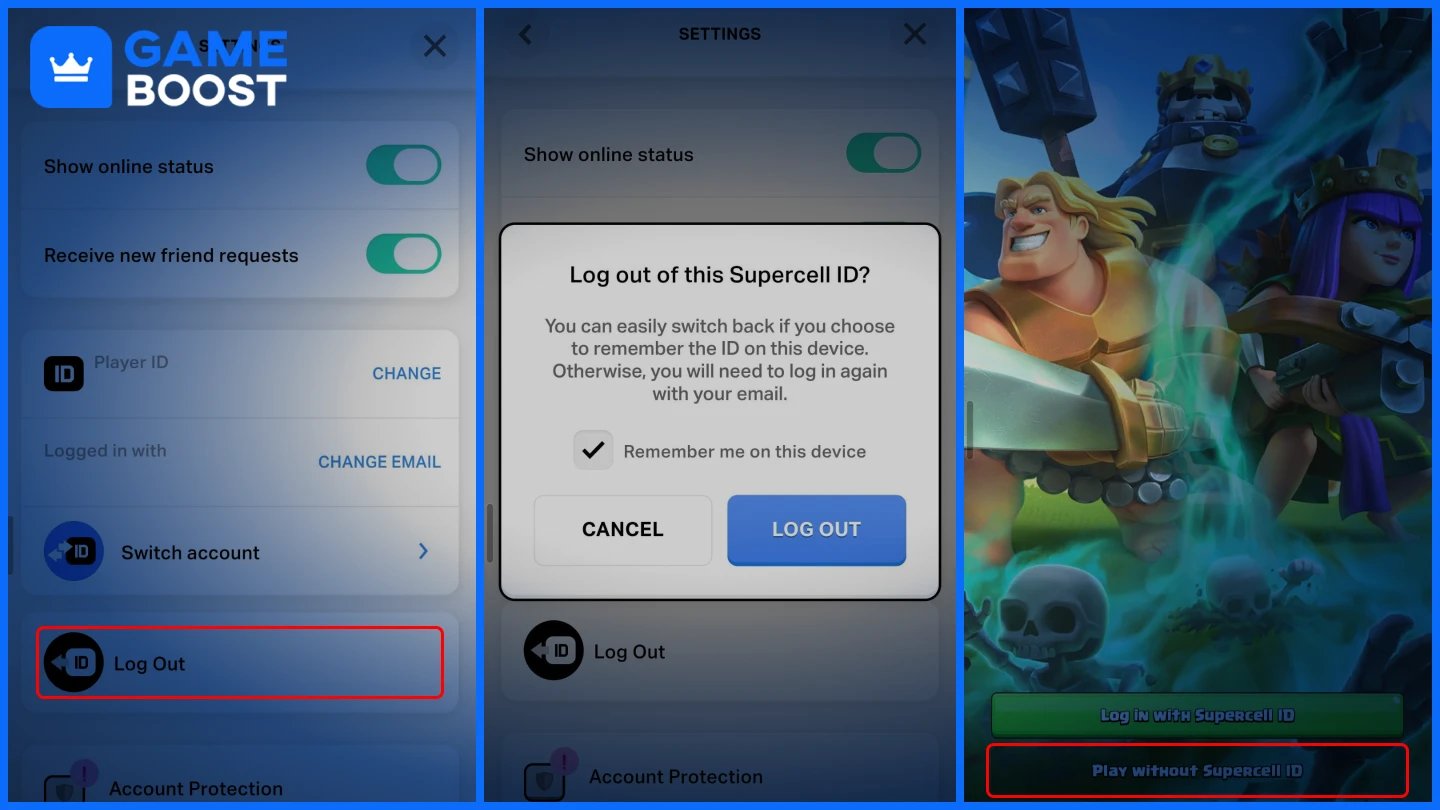
The recommended way to create a new Clash Royale account is through Supercell ID, which keeps your progress saved and lets you manage multiple accounts on the same device. Here's how to do it:
Open Clash Royale and tap the three horizontal lines in the top-right corner.
Go to Settings and tap on Supercell ID.
Tap "Log Out" to disconnect from your existing account.
The game will restart and prompt you to continue with a Supercell ID or play without one. Select "Play without Supercell ID" to start fresh.
Complete the tutorial to unlock the full game.
Once the tutorial is done, go back to Settings and tap Supercell ID.
Select "Register Now," enter a new email address, and verify it using the code sent to your inbox.
Your new account is now saved and linked to the new Supercell ID.
To switch accounts, open Clash Royale and go to Settings. Tap on Supercell ID, select "Log Out," then log back in using the email address linked to the account you want to switch to. Make sure you fully log out before switching to avoid any conflicts between accounts.
Each account has its own separate trophy count, card collection, and resources, so you'll be doing this regularly if you run more than one. For a more detailed breakdown of managing multiple accounts on one device, check out our full guide on how to use multiple accounts in Clash Royale.
Also Read: Clash Royale: Account Bans, Durations, and Appeals
You can start a new Clash Royale account without using a Supercell ID, but it comes with a significant risk. Your progress will not be saved if the game is deleted or your device is reset. Here’s how to do it:
Open Clash Royale on your device.
When the game loads, tap "Player without Supercell ID" instead of logging in.
Complete the tutorial to access the game.
If you lose access, you can reach out to Supercell support through the game's settings and provide account details like your username, level, and any purchases you've made to prove ownership. However, recovery is not guaranteed, so linking your account to a Supercell ID as soon as possible is the safest way to keep your progress protected and accessible from any device.
Creating a new Clash Royale account is a straightforward process once you understand how Supercell ID works. The steps are quick, and the whole setup takes just a few minutes from logging out to completing the tutorial.
The most important thing is linking your new account to a Supercell ID right away so your progress stays safe. Skipping that step leaves your account vulnerable, and support recovery is not always a guaranteed fix. Keep your login email accessible, and you'll have no issues managing your accounts long-term.
Buy Clash Royale Gems
Clash Royale Accounts For Sale
View all GameBoost Accounts
View all GameBoost Boosting Services
View all GameBoost Currencies
View all GameBoost Game Keys
View all GameBoost Gift Cards
View all GameBoost Top Ups
View all GameBoost Items
Buy CS2 Skins
“ Mustafa Atteya has been writing about gaming and esports since 2023, specializing in competitive game content and player improvement guides. At 25, he brings both hands-on gaming experience and professional SEO writing expertise to the GameBoost team.”