


•Mustafa Atteya• 4 min read
Clash Royale

Supercell ID is the account system that ties your Clash Royale progress to a profile you can access across any device. Without it, your cards, trophies, and resources stay locked to a single device, meaning a factory reset or a new phone could wipe everything you've built.
Linking your account protects your progress and makes switching devices straightforward. Unlinking becomes necessary when you want to start fresh, hand over a device to someone else, or manage multiple accounts separately. Both processes are simple once you know where to look, but a lot of players run into confusion around them.
In this article, we'll explore how to link and unlink your Clash Royale account through Supercell ID, covering the full process step by step for both actions.
Also Read: Clash Royale: Account Bans, Durations, and Appeals

Supercell ID is the account system that saves your Clash Royale progress to an email address, allowing you to access it from any device
To link your account, go to Settings, find the Supercell ID section, tap Connect, enter your email, and verify with the six-digit code Supercell sends
To log out, go to Settings, find the Supercell ID section, tap the button, and select Log Out
Logging out only removes your account from the current device. Your progress stays saved to your Supercell ID email
After logging out, the device reverts to a guest session, and your original account remains accessible from any other device
There is no in-game option to permanently remove your account from a Supercell ID email. It requires contacting Supercell support directly
Also Read: Where to Buy Clash Royale Accounts
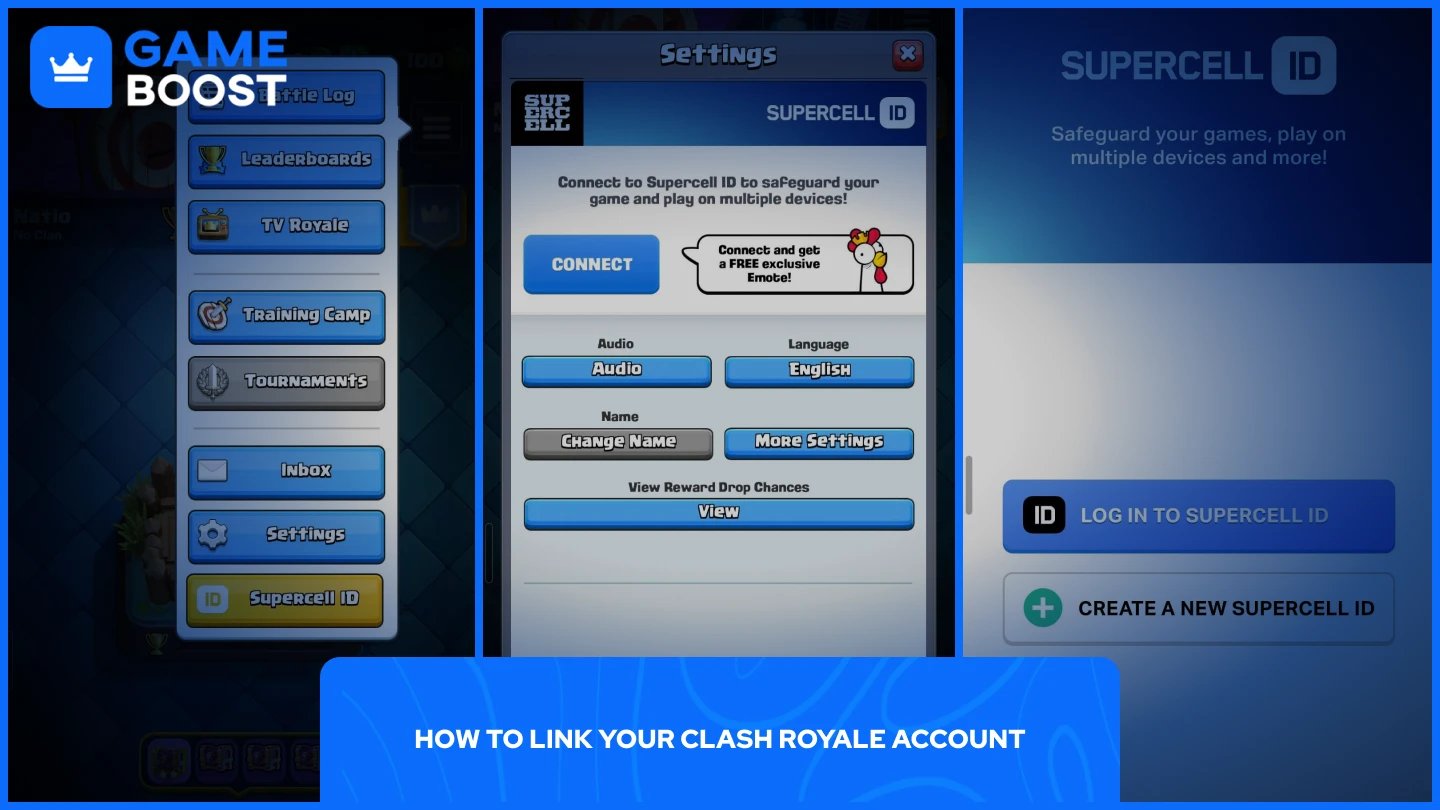
Linking your account to Supercell ID takes under two minutes and only requires a valid email address. Follow these steps:
Open Clash Royale and tap the three horizontal lines in the top-right corner.
Select Settings.
Find the Supercell ID section and Tap Connect.
Enter your email address and submit.
Check your inbox for the six-digit verification code Supercell sends.
Enter the code in-game to complete the process.
Once linked, the Supercell ID section in your Settings will display your email address, confirming the connection is active.
Unlinking works through the same settings menu. Here's how to do it:
Open Clash Royale and tap the three horizontal lines in the top-right corner.
Select Settings.
Find the Supercell ID section. It will show as "Connected."
Tap the button, go to Settings (a gear icon), and select Log Out.
Confirm your choice when prompted.
The game will restart after logging out. Keep in mind that this only signs you out of the current device. Your progress stays permanently tied to the Supercell ID email it was registered with, and there is no in-game option to change that.
If you're looking to fully remove your account from a Supercell ID entirely, you need to contact Supercell's support team directly, as they handle the process and verify account ownership before making any changes.
Also Read: Clash Royale: How to Fix Account Locked or Disabled
When you disconnect from Supercell ID, you're only disconnecting your progress from the device you're currently using. Your account itself stays intact because it's tied to your Supercell ID email, not the device. The device simply goes back to a guest session with no account loaded on it. Your progress, cards, trophies, and resources remain saved to your email and can be restored on any device by logging back in with the same Supercell ID.
From that point, you have two options. You can log back into your Supercell ID to restore your account on the device, or select "Play without Supercell ID" to start a fresh profile. The fresh profile is a separate account and has no connection to your original one. Your original account stays accessible from any device as long as you have the Supercell ID email it's registered to.
Also Read: How to Recover Your Account in Clash Royale
Linking your Clash Royale account to a Supercell ID is the safest way to make sure your progress is never tied to a single device. The process takes a couple of minutes and only requires a valid email address.
Logging out removes your account from the device but does not affect your progress. Everything stays saved to your Supercell ID email and can be restored on any device at any time. If you ever need to fully remove your account from a Supercell ID, that requires contacting Supercell support directly, since there is no in-game option for it.
Buy Clash Royale Gems
Clash Royale Accounts For Sale
View all GameBoost Accounts
View all GameBoost Boosting Services
View all GameBoost Currencies
View all GameBoost Game Keys
View all GameBoost Gift Cards
View all GameBoost Top Ups
View all GameBoost Items
Buy CS2 Skins
“ Mustafa Atteya has been writing about gaming and esports since 2023, specializing in competitive game content and player improvement guides. At 25, he brings both hands-on gaming experience and professional SEO writing expertise to the GameBoost team.”