




•Hamza Rashid• 8 min read
Clash of Clans
Delivery method
Choose how you want your top-up delivered
Gems
Select an amount to view details and purchase
Game Passes
Select an amount to view details and purchase
Other Sellers · 10


Excellent 4.9 out of 5.0
Based on 363,755+ orders

Buy Clash of Clans Gems from KYC-verified sellers, with quick delivery through your Supercell ID.

Gold and Elixir come in steadily from raids and collectors, but Gems come in far more slowly. You pick a few up from clearing trees and rocks or finishing achievements, and that's about it for free. Players who want more builders or faster upgrades buy CoC gems instead. Those who'd rather skip the early grind altogether pick from Clash of Clans accounts for sale.
Gems are the premium currency in Clash of Clans, and they're what turns waiting into building. With a bigger balance, you can add extra builders to run more upgrades at once, finish long timers and buy Magic Items from the Trader. Clash of Clans gems for sale come in six packs, from 80 up to 14,000. Next to them sit the Gold Pass and Event Pass, monthly passes with their own boosts and rewards.
Every CoC top up lands straight in your village, and the product description shows how:
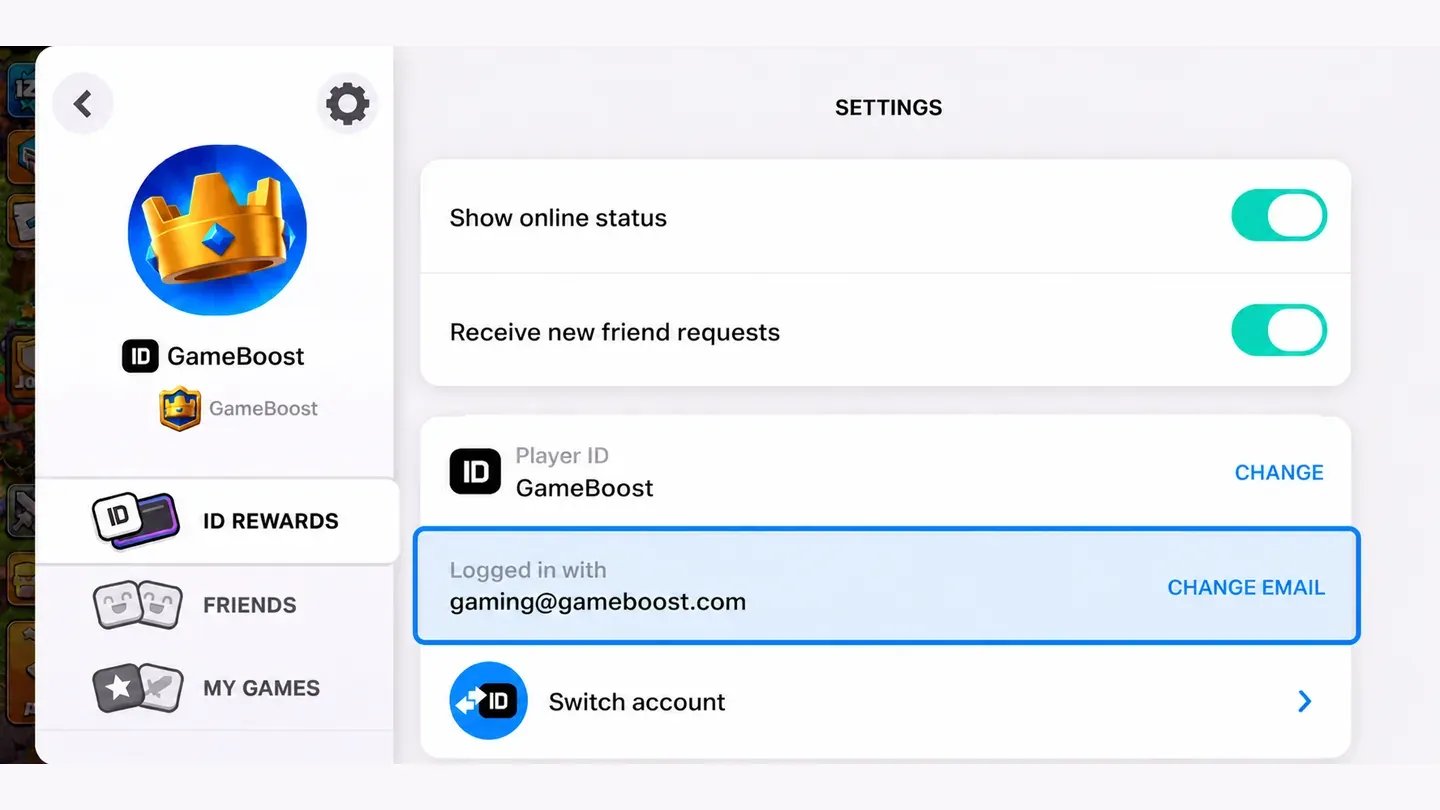
Supercell ID login: Used by almost every offer. You share the email linked to your Supercell ID. Then you send the seller the 6-digit code Supercell emails you, so they can log in and buy the pack.
Redeem code: Some offers deliver a code to your order panel after payment, and the product description explains where to use it.
Supercell ID is the free login that saves your village to an email address, and sellers sign in with that same email. Your village has to be connected to Supercell ID before you order, or there's nothing for the seller to log in to. Many sellers send a logout video or a purchase receipt once they're done, and the product description says if yours does.
Planning ahead helps your Gems go further, especially on bigger upgrades. These five tips cover the choices most players face:
Pick the right pack: 2,500 Gems covers the third builder at 500 Gems and the fourth at 1,000, with room left for timers.
Best first buy: Extra Builder's Huts keep paying off for months, so they're the smartest use of a fresh balance.
Check the inbox: Keep the email on your Supercell ID open while you order, since the login code goes there.
Gold Pass timing: Buying early in the season gives you more days to use its builder and research boosts.
Read each description: Delivery method, timing and any extra steps differ from seller to seller.
In the official in-game shop and the Supercell Store, Gem prices are fixed, from $4.99 for 500 Gems up to $99.99 for 14,000. Online, each seller sets their own price for the same packs, which is why you'll find cheap CoC gems and larger packs well below the official price.
Before ordering, make sure you can open the email linked to your Supercell ID, because the seller needs the code it receives. Only share your login code inside the order chat, never anywhere else.
Buying CoC gems online takes four steps:
Choose an offer by Gem pack or pass, and read its product description.
Pick the amount and quantity you want.
Add your Supercell ID email and any other details the product description asks for.
Pay at checkout with the payment method of your choice.
Once you've paid, the seller asks for your login code in the order chat. They log in, buy the pack and log out, Gems show up in your village the next time you open the game. CoC top up is quick on most offers, and the product description shows the expected time.
Gems are Clash of Clans' premium currency, used to add builders, skip upgrade timers and buy Magic Items. Unlike Gold, Elixir and Dark Elixir, which you farm in battles for buildings and troops, Gems pay for speed and extras. That's why Gems are the one currency you can't raid from other players.
Your Gem balance covers a wide range of things in the game, and these are the most common:
Builder's Huts: Extra builders cost 250, 500, 1,000 and 2,000 Gems, and each one lets you run another upgrade.
Finishing timers: Instantly complete building, Laboratory and Builder Base upgrades.
Trader items: Magic Items like Books, Potions and Runes, plus returning Hero Equipment.
Resources and Shields: Top up Gold, Elixir or Dark Elixir, or protect your village with a Shield.
Account extras: Change your name after the free change, or unlock extra war base slots.
Gold Pass is a monthly pass that costs $6.99 and speeds up the whole season with boosts, extra loot and a Hero skin. It's the paid version of the free season pass, and it's paid with money, not Gems. The smaller Event Pass for limited-time events costs $4.99, and both appear as separate offers next to the Gem packs.
On top of the free track, the CoC Gold Pass adds a premium reward track, and its perks make the season noticeably faster:
Faster upgrades: Up to 20% off building and research times for the whole season.
Season Bank: Up to five times the loot you collected during the season, paid out at the end.
Hero skins: One new exclusive Hero skin each season.
Extra rewards: Books, Hammers, Runes and Potions on the premium track.
Since the boosts save time on every upgrade, buying Gold Pass early in the season gets the most out of it.
You get Gems by buying them in the in-game shop or the Supercell Store, or by earning a few for free from obstacles, achievements and the Gem Mine. Buying is the only way to get Gems in large amounts, so each source suits a different need:
In-game shop: Gem packs sit in the Treasure section, priced by your region.
Supercell Store: Supercell's official web store sells the same packs, and its Store Bonus Track unlocks extra Gems and Magic Items as you collect points.
Gift cards: Topping up with a Google Play gift card or Apple gift card adds balance you can spend on Gems in the game.
Free sources: Obstacles drop up to 6 Gems and a Gem Box gives 25, while the Gem Mine makes about 5 a day and achievements pay out more.
Online marketplaces: Sellers deliver Clash of Clans gems through your Supercell ID, often for less than the official price.
Free Gems add up over months, but they won't cover several builders or a string of finished upgrades. That gap is why most active players combine free sources with a CoC top up from time to time.
Every seller who tops up villages on GameBoost has passed KYC verification before they can list, and every order comes with buyer protection. You can also see each offer's delivery method and timing before you pay. That way, you know how your order will work before you share your Supercell ID email.
Every CoC Gems order also comes with these perks, in the order you'll use them:
Verified sellers: Each one passes KYC before posting an offer.
Flexible payments: Pay by card, Apple Pay, Google Pay, Paysafecard, Skrill or crypto.
Quick delivery: Most offers are completed within minutes of the seller getting your code.
Order chat: Talk to the seller directly from your order page while they work.
24/7 support: Real people answer questions about your order at any hour.
GameBoost is a safe place to buy Clash of Clans Gems, since every seller is KYC-verified and every order is protected. For any question, you can open a support ticket at any time.
Prices differ between offers because each seller sets their own for every pack. Comparing a few shows you where the cheap Clash of Clans gems are, especially on the 6,500 and 14,000 packs.
Ordering a CoC top up starts with your Supercell ID, since that's how sellers reach your village. Make sure your village is connected to it and keep that email inbox open, because the login code arrives there during the order.
Buying CoC Gems on gameboost.com takes five steps:
Search for Clash of Clans in the search bar, or open Top-Ups from the main menu.
Open an offer and read the product description.
Choose the amount of Gems or the pass you want.
Fill in your Supercell ID email and any details the product description asks for.
Click Buy Now, pick a payment method and click Pay Now.
After payment, your order opens in My Orders with a chat to the seller, who asks for the login code when they're ready. Once they've logged out, open Clash of Clans and your Gems or pass are waiting in your village.
“GameBoost is not affiliated, endorsed, sponsored, or authorized by Supercell Oy, Clash of Clans, or any of its subsidiaries or affiliates. Supercell Oy’s official website can be found at: https://supercell.com. The name Clash of Clans, as well as related names, marks, emblems, and images are registered trademarks of their respective owners. Use of trademarks is covered by fair use principles under EU Regulation 2017/1001, Article 14.”