






Free Fire Top Up
Buy Free Fire Diamonds from verified sellers, with offers matching your server region.

Free Fire Diamonds for Sale
Regular Free Fire matches pay out Gold, not Diamonds, so a Free Fire top up is the quickest way to fill your balance. Events and redeem codes do hand out a few Diamonds, but saving up for a new bundle that way takes ages. That's why plenty of players buy them, and some skip the grind entirely by buying a Free Fire account that already has characters and skins on it.
With Diamonds in hand, you can pick up skins, characters and the Booyah Pass whenever you want. You can also spin Diamond Royale or Weapon Royale the moment a reward you've had your eye on shows up.
Supported Servers and Regions
Free Fire splits players across regional servers, and every Diamond offer is made for one of them. Besides Global offers, you'll find Diamonds for sale for other regions, like Brazil, Latin America, Indonesia, Vietnam, the Middle East, Europe, Singapore, Malaysia and Thailand.
Just pick the region your account plays on, since Free Fire account can't switch servers. Some offers also cover only certain countries inside a region, like an offer that works across Latin America but leaves out Brazil. The offer notes say which countries are included, so give them a quick read before checkout.
Required Information
For almost every Garena Free Fire top up on GameBoost, all you need is your UID, also called your Player ID. You'll see delivery labels like UID, Gift system or In-game mail on the offers, but sellers use that same ID for all of them. A few offers ask for your in-game nickname too, and each one tells you what it needs before checkout.
Grabbing your UID only takes a few taps:
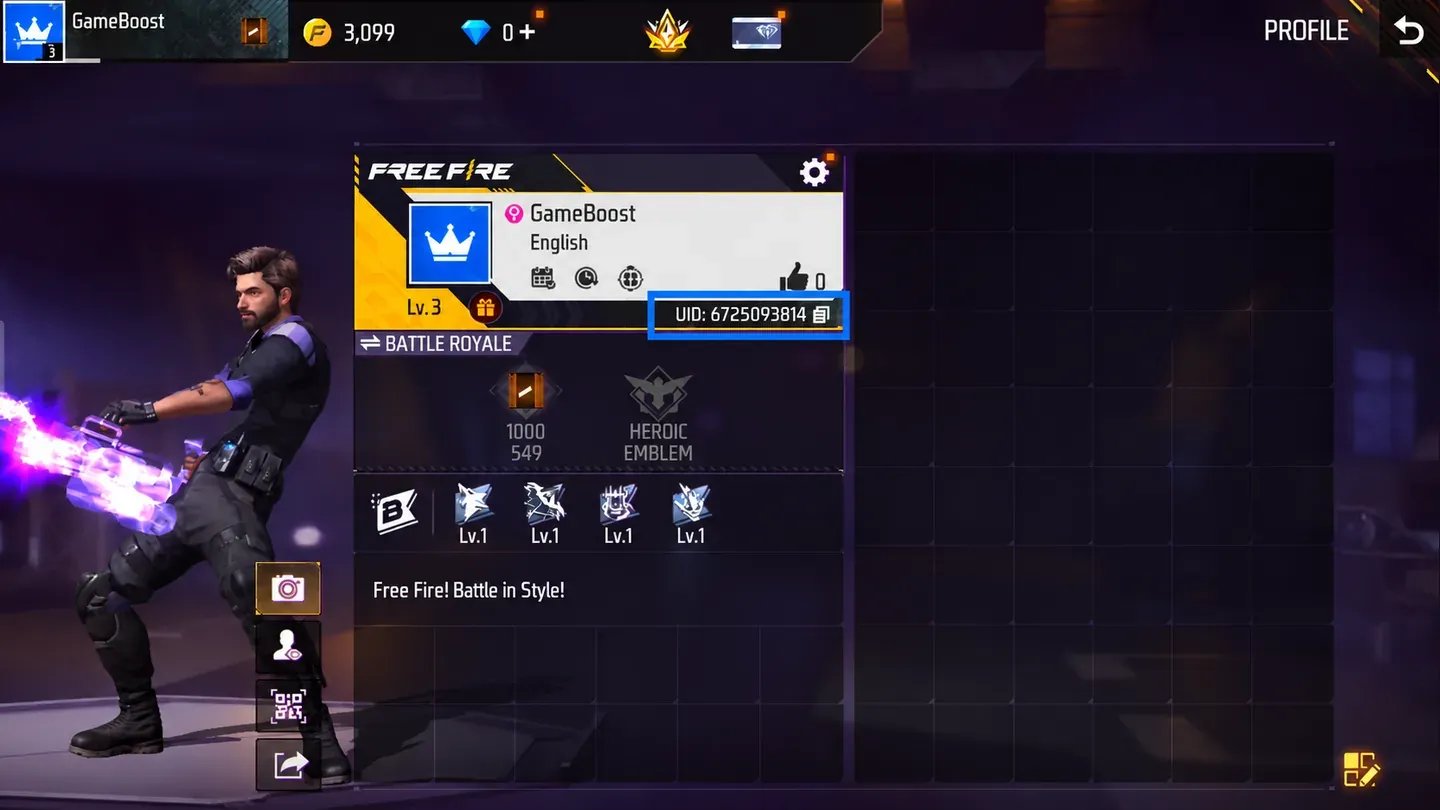
Open Free Fire or Free Fire MAX and wait for the lobby to load.
Tap your profile picture in the top-left corner.
Tap the copy icon next to the number under your nickname.
Diamonds go to whatever UID you enter, so you can just as easily buy them for a friend with their UID.
Gift system offers work the same way on GameBoost: you give your UID, plus your nickname if the offer asks for it, and the seller sends the Diamonds to that account. Free Fire's own in-game gift feature is something else, since it sends store items like bundles and characters to friends and is paid for with Diamonds.
Tips Before You Buy Free Fire Diamonds
Go for an offer made for the server region your account uses.
Check the offer notes to see which countries the offer covers and exactly what's in the pack.
Once your order's done, hop into the game and check your Diamond balance.
Message the seller in the order chat, or reach the store's support team, whenever a question comes up.
How to Buy Free Fire Diamonds?
Free Fire recharge from a seller really comes down to two things: picking the right offer and giving the right ID. Your UID goes in before you pay, so the seller knows exactly where to send the Diamonds.
Buying Diamonds for Free Fire from a seller takes four short steps:
Pick an offer for your server region and delivery type.
Select a pack of Diamonds or a membership.
Add your UID and any details the offer asks for.
Pay at checkout to complete the purchase.
Always paste the UID you copied rather than typing it out, since top-up sent to the wrong UID can't be reversed. You never need to share a password for UID offers, and nothing on your account changes except your Diamond balance.
What Are Free Fire Diamonds?
Free Fire is Garena's mobile battle royale, and it runs on two kinds of coins. Gold is the free one you earn by playing matches. Diamonds are the premium one, and you buy them with real money instead of earning them.
Diamonds pay for the things most players chase, like new characters with their own skills and costume bundles and weapon skins. They also cover the Booyah Pass upgrade and its premium rewards. On top of that, they pay for spins in Diamond Royale, Weapon Royale and the Incubator, where every draw has a shot at a rare skin or weapon.
You can spend Diamonds on these Free Fire items, and each one gets you something different:
Item | What it gets you |
|---|---|
Characters | New fighters, each with its own skill |
Skins and costume bundles | New looks for your character and weapons |
Booyah Pass upgrade | Premium pass rewards, including outfits and a gun skin |
Luck Royale spins | Draws in Diamond Royale, Weapon Royale and the Incubator for rare rewards |
Gold covers a handful of store items, like some characters, but most of the premium stuff needs Diamonds. Diamonds can't be earned from regular matches, so a top-up or a membership is how most players keep their balance up.
Diamonds and Gold differ in what they buy and where they come from:
Resource | What it is for | How to get it |
|---|---|---|
Diamonds | Booyah Pass, skins, bundles and characters | A top-up, memberships, events and official redeem codes |
Gold | Characters and some store items | Matches, daily logins and missions |
A Weekly or Monthly Membership is a Diamond pack you buy once that pays out over time. Instead of giving you everything at once, it hands out Diamonds through daily login claims for seven or 30 days. You only get the full amount if you log in and claim every day, so it suits players who jump in daily anyway.
How to Get Diamonds in Free Fire and Free Fire MAX?
Free Diamonds do exist, but Garena only hands them out through its own channels. If a site outside those channels promises Diamonds for nothing, it's a scam.
These official routes can get you a few free Diamonds:
In-game events that reward Diamonds when you finish missions.
Redeem codes posted on Garena's official social channels.
Google Opinion Rewards, where survey credit can pay for Diamonds in some regions.
Free routes add up slowly, so most players who want a bundle or the Booyah Pass end up buying Free Fire Diamonds online. And skip the generator sites, since Diamond generators don't work and can get your account banned.
If you play Free Fire MAX, the higher-spec version with sharper graphics, your Diamonds work exactly the same. Garena's Firelink lets you use one account across both apps, with progress and items synced. A top-up to your UID shows up in either one.
Why Buy Free Fire Diamonds on GameBoost?
Buying FF Diamonds turns your next bundle or Booyah Pass upgrade into a quick checkout instead of a long grind. On a marketplace, you also get to choose the offer that fits your region and your budget.
Every Diamond purchase on GameBoost comes with these perks:
Verified Sellers: Every offer comes from someone who passed KYC checks before they could list anything.
Safe Checkout: You pay on a protected page, and your Free Fire password never comes into it.
Flexible Payment: You can choose from several ways to pay at the last step.
Buyer Protection: Your purchase is covered from the moment you pay until the Diamonds arrive.
Round-the-Clock Support: A real team is around to answer questions any time, day or night.
With KYC-checked sellers, a protected checkout and UID delivery, GameBoost is a safe place to buy Diamonds for Free Fire. If anything's unclear, open a support ticket or ask the team in the GameBoost Discord at any hour.
Prices vary from offer to offer, since every seller sets their own rate. Sort by price and you'll quickly spot cheap Free Fire Diamonds that fit your budget.
How to Buy Free Fire Diamonds on GameBoost
Ordering on GameBoost is simple, and the only thing you need ready is your UID, plus your nickname if the offer asks for it. Copy it from your profile before you start, so the details step goes smoothly.
From the homepage to checkout, you can buy Free Fire Diamonds by following these six steps:
Search for Free Fire in the gameboost.com search bar, or open Top-Ups from the main menu.
Filter the offers by region, delivery method and price.
Open an offer and read its notes and region limits.
Choose the amount, then click Buy Now.
Enter your UID and any extra details, then click Buy Now again to review.
Pick a payment method and click Pay Now.
After you pay, the order chat connects you with the seller, who sends the Diamonds to your UID. Your new balance shows up in Free Fire quickly.