



•Filip Premuš• 12 min read
Call of Duty: Modern Warfare 4
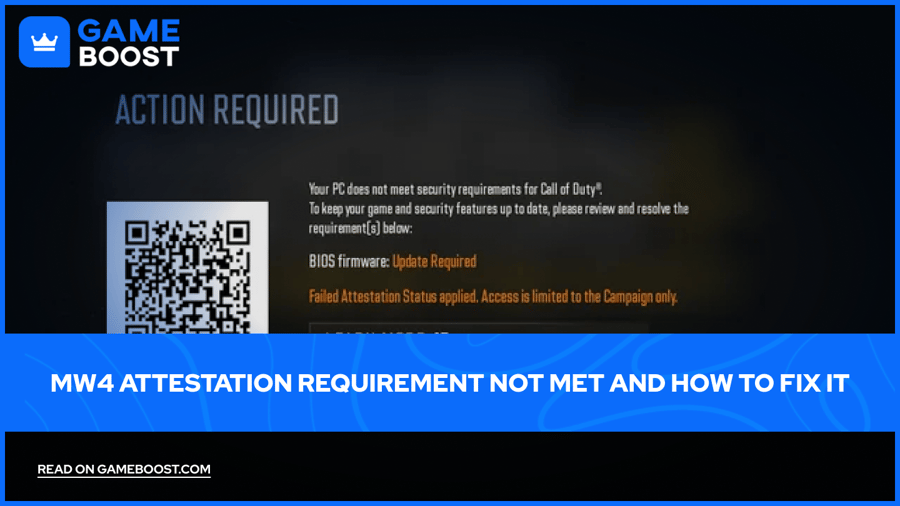
The MW4 failed attestation error stops PC players at the menu. Call of Duty: Modern Warfare 4 checks your hardware security before it lets you in, and if TPM 2.0 or Secure Boot is missing, the game blocks every online mode. The MW4 attestation requirement not met message is the same problem in different words.
Below, you'll find how to check your system, fix each setting, and handle the firmware warnings.
MW4 requires TPM 2.0 and Secure Boot on PC, and failing the check locks you out of all online modes.
You need Windows 10 22H2 or later, an Intel 8th Gen or AMD Ryzen 2000 CPU or newer, UEFI boot mode, and a GPT system drive.
Check TPM with tpm.msc and Secure Boot with msinfo32, or run Activision's Secure Attestation Wizard.
Turn on Intel PTT or AMD fTPM in BIOS, then switch Secure Boot on.
Legacy or CSM boot has to go. Convert the drive from MBR to GPT first if needed.
AMD TPM firmware 3.x.0.x and some Intel versions need a BIOS update.
MW4 shows failed attestation when it can't confirm that your PC runs TPM 2.0 and Secure Boot. Activision says both are required to play, and its TPM 2.0 and Secure Boot support page lists the penalty for MW4 as a block on all online modes.
Your PC needs Windows 10 version 22H2 or later, or any Windows 11 build. For TPM 2.0, Intel CPUs from the 8th Gen onward use Intel PTT, and AMD chips from the Ryzen 2000 series onward use fTPM. A discrete TPM chip also works.
Secure Boot needs the BIOS to boot in UEFI mode, with Legacy and CSM turned off, plus a Windows drive on the GPT partition style.
Windows 11 already requires TPM 2.0, and Activision says most Windows 11 PCs likely have both settings on already. So who gets hit hardest by the MW4 TPM 2.0 error? Mostly Windows 10 players on older BIOS defaults.
Press Windows + R, type tpm.msc, and press Enter. A status saying the TPM is ready for use means TPM 2.0 is active. No compatible TPM found means it's off in BIOS or unsupported.
For Secure Boot, open msinfo32 the same way. You want BIOS Mode: UEFI and Secure Boot State: On. Off means it's supported but switched off.
Partition style shows up in Disk Management. Open it, right-click the drive with Windows, pick Properties, and look at the Volume tab for GPT.
Activision also offers the Call of Duty Secure Attestation Wizard on the same support page. Run CODSecureAttestationWizard.exe from the zip, and it lists every setting that fails.
Fix the attestation requirement not met error by turning on the missing settings in BIOS. Go to Settings > System > Recovery on Windows 11 (or Update & Security > Recovery on Windows 10), pick Restart Now under Advanced startup, then Troubleshoot > Advanced Options > UEFI Firmware Settings.
Under Advanced, Security, or Trusted Computing, turn on Intel PTT (sometimes called Security Device Support) or AMD CPU fTPM, then press F10 to save and reboot. For MW4 Secure Boot, open the Boot tab and set Secure Boot to Enabled. If the option is grayed out, the board is most likely still in Legacy or CSM mode.
Switching to UEFI on an MBR drive needs a conversion first. Activision points players to Microsoft's MBR2GPT tool: run mbr2gpt /validate /allowFullOS in an admin Command Prompt, then mbr2gpt /convert /allowFullOS if validation passes. It also needs 64-bit Windows, three partitions or fewer, BitLocker off, and no dual boot.
The first launch after the fix asks for admin approval through CODBrokerInstaller.exe or enrollaik.exe. Click Yes. Declining or closing either prompt blocks play. If you skipped the enrollaik.exe prompt, the wizard shows Authorization Key Failed, so click Generate Key and accept the prompt this time.
The MW4 BIOS update required warning means your TPM firmware passes today but should be updated. Activision says it may become mandatory later. Find your version in tpm.msc under TPM Manufacturer Information.
AMD systems on Manufacturer Version 3.x.0.x need new firmware, so 3.92.0.5 fails and 3.92.5.5 passes. This firmware can also make the enrollaik.exe prompt keep reappearing. Intel versions INTC 302.12.x.x and INTC 303.12.x.x may also need an update, which comes from your motherboard maker.
A TCG Event Log Failed result points to an outdated Windows install, so run Windows Update and restart. If everything passes and the error stays, Activision's page has a form to report your attestation status.
Once you're back online, MW4 bot lobbies make camo and rank grinds faster. Our Shipment guide picks the best playlist for it.
Most MW4 failed attestation cases come down to one setting left in its factory state, usually CSM boot or fTPM switched off. The wizard finds it fast.
Firmware cases take longer. Activision ties some failures to specific AMD and Intel TPM versions that only a motherboard BIOS update fixes, so you're waiting on the board maker. I'd check your board's support page before assuming the problem is on Activision's side.
Treat the BIOS Firmware Update Required notice as a warning with a deadline. Activision says it may become required, and flashing early beats getting locked out mid-season.
All Call of Duty Games Collection
Get Call of Duty: Modern Warfare 4 Accounts
Call of Duty: Modern Warfare 4 Items on GameBoost
Buy Call of Duty Points on GameBoost
View all GameBoost Game Keys
View all GameBoost Accounts
View all GameBoost Boosting Services
View all GameBoost Currencies
View all GameBoost Gift Cards
View all GameBoost Top Ups
View all GameBoost Items
“ A former sports journalist and editor, Patrik joined Gameboost SEO team in 2026. He has spent most of his life playing Football Manager, but his sphere of interests spreads through whole gaming universe.”


