




•Filip Premuš• 10 min read
Call of Duty
Popular searches:
Popular Categories:
Trusted by Millions of Gamers Worldwide

Excellent 4.9 out of 5.0
Based on 1,219,638+ orders

Gian Marco Spada
Finland
I recently purchased a GTA5 account from gameboost, and the overall experience was fantastic. The entire process was awesome! It was a smooth and great experience overall.

Nick
Germany
I bought the account 07:00 and received everything at 07:05 it is super fast. The account is working i can change the mail adress. Perfect I will buy again. Have a nice day. 😘❤️
God Church
France
Bought an account here, best experience, helped me change the email and provided me with a good account.
Noel van der meulen
France
Account works great
Sekai
Germany
A kind seller and a clean account ! Thanks !
simon hitter
Netherlands
perfect, i got fast access to the account and it is exactly what i wanted
Buy CoD MW4 accounts with full email access and GB Coins cashback on every order.

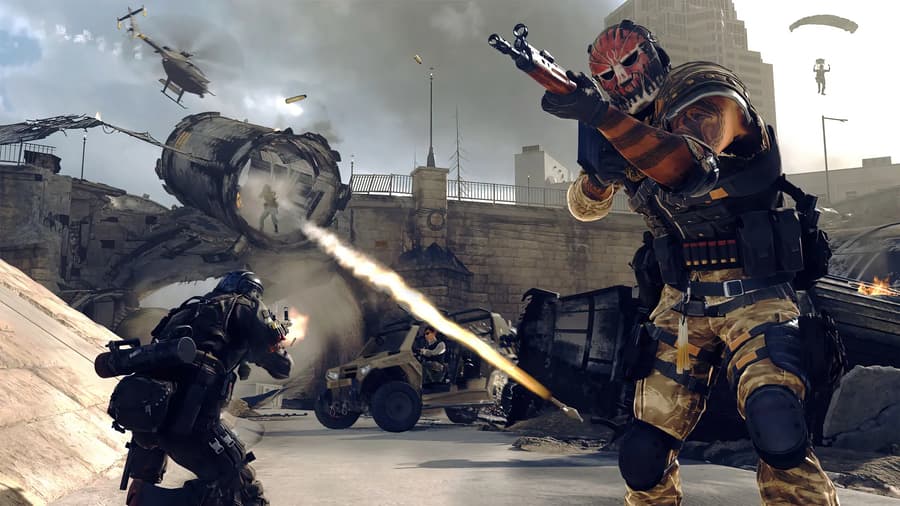
Call of Duty: Modern Warfare 4 comes out on October 23, 2026, and every new player starts it at level one. Reaching higher levels, better weapons and more Operators takes a lot of matches, which is why many players buy a profile that's already been played. With one of these accounts, you start the game with that progress already in place. If you only want to add to your own profile, you can buy MW4 items instead.
All of that progress is saved to an Activision account, the profile Activision uses for every Call of Duty game. It keeps your level, your weapons and your Operators, which are the characters you pick before a match.
How you'll play depends on the kind of account you buy. Progress-only accounts are just the Activision profile, so you connect one to your own PlayStation, Xbox, PC or Switch 2 and play there. Game-included accounts are a Steam, PlayStation or Xbox login with MW4 already bought, so you play on that same platform.
Modern Warfare 4 runs on four platforms, and each one has something to know before you buy:
PlayStation 5: MW4 on PS5 works with both account types once the Activision profile is linked to your PSN account.
Xbox Series X|S: MW4 isn't on Game Pass at launch, so you need your own copy or an offer with the game included.
PC: Modern Warfare 4 on Steam, Battle.net and the Xbox app all work, but your computer needs two security settings turned on.
Nintendo Switch 2: MW4 on Switch 2 uses the same Activision profile, so linked progress shows up there too.
PS4 and Xbox One: Not supported, so older consoles can't run the game.
Your platform account only shows progress from the Activision profile it's linked to. If your PSN account is still linked to your old Activision profile, MW4 loads your old progress instead of the account you bought. To switch, you link and unlink accounts in Call of Duty, and Activision allows one unlink per platform every 12 months.
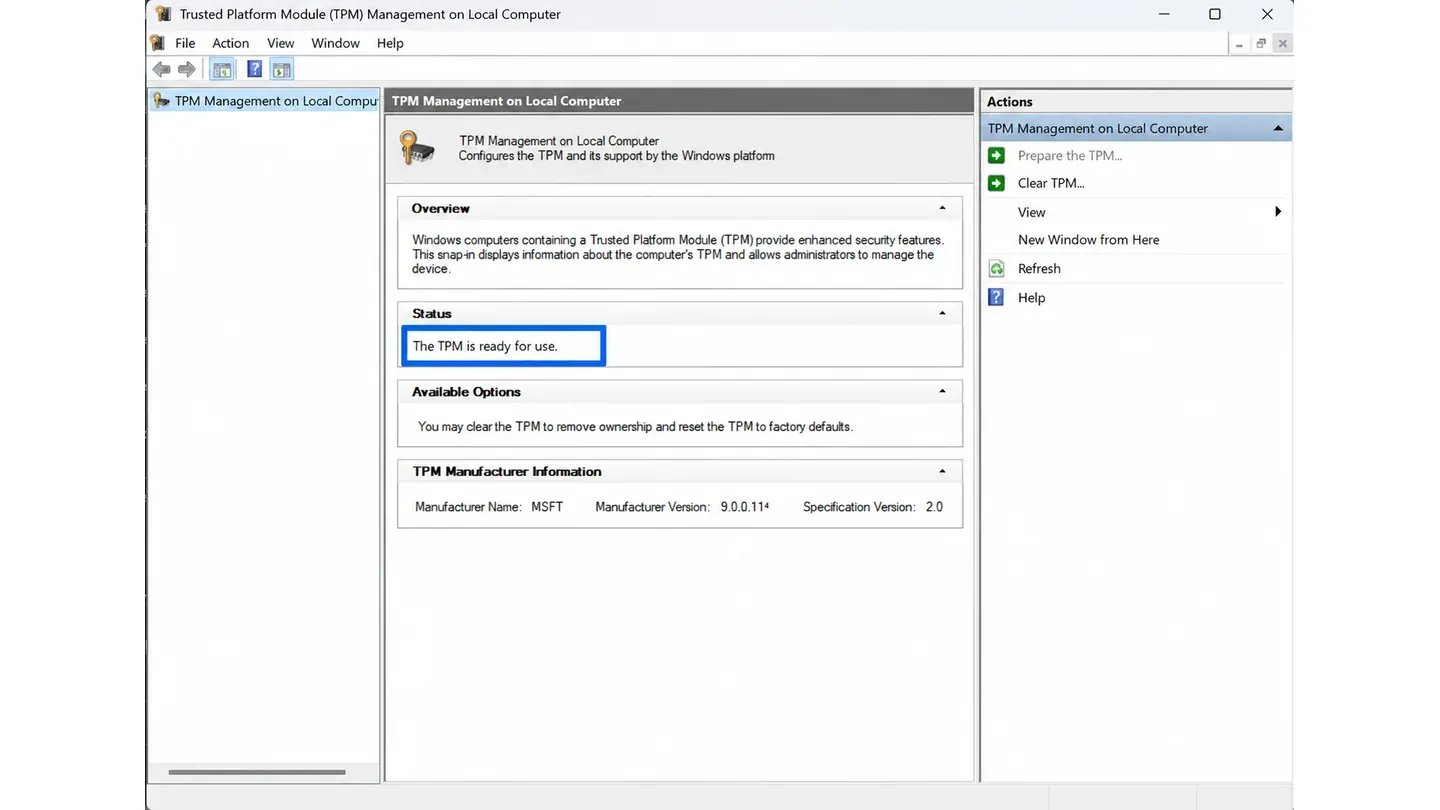
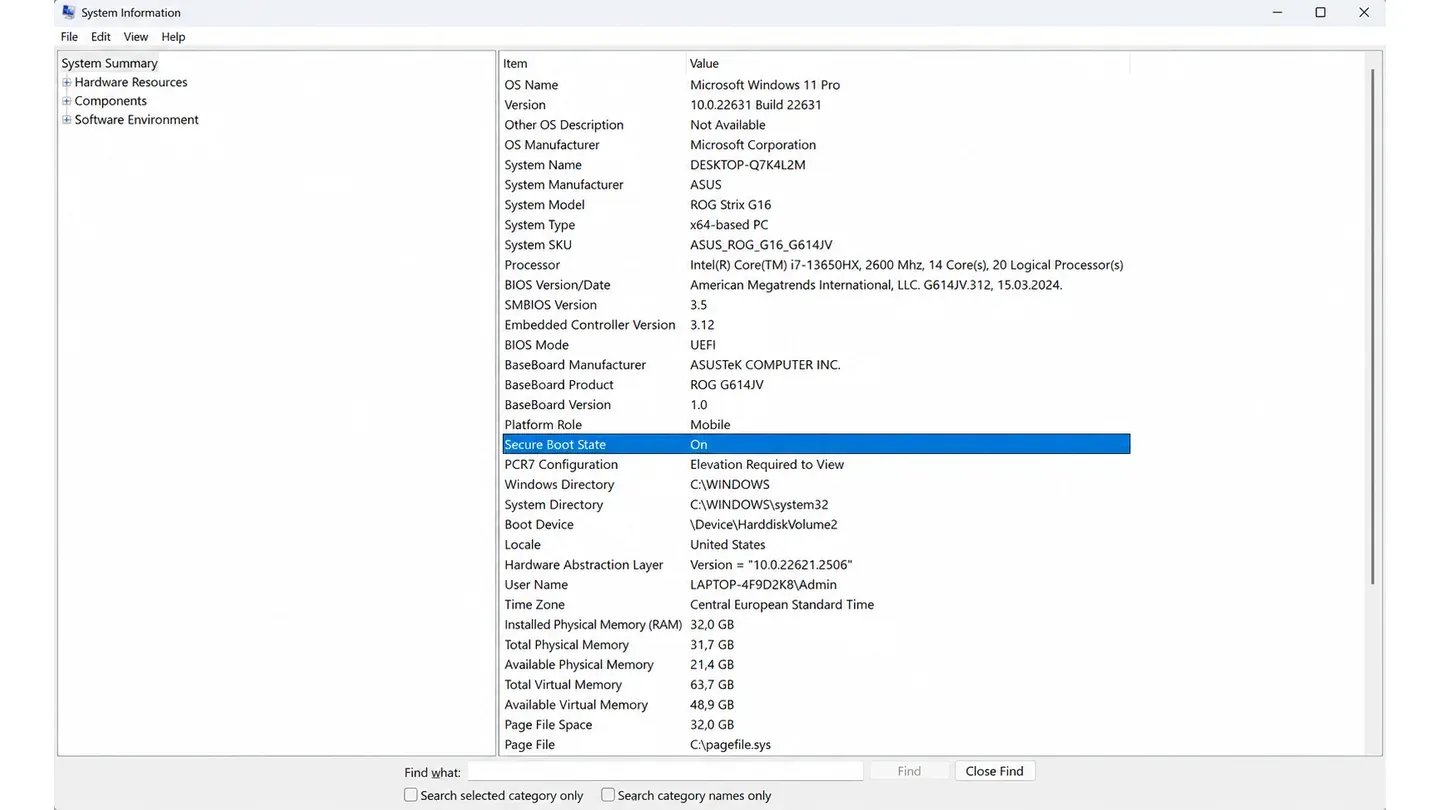
Modern Warfare 4 on PC needs two Windows security features turned on before you can play online. TPM 2.0 is a security chip that every Windows 11 computer has, and Secure Boot makes sure only trusted software runs when your PC starts. Activision's anti-cheat relies on both, and without them MW4 blocks every online mode.
Checking both settings takes three steps:
Press Windows + R, type tpm.msc and press Enter. If you see "The TPM is ready for use", TPM 2.0 is on.
Press Windows + R, type msinfo32 and press Enter. Secure Boot State should say On.
Turn on anything that's off in your PC's UEFI settings, which open from Settings, Recovery and Advanced startup.
UEFI menus look different on every computer, so follow your motherboard maker's guide if you're unsure. Windows 10 PCs also need version 22H2 or later. Once both settings are on, you can sign in to your account and play online.
Every MW4 account for sale falls into one of three types, and its product description says which one it is:
Progress only: Activision profile with levels and unlocks, but no copy of the game. You link it to your platform and play Multiplayer, Campaign or DMZ with a copy you own.
Game included: Steam, PlayStation or Xbox login with MW4 already bought, in Standard or Vault Edition.
Stacked profile: Older account with progress from earlier games plus MW4. You'll find more like it among all Call of Duty accounts for sale.
Most offers include full email access, which means you also get the login for the email the account uses. That lets you move the account to your own email address, so nobody else can reset it. Each product description shows exactly what that offer includes.
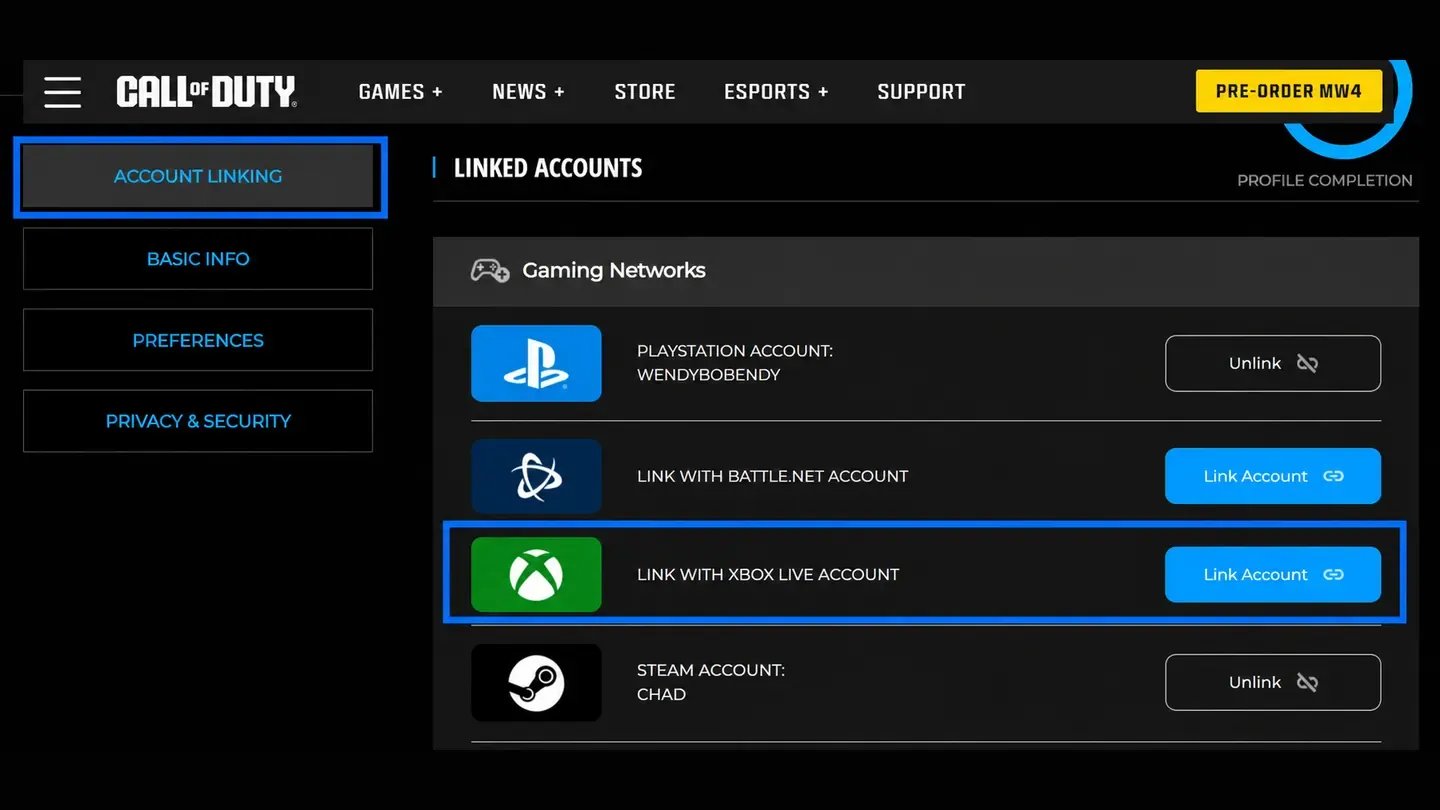
Linking a progress-only account to your own platform takes six steps on the Activision website:
Log in to your platform account (PlayStation, Xbox, Steam, Battle.net or Nintendo) in your browser.
Log in to the Activision account from your order in the same browser.
Open the Account Linking tab in the Activision profile.
Click Link Account next to your platform.
Click Send Code and enter the code Activision emails to the account.
Confirm on your platform's website, where Activision sends you to finish the link.
Once that's done, start MW4 on your platform and the level and unlocks you bought will be there. You only need to link each platform once, and it takes a few minutes. If the product description adds anything for linking, do that first.
Picking the right account comes down to three things: owning the game, your platform and what you want unlocked. Sorting those out first makes it much easier to narrow down the offers. Two Activision account settings are also good to know before you order.
These five tips help you choose the right Call of Duty MW4 account:
Own a copy first: Progress-only offers need MW4 bought on your platform, so pick a game-included offer if you don't have it.
Want more content: Modern Warfare 4 Vault Edition adds Operators, weapons and a season of BlackCell from day one.
Set up Windows: Turn on TPM 2.0 and Secure Boot before choosing an account for PC.
Store region: On MW4 Steam offers, follow the product description on adding funds or payment methods during the first weeks.
Email change limit: Activision lets you change an account's address once every 12 months, and only after 2FA is on.
Buying Modern Warfare 4 from an official store gets you the game with a brand new, level-one profile. When you buy an MW4 account, you get a profile someone has already played, and each seller sets their own price for it. Prices follow what's on the account, so progress-only offers usually cost less than game-included or stacked ones. If you already own the game, those progress-only offers are where you'll find cheap MW4 accounts.
Check the product description to see if the game is included before you order. Without it, you need your own copy of MW4 on your platform to play. With it, you can start playing as soon as you log in.
Buying an MW4 account takes four steps:
Choose an offer with the filters for Platform, Level and Price.
Read the product description to check the account type, edition and platforms.
Click Buy Account and pay, adding the lifetime warranty at checkout if you want longer cover.
Open the order panel to find the login details, which appear instantly on most offers.
Log in first and make sure the account matches the offer before you change anything. Once it does, confirm the order in the order panel. Every order comes with a free 14-day warranty, and optional lifetime warranty keeps that cover going after the first two weeks.
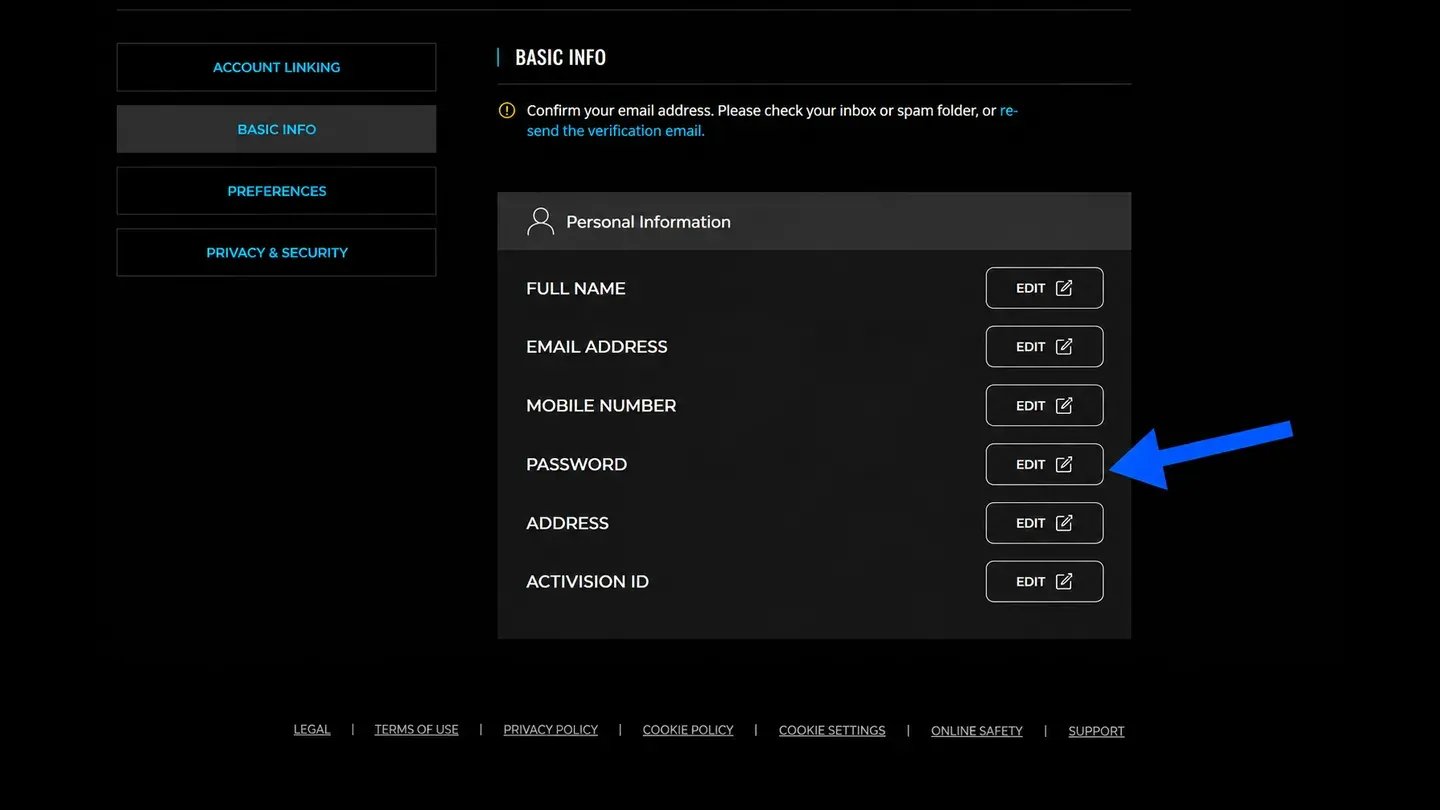
Next step is to set your own password on the Activision website by opening Basic Info and clicking Edit next to the password.
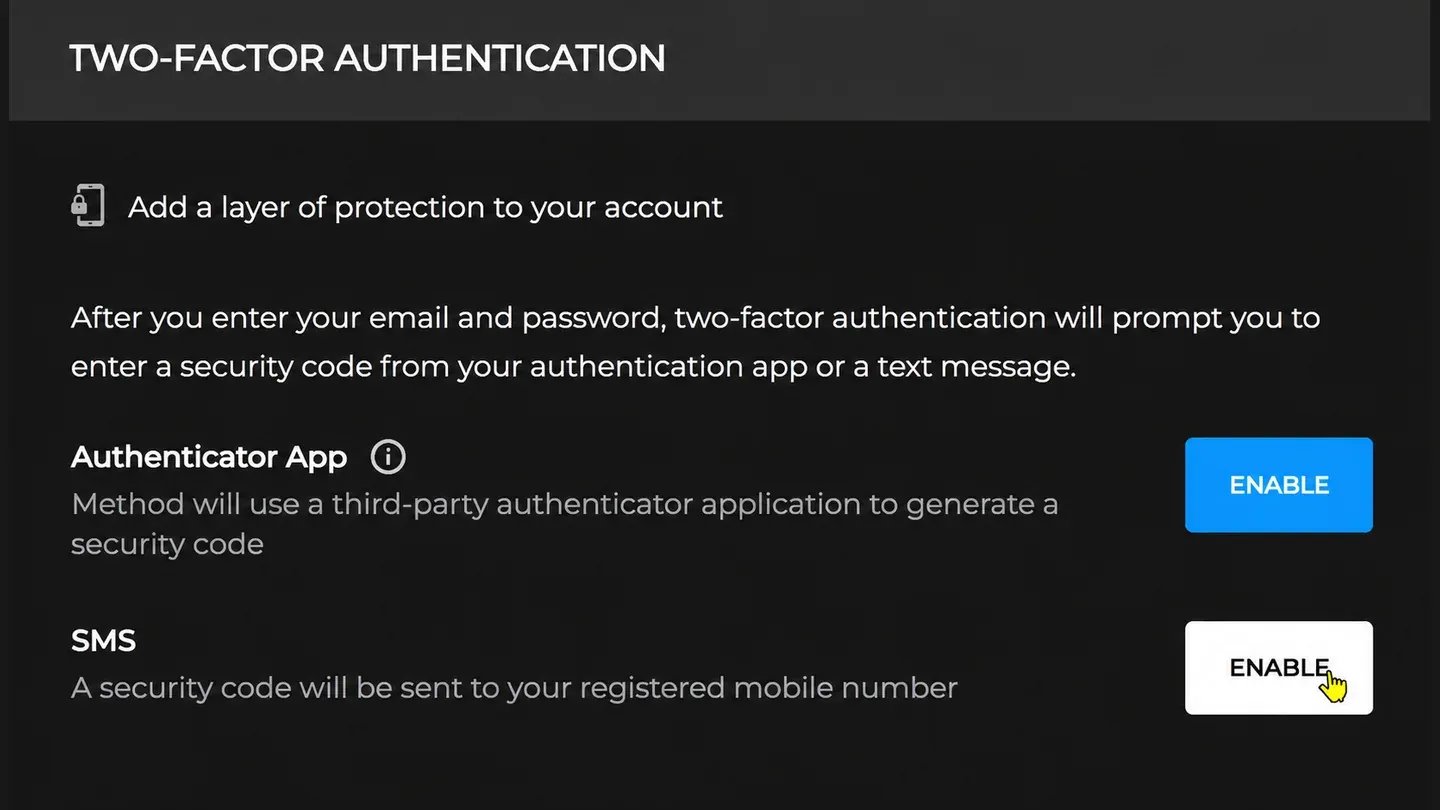
Then turn on two-factor authentication, or 2FA, in the Privacy & Security tab, which adds a code from your phone to every login. If the product description says the seller already set up an authenticator app, follow those steps instead of removing it.
With 2FA on, go back to Basic Info and click Edit next to the email to add your own address. Activision sends a code to the current email first, which you can open with the email login from your order. After that, the account is fully in your hands.
Modern Warfare 4 comes in two digital editions, Standard and Vault, and game-included offers say which one you get. Standard Edition is the full game, with Multiplayer, the story Campaign and MW4 DMZ, a mode where squads grab military gear and try to escape. Vault Edition has all of that plus five extras.
Each Vault Edition extra adds something different, and this table lists what you get from each one:
Vault extra | What you get |
|---|---|
Hostile Alliance Operator Pack | Price, Valeria, Ghost and Blix |
Special Forces Operator Pack | Four soldiers from French, German, South Korean and British units |
Signature Weapon Collection | Five weapons with blueprints |
BlackCell, one season | Premium Battle Pass, 20 tier skips and 1,100 COD Points |
DMZ Deployment Bonus | Extra content for DMZ |
Operators are the characters you play as, and blueprints are ready-made versions of a gun with their own look. BlackCell is the paid version of the Battle Pass, a reward track you move up by playing during a season. Its tier skips move you up that track straight away, and the COD Points can be spent in the in-game store.
BlackCell only covers one season, so the product description shows which season a Vault account's BlackCell is for. Standard owners can upgrade to Vault later on the same platform. Physical disc copies are the exception, because they can't be upgraded.
Every MW4 profile climbs from level 1 to level 55, earning XP from matches, eliminations, objectives and challenges. New levels unlock weapons, perks and equipment, and Create-a-Class opens at level 4. Until then, you only get premade loadouts, and some weapons, like the Cronen Squall, stay locked until level 55.
Modern Warfare 4 launches with 33 weapons and 33 Operators, and each weapon also levels up on its own as you use it. Every weapon level unlocks an attachment, a part like a scope or barrel that changes how the gun handles. Fully leveling a weapon unlocks its Apex Attachment, a special upgrade that changes how that weapon behaves in a fight.
Camos are some of the slowest unlocks, since each one needs its own challenges. MW4 camos come in four kinds:
Military camos: Eight per weapon, unlocked as that weapon levels up.
Special camos: Three per weapon, each tied to a challenge in one mode.
Completionist camos: Gold, Platinum, Harmonic Break and Divergence, earned by finishing camo challenges across weapons.
Mastery camos: Mode-specific finishes, such as Mercurial Drift for Multiplayer and Helio for DMZ.
Accounts that already have MW4 mastery camos save you one of the longest grinds in the game. Divergence alone needs 33 Harmonic Break challenges. Check the product description to see which camos an offer includes.
Reaching level 55 lets you Prestige, and MW4 gives you two paths to choose from. Classic Prestige resets your level unlocks and Create-a-Class progress. In return, you get a 20% XP boost and a Permanent Unlock Token, which keeps one item unlocked for good. Regular Prestige also restarts you at level 1, but you keep everything you've unlocked.
After 10 Prestige levels comes Prestige Master, which runs from level 56 to level 1,000. DMZ has its own 70-level track for Operators, and DMZ XP also counts toward your main level. From Season 1, Warzone shares the same player progression, so levels earned in either game add up.
Every seller who lists MW4 accounts has applied, been approved and passed KYC verification before listing. Each offer comes from someone who has been checked, and every order is covered by a free warranty.
These five protections cover your Modern Warfare 4 order from checkout to after delivery:
Verified sellers: Each one passes KYC before posting an offer.
Fast delivery: Login details show up in your order panel right after payment on most offers.
Full email access: Most offers include the mailbox login, so the account can be fully yours.
14-day warranty: Free with every order, with lifetime cover is available at checkout
24/7 support: Real people answer questions about your order whenever you need them.
Prices change from offer to offer because each seller prices their account by its level, unlocks and edition. Progress-only offers usually cost the least. Comparing a few is the easiest way to find cheap Modern Warfare 4 accounts with what you want.
GameBoost is a safe place to find MW4 accounts for sale, because every seller is KYC-verified and every order includes a warranty. Each purchase also earns 3% cashback in GB Coins for your next order. For anything else, you can open a support ticket at any time.
If you already own Modern Warfare 4, a progress-only offer is all you need, since you'll link it to the copy on your console or PC. If you don't, an offer with the game included lets you play right after you log in. Once you know which type you're after, finding it only takes a few clicks.
Starting from gameboost.com, these are the five steps to buy MW4 accounts:
Search for Call of Duty in the search bar and open Accounts.
Select Modern Warfare 4 in the Game filter.
Open an offer and read its product description.
Click Buy Account and sign in.
Pick a payment method and click Pay Now.
After payment, your login details are in the order panel, which you can reopen anytime from My Orders under your profile icon. Order chat sits on the same page if you want to message the seller. From there, follow the checks and security steps above, and you're ready for your first match.
“GameBoost is not affiliated, endorsed, sponsored, or authorized by Activision, Inc., Call of Duty, or any of its subsidiaries or affiliates. Activision, Inc.’s official website can be found at: https://www.activision.com. The name Call of Duty, as well as related names, marks, emblems, and images are registered trademarks of their respective owners. Use of trademarks is covered by fair use principles under EU Regulation 2017/1001, Article 14.”