


•Hamza Rashid• 10 min read
Genshin Impact
Region
Choose your region to see available top-up options
Delivery method
Choose how you want your top-up delivered
Genesis Crystals
Select an amount to view details and purchase


All-in-one Bundle
Select an amount to view details and purchase
Blessing of the Welkin Moon
Select an amount to view details and purchase

Game Passes
Select an amount to view details and purchase
Other Sellers · 8


Trusted by Millions of Gamers Worldwide

Excellent 4.9 out of 5.0
Based on 361,988+ orders

ho*****th
Denmark
werry nice guy, perfect service
Je*****la
United States
Resolved my issue fast with no problems
Th*****11
Norway
He is very polite and answers to all My questions
_g*****e_
Belgium
super fast within 5 minutes and this dude wanna do effort for the costumor
Ry*****n)
United States
10/10 another perfect sale. Will use again and again.
Or*****ra
Colombia
Very happy with my purchase, he was patient and helpful, I recommend him.

Buy Genesis Crystals for any Genshin server, with a choice of UID or login delivery.

Free Primogems come in slowly. Daily Commissions pay 60 Primogems a day, while one wish costs 160, so saving up for a limited character can take months. That's why many players top up Genshin instead. With Genesis Crystals, you can wish for a new character the day their banner opens, instead of saving up across several updates. Players starting fresh often pair a top-up with a ready-made Genshin Impact account to skip the early grind.
Every pack goes straight to the account you already play on, and all four servers are covered: America (NA), Europe (EU), Asia and TW/HK/MO. Along with Genesis Crystals, you can pick up a Blessing of the Welkin Moon or a Battle Pass the same way.
Genshin Impact top-ups are delivered in one of two ways, so you can choose before you pay:
UID top up: You only share your UID and server. The UID is the number in the bottom-right corner of your game screen, and nobody needs to sign in to your account.
Login top up: You share your HoYoverse email and password in the chat. The seller signs in once, buys the pack in the in-game shop and signs out. Stay off the account while they work, but keep your email open, since HoYoverse may send a verification code at sign-in.
Most top-ups are done within minutes, and many sellers send a screenshot of your new balance as proof. If you went with a login top up, change your HoYoverse password once the crystals are in your account, so you're the only one with access. Sign in at account.hoyoverse.com, open Account Security Settings and set a new password there.
Before paying, keep these account and bonus details in mind:
Server and UID: Each Genshin server has its own accounts, so pick the one your character plays on and double-check your UID. A top-up sent to the wrong account can't be refunded.
PlayStation: Your progress carries over between PlayStation, PC and mobile, but Genesis Crystals don't. Crystals bought on PC or mobile can only be spent there, so they won't appear when you play on PS4 or PS5.
Double bonus: The first purchase of each Genesis Crystal pack gives double crystals. HoYoverse resets this bonus right before the game's anniversary each September. With a login top up, the pack is bought in your own game shop, so the bonus applies if your account still has it.
The official Genshin top up center and the in-game Genesis Crystals shop sell packs at HoYoverse's set prices. Buying from a marketplace gets you the same packs, with prices set by each seller and a choice between UID and login delivery.
To top up Genshin, follow these steps:
Pick your server, the one your character plays on.
Choose a pack: Genesis Crystals, Blessing of the Welkin Moon or a Battle Pass.
Select UID or login as the delivery method.
Pay at checkout.
Send your UID, or your HoYoverse login, in the chat.
Open Genshin Impact and check your Genesis Crystals.
Genesis Crystals are Genshin Impact's premium currency, and the only way to get them is with real money. They're not the same as Primogems, which you earn by playing, but they convert into Primogems at a 1:1 rate.
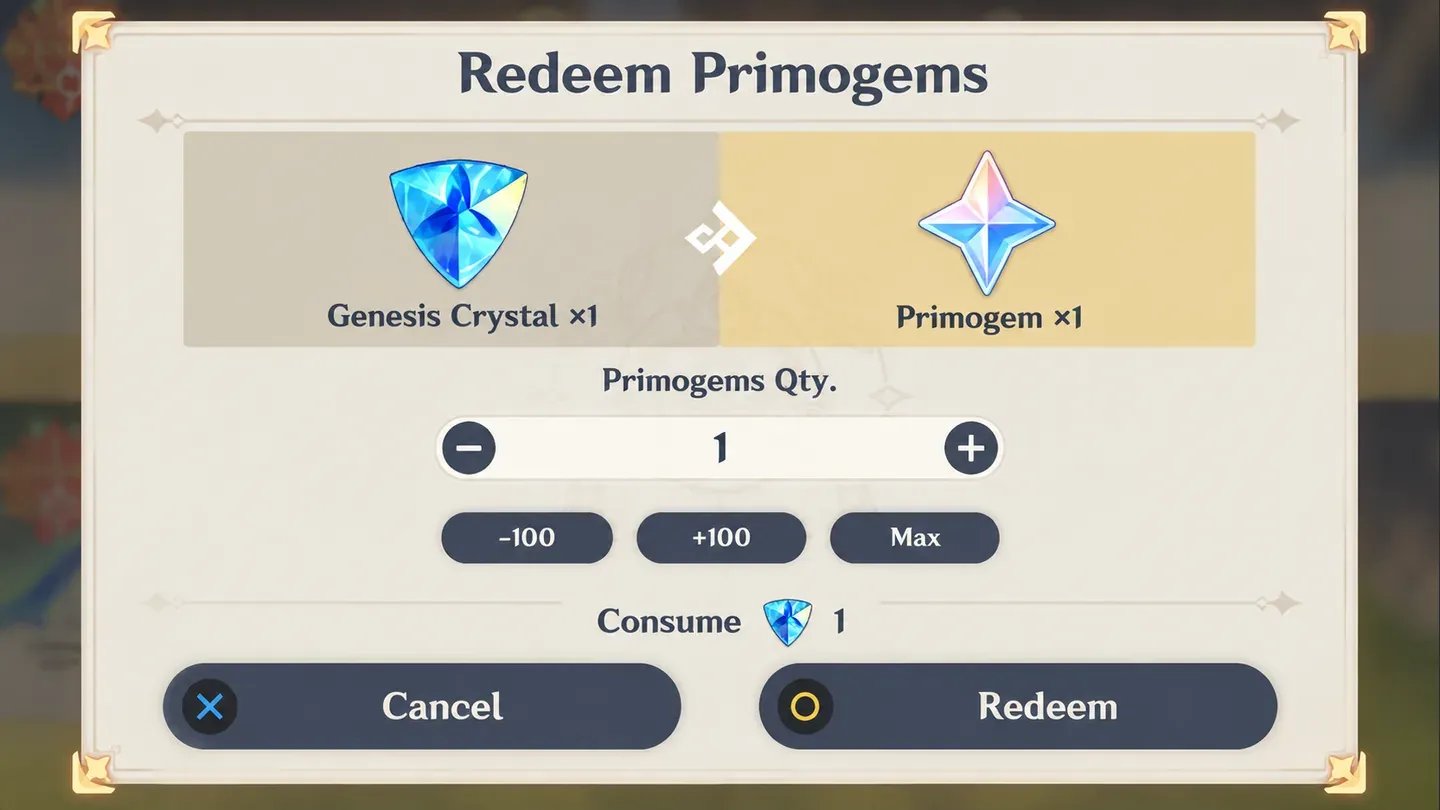
Players use Genesis Crystals for:
Primogems: Convert any amount, then spend 160 Primogems per wish on character and weapon banners. That means 10 wishes need 1,600 Genesis Crystals, and 90 wishes need 14,400.
Character outfits: Alternate looks for your characters, sold in the shop's Character Outfits tab.
To convert Genesis Crystals to Primogems, open Wish, select your Primogem count at the top of the screen and choose how many Genesis Crystals to exchange.
Every pack you can buy falls into one of these groups:
Genesis Crystals: Genshin crystals in packs from 60 up to 80,800.
Blessing of the Welkin Moon: 300 Genesis Crystals right away, then 90 Primogems a day for 30 days. It's also sold as 90 or 180 days, or bundled with extra crystals. Log in daily to claim the Primogems, since missed days are lost, and stack up to 180 days at once.
Battle Pass: Gnostic Hymn unlocks the paid track, worth 680 Primogems and 4 Intertwined Fates at level 50. Gnostic Chorus adds 10 levels right away and a namecard.
Free Primogems come from regular play, and most of them from these sources:
Daily Commissions: Up to 60 Primogems a day.
Spiral Abyss and Imaginarium Theater: Endgame modes that pay out again each cycle.
Events: Each version's events add several hundred Primogems.
Exploration and quests: Chests, waypoints, quests and achievements.
Codes and compensation: Livestream codes each version, plus Primogems after maintenance.
It all adds up, but at 60 a day from commissions, one wish takes almost three days of play. That's why players chasing a limited character often buy Primogems through Genesis Crystals instead.
No, Genshin has no way to send Genesis Crystals or Primogems from one account to another. You can still get them to a friend in two ways:
UID top up: Buy a pack with your friend's UID and server, and it goes straight to their account. A Blessing of the Welkin Moon can be sent the same way.
Gift card: Send an App Store or Google Play gift card, which your friend spends on Genesis Crystals in the game.
The guide on how to gift Primogems in Genshin Impact walks through each option in more detail.
Limited banners only run for a few weeks, and the character you want might not come back for a long time. With offers for every server, you can wish the day a banner goes live instead of saving free Primogems for months.
Each Genshin top-up comes with:
Every Server Covered: NA, EU, Asia and TW/HK/MO are all covered.
UID or Login Delivery: Pick UID if you'd rather nobody signs in.
Verified Sellers: Each one has passed KYC checks.
Payment Options: Pay with Apple Pay, PaysafeCard and more.
Secure Checkout: Your payment never leaves the site.
Cashback: 3% of what you pay comes back as GB Coins.
24/7 Support: Someone's around to help at any hour.
UID delivery, KYC-checked sellers and a checkout that stays on the site make GameBoost a safe place to buy cheap Genshin Genesis Crystals. If anything comes up, open a support ticket or message the team on the GameBoost Discord.
Getting from the homepage to crystals in your account takes a few minutes. Your buyer dashboard keeps you updated at every step, so you always know where things stand.
These steps take you from the homepage to your Genesis Crystals:
Go to gameboost.com and set your language and currency.
Open Top-Ups and pick Genshin Impact, or search for it.
Select your server and a pack.
Filter by UID or login delivery.
Pay with the method you prefer.
Send your UID or login in the chat.
“GameBoost is not affiliated, endorsed, sponsored, or authorized by Shanghai miHoYo Network Technology Co., Ltd, Genshin Impact, or any of its subsidiaries or affiliates. Shanghai miHoYo Network Technology Co., Ltd’s official website can be found at: https://www.mihoyo.com. The name Genshin Impact, as well as related names, marks, emblems, and images are registered trademarks of their respective owners. Use of trademarks is covered by fair use principles under EU Regulation 2017/1001, Article 14.”