

•Mustafa Atteya• 5 min read
MLBB
Region
Choose your region to see available top-up options
Delivery method
Choose how you want your top-up delivered
Diamonds
Select an amount to view details and purchase


Game Passes
Select an amount to view details and purchase
Other Sellers · 4


Trusted by Millions of Gamers Worldwide

Excellent 4.9 out of 5.0
Based on 356,598+ orders

si*****le
Germany
Good valo points seller (also fast)
De*****os
Germany
Fast Friendly and like always Safe. I love the guy and ofc the best Price of cause.
Al*****ia
Spain
Very fast! good comunication and very secure
Ja*****11
United Kingdom
Great service from this person, first time ordering with him and the vbucks were in my account within about 15 minutes, thank you so much, would highly recommend 🫶🏻
Al*****tó
Netherlands
Great seller, highly recommended! ☺️
Ma*****04
United Kingdom
Very fast, helpful and reliable, very good seller
Buy Mobile Legends diamonds with automatic delivery, and still get double diamonds on each first recharge.

Diamonds pay for most of what makes an MLBB account stand out, like epic skins and Starlight perks. Free diamonds are rare, since events and missions only hand out small amounts and one skin can cost hundreds.
Players who want something specific usually skip the wait with an MLBB recharge, which puts a new hero on your roster on release day or an event skin in your collection before it's gone. If you're starting over, buying an MLBB account that already has heroes and skins unlocked saves even more time.
With an ML top up, diamonds are sent to your account using your User ID and Zone ID, so you never share your password. Most sellers deliver automatically, which means an ML diamonds recharge is usually done within minutes.
From entering your IDs to seeing the diamonds in your account, a recharge goes through three stages:
IDs: Before paying, you type in your User ID and the Zone ID shown in brackets next to it.
Purchase: A seller sends your diamond pack to that account, often through an automated system.
Balance: Your new diamonds appear in the game, with no login shared at any point.
Players who'd rather redeem a code can pick up Mobile Legends gift cards, which come in diamond amounts as well.
A few account details decide if your recharge goes through:
Region: Offers come in Global, Indonesia, Philippines, Malaysia, Singapore and Turkey versions. Global packs aren't meant for accounts from Indonesia, the Philippines, Malaysia, Singapore or Russia, so buy the version that matches your account.
US accounts: Accounts made in the United States run on the separate MLBB US version, and third-party recharges don't support it.
Double recharge: Your first purchase of each diamond tier gives double diamonds, once per tier, even when you don't buy through the in-game shop.
Diamonds from the in-game shop are charged through Google Play or the App Store at Moonton's prices. A recharge by ID works around the app store: you pick a seller, pay their price, and the diamonds go to the same account you play on.
Five steps are all it takes to top up ML:
Copy your User ID and Zone ID from your MLBB profile.
Select your region so it matches your account.
Pick a diamond pack, or the Weekly Diamond Pass.
Enter both IDs, then pay.
Check your balance in the game once delivery is done.
Diamonds are MLBB's premium currency, bought with real money and only rarely handed out by events. Mobile Legends uses a few currencies, and diamonds sit at the top: most premium items in the shop carry a diamond price.
Battle Points, earned from matches, are the free currency. They cover heroes and emblem items, but Battle Points can't buy skins, so skins are where most players spend their diamonds. New heroes can be bought with either currency, which lets diamond buyers skip the Battle Point grind.
Mobile Legends diamonds go toward:
Skins: From regular hero skins to limited event and collab skins.
Heroes: New releases, unlocked the day they come out.
Starlight membership: A monthly membership with an exclusive skin and extra perks.
Draw events: Spins on events like the Magic Wheel, a source of some of the rarest skins.
Emotes and effects: Battle emotes, plus elimination and recall effects.
For players who log in every day, MLBB's Weekly Diamond Pass spreads diamonds across a week: 80 right away, then 20 a day for 7 days, 220 in total. Each day's diamonds have to be claimed in the game, and the pass doesn't count toward first-recharge or recharge rewards.
Free diamonds come from two main sources in Mobile Legends:
Events: Limited-time events pay diamonds for tasks or logins, though many end within days.
Missions: Daily and weekly missions add small amounts as you play.
Put together, MLBB free diamonds rarely add up to more than a few hundred a month. For a specific skin or hero, buying diamonds in ML is the faster route.
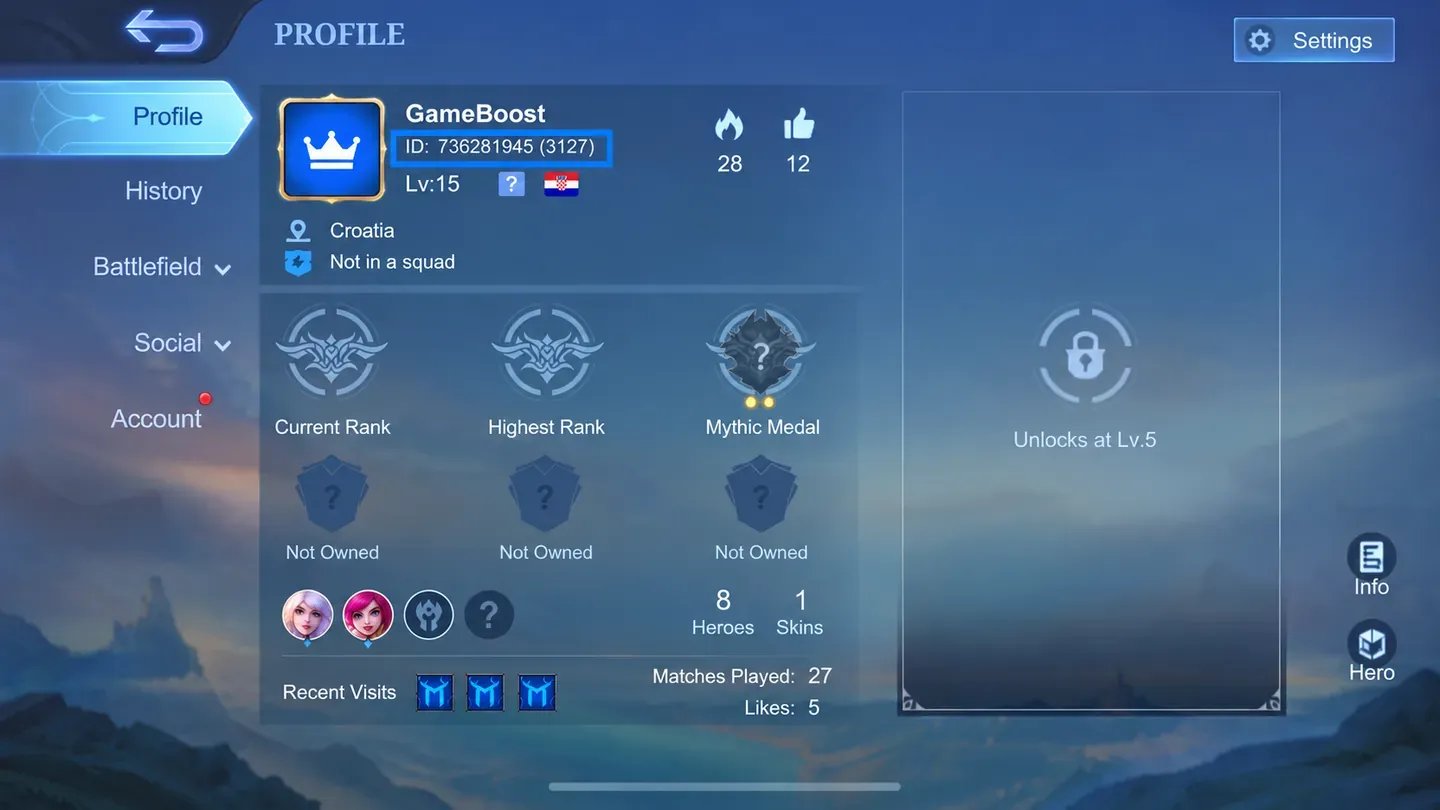
Your User ID and Zone ID both sit on your in-game profile, and sellers need the two of them to send diamonds to the right account. To find them:
Open Mobile Legends and tap your avatar in the top-left corner of the main screen.
Look for the ID line: your User ID is the long number.
Your Zone ID is the shorter number in brackets, as in 12345678 (1234).
Copy both exactly. Diamonds sent to a wrong User ID or Zone ID go to someone else's account and usually can't be refunded.
New heroes and skins arrive with almost every patch, and event skins disappear once their event ends. With most recharges delivered automatically, you can recharge MLBB the moment a skin shows up instead of hoping it comes back.
Buying MLBB diamonds on GameBoost comes with:
Six Regions: Packs for Global, Indonesia, Philippines, Malaysia, Singapore and Turkey accounts.
Any Pack Size: From small top-ups to the biggest diamond bundles, plus the Weekly Diamond Pass.
Verified Sellers: Sellers go through KYC checks before they can sell.
Secure Checkout: Plenty of payment options, all paid on the site.
ID-Only Delivery: Diamonds are sent to your IDs, no password needed.
GB Coins: 3% of every purchase comes back as cashback.
Round-the-Clock Help: Support stays online 24/7.
ID-only delivery, KYC-checked sellers and on-site payment make GameBoost a safe place to buy ML diamonds. Support is reachable through a support ticket or the GameBoost Discord whenever you need help with a recharge.
Sellers compete on every pack, which keeps cheap ML diamonds easy to find, even in the biggest bundles.
Your buyer dashboard follows each recharge from payment until the diamonds show up in your game, and every step of the purchase stays on the site.
Getting your MLBB diamonds takes six steps:
Visit gameboost.com and choose your language and currency.
Open Top-Ups and find Mobile Legends, or type it into search.
Set your region and pick a diamond pack.
Compare prices and read each seller's notes.
Enter your User ID and Zone ID, then pay.
“GameBoost is not affiliated, endorsed, sponsored, or authorized by Shanghai Moonton Technology Co., Ltd., Mobile Legends, or any of its subsidiaries or affiliates. Shanghai Moonton Technology Co., Ltd.’s official website can be found at: https://www.mobilelegends.com. The name Mobile Legends, as well as related names, marks, emblems, and images are registered trademarks of their respective owners. Use of trademarks is covered by fair use principles under EU Regulation 2017/1001, Article 14.”