





•Filip Premuš• 10 min read
Call of Duty
Platform
Choose your platform to see available top-up options
Delivery method
Choose how you want your top-up delivered
COD Points
Select an amount to view details and purchase
Game Passes
Select an amount to view details and purchase
Trusted by Millions of Gamers Worldwide

Excellent 4.9 out of 5.0
Based on 363,755+ orders

Sc*****er
Spain
Pretty much quick and good service management! Appreciate it!
Vl*****zo
Czech Republic
It took a while to buy the gamepass but it's good
es*****3k
United States
Great communication, great work
st*****ls
Portugal
A conta foi entregue com mais V bucks, agora resta esperar para usufruir
Ze*****34
United States
I just had another fantastic experience with PlayerBazaar on February 26, 2026! Since I’ve bought from them before, everything went smoothly, and I didn’t need any help with the purchase. They’re super professional, quick, and really great at what they do. I’d totally recommend them to anyone who’s thinking about buying platinum!
Al*****an
Germany
very good seller,extremly fast delivery :)

Buy cheap Call of Duty Points below store price, valid in MW4, BO7, BO6 & more. Fast delivery, verified sellers, 24/7 support.

Playing matches in Call of Duty earns you XP and new gear, but never points. Even the free Battle Pass leaves them out, and it only rewards a handful of base weapons and cosmetics. So when a season drops a new operator bundle or premium pass, paying is the only way to get it. That's why so many players buy Call of Duty Points before a season starts, so the balance is ready on launch day. Others go a step further with Call of Duty accounts for sale, which already own rare operators and camos.
Once the points are in your balance, you can pick up the premium Battle Pass, operator bundles and weapon blueprints whenever they go live. That same balance works in both Black Ops 7 and Warzone, so you don't need a separate one for each game.
You'll find CoD Points for Xbox, PS5 and PC players. Every seller adds them to an Xbox account linked to Activision, and here's how that works on each platform:
Xbox: Your new balance shows up as soon as you launch the game on that account.
PS5 and PC: Your PlayStation or PC store can't see points on an Xbox account, so you spend them on the Call of Duty website instead. Whatever you buy there with them, like a bundle or the Battle Pass, unlocks in your game on PS5 or PC too.
Activision keeps a separate balance for each platform, and CoD Points only work on the platform they were added to. Bundles and Battle Passes are different, since they follow your Activision account to every linked platform.
Most Call of Duty top up offers go through your Xbox account in one of two ways. Each product description tells you which one an offer uses before you buy:
Xbox login: You share the email and password of your linked Xbox account. Your seller signs in, redeems the points for you and sends proof once they're added.
CoD Points code: You get a 25-character Xbox code and redeem it yourself. This way, you never share a password with anyone.
If you play on PlayStation or PC, you might not have an Xbox account linked yet. Setting one up is free and takes about ten minutes:
Go to xbox.com and click Sign in, then choose Create one! to make a free Microsoft account with your email.
Set a password, add your name and birthday, then enter the code Microsoft emails you.
Sign in on xbox.com with that email and pick a gamertag, which finishes your Xbox account.
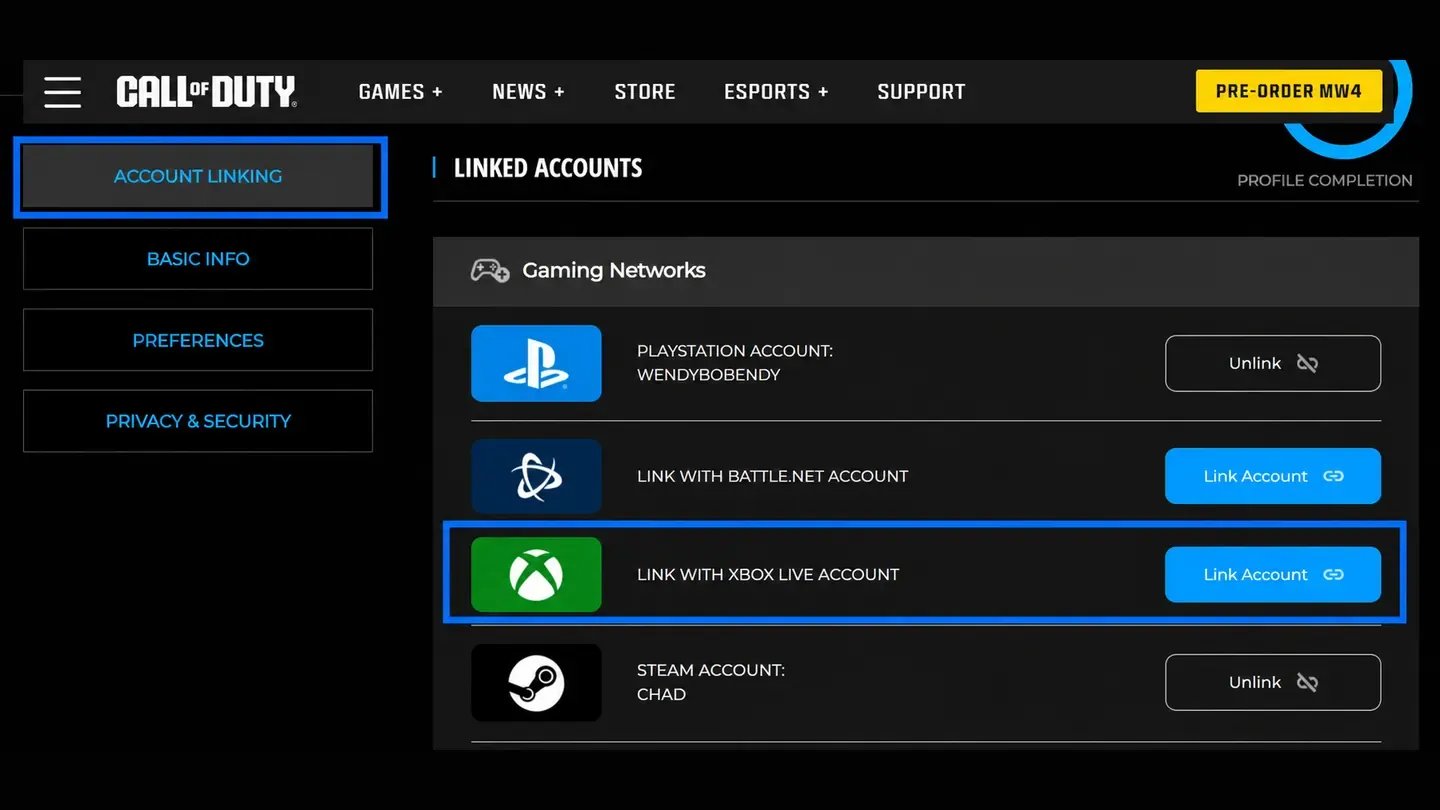
Log in to your Activision account on the Call of Duty website in the same browser, then open your profile and go to Account Linking
Click Link Account next to Link With Xbox Live Account, choose Send Code and enter the code Activision emails you.
Sign in with your Xbox account when you're sent to Microsoft's page, and finish linking there.
Link your Xbox account to Activision before you order, so the seller can add the points as soon as you pay.
Pick a pack that covers what you're after, like 1,100 points for the Battle Pass or 2,400 for the Battle Pass Bundle.
If you don't own an Xbox console, check the product description to see how the seller delivers the points for you.
For login offers, keep your email open in case a sign-in code is sent there.
Inside the game, every pack costs the official store price, and there's no way around it. Online sellers work differently, since each one sets their own rate, you can buy cheap CoD Points that often cost far less than the same pack from Activision.
Before you order, check that your Xbox account is linked to the same Activision profile you play on. That link is what carries the points over, and points added to an unlinked Xbox account won't reach your game.
Buying CoD Points online takes four steps:
Choose an offer for your platform and delivery method.
Pick the amount you want.
Add your Xbox login if the offer asks for it.
Pay at checkout to place the order.
After payment, your seller either sends a code to redeem or adds the points to your linked Xbox account directly. If you picked a login offer, you can change your password after that. Sign in at account.microsoft.com and update it in the Security section, and your items and progress stay exactly where they are.
Code offers leave the last step to you. Redeeming the code on your linked Xbox account only takes a minute:
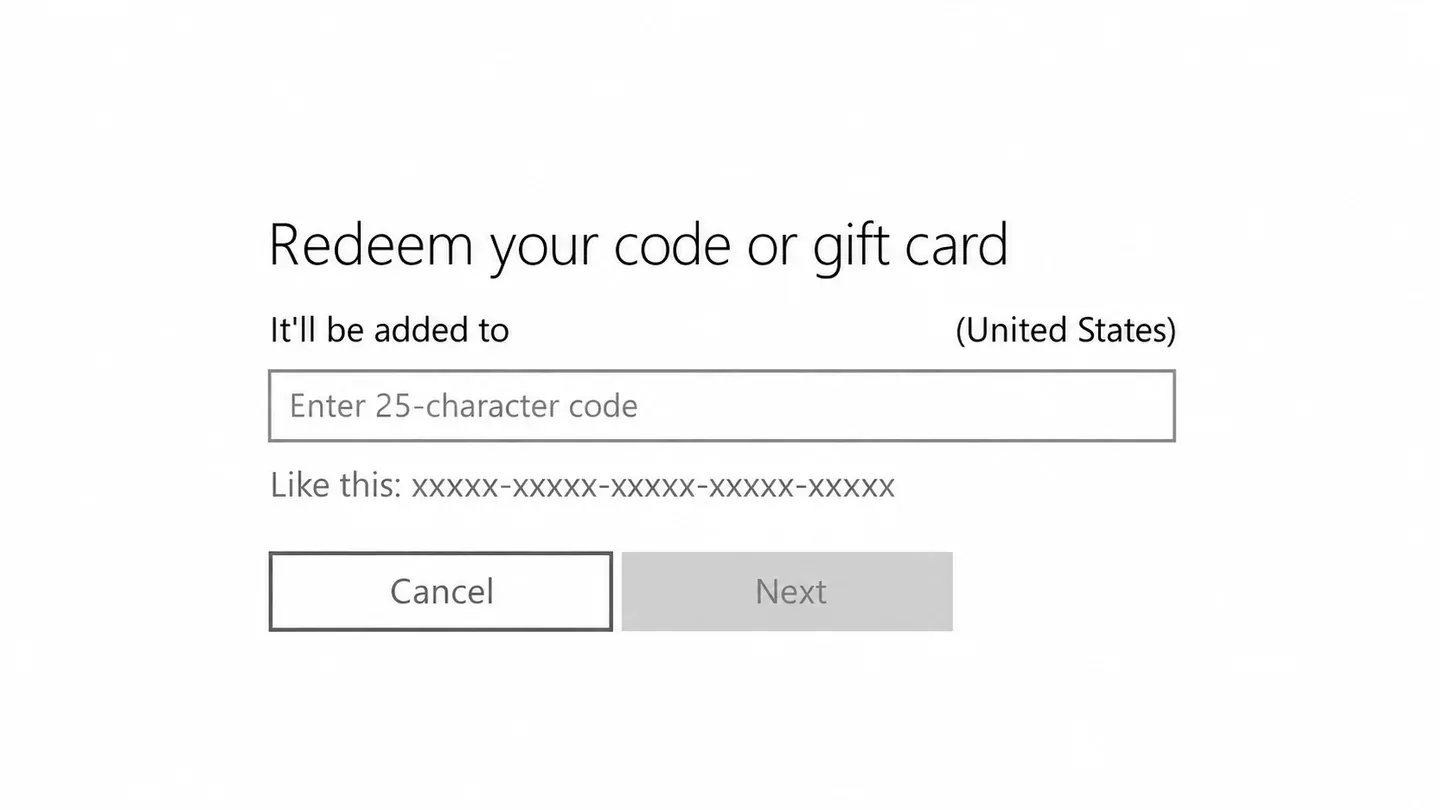
Open the redeem page, either through Store > Redeem Code on an Xbox console or at microsoft.com/redeem in a browser.
Enter the 25-character code and confirm it.
Launch Call of Duty on that Xbox account so the new balance shows up.
On Xbox, that's all you need. PlayStation, Battle.net and Steam players have one more step, since they spend the balance through the Call of Duty web store:
Log in to the Call of Duty store with your Activision account.
Pick a bundle or the Battle Pass, then choose your linked Xbox account from the points dropdown.
Click Buy Now, then launch the game on your own platform, where the bundle or Battle Pass you bought is ready to use.
Battle Pass purchases only register once you log in to the game. After buying the pass on the web store, open Black Ops 7 or Warzone, and your premium rewards will be waiting.
CoD Points are the premium currency in Call of Duty, and stores also sell them as Warzone Points. You spend them on anything outside the free rewards. Every season, they go toward two things: the Battle Pass and store bundles. Bundles hold the cosmetics most players are after, like operator skins, weapon blueprints, calling cards and emblems. Items never sell on their own, so if you want one skin from a bundle, you buy the whole bundle.
Mastery camos like Singularity work differently, since you unlock them through weapon challenges, not the store. Players who want them without the grind look at Call of Duty items for sale instead.
Each season, Black Ops 7 (BO7) and Warzone share one Battle Pass. It's a reward track split into pages, and you work through it by earning XP in any public match. Everyone gets the free version, but it only holds base weapons and a few cosmetics.
Most of the good stuff sits in the paid versions, and each one adds something different:
Battle Pass (1,100 points): Over 100 rewards like operator skins and weapon blueprints, plus up to 1,100 points back as you clear its pages.
Battle Pass Bundle (2,400 points): Everything in the Battle Pass, plus 20 tier skips, so you start the season a few pages ahead.
BlackCell (paid with money, not points): Everything above, plus exclusive operators and blueprints. It also adds 1,100 points to your balance right away.
Those points back are why many players buy the pass every season. As you clear its pages, the paid pass hands back up to 1,100 points, the same amount you paid for it. Clear all of them, and you have enough saved to buy next season's pass without spending more money. So one purchase can keep you going for a long time, as long as you play enough to clear the pages.
Your Battle Pass progress and rewards follow your Activision account to every linked platform. Points earned in the pass don't, though, since Battle Pass points only work on the platform you earned them on.
Call of Duty: Mobile runs separately too, it has its own currency and store, so CoD Points don't work in Call of Duty: Mobile.
Matches don't pay out points, and neither does the free Battle Pass. That means there are no free CoD Points without a purchase. Even the points you earn back from the paid Battle Pass only come after you spend that first 1,100.
You can purchase CoD Points from these four places:
In-game store: Activision sells Call of Duty CoD Points packs inside Black Ops 7 and Warzone, at the official price.
Platform stores: PlayStation, Xbox, Battle.net and Steam each sell packs for their own platform.
Gift cards: Xbox gift cards and other platform cards work like a CoD Points gift card. They add store credit, which you can then spend on a pack.
Online marketplaces: Sellers add the points to your linked Xbox account or send you a code, usually for less than the official price.
Each Battle Pass only runs for one season, and Activision doesn't sell old passes once it ends. If you buy the pass late, you have fewer weeks to clear its pages and earn those points back. Topping up early means you get the pass at the start of the season and have every week of it to play through.
Every Call of Duty Top Up for sale comes with these perks:
Every Platform Covered: You'll find cheap CoD Points for PS5, Xbox, Battle.net and Steam.
KYC-Verified Sellers: Everyone listing points passed an ID check before they could sell.
Several Ways to Pay: You choose the payment method that works for you at checkout.
Order Chat: You can message the seller at every step, from payment to delivery.
GB Coins Cashback: You get 3% of each purchase back to spend on your next order.
Sellers set their own CoD Points price, and many offers come in well below the official store. Over a few seasons of Battle Passes and bundles, that difference adds up. It also means cheap Call of Duty Points are easy to find for any platform.
Between KYC-verified sellers and a protected checkout, GameBoost is a safe place to buy CoD Points. Whenever you'd like to ask the team something, open a support ticket.
Every pack of CoD Points for sale goes through the same checkout, from the smallest to the biggest. Before you start, have your linked Xbox account ready. If you pick a login offer, keep its email and password close too.
From gameboost.com, your Call of Duty Points order takes five steps:
Search for Call of Duty in the search bar, or open Top-Ups from the main menu.
Open an offer for your platform and read the product description.
Choose the amount you want.
Fill in any details the product description asks for.
Click Buy Now, pick a payment method and click Pay Now.
Once you've paid, your seller either sends the code or adds the points to your linked Xbox account. You can follow each step in the order chat, and your new balance shows up in the game once the points are in.
Yes. The same balance works in both Black Ops 7 and Warzone, since they share one Battle Pass each season.
No. Call of Duty: Mobile runs its own currency and store, so CoD Points bought for console or PC don’t work there.
No, the points themselves don’t, each platform keeps its own balance. Bundles and Battle Pass progress do carry over, since those follow the Activision account to every linked platform.
Sellers either send a 25-character code to redeem yourself or add the points directly by signing into your linked Xbox account and redeeming them for you.
“GameBoost is not affiliated, endorsed, sponsored, or authorized by Activision, Inc., Call of Duty, or any of its subsidiaries or affiliates. Activision, Inc.’s official website can be found at: https://www.activision.com. The name Call of Duty, as well as related names, marks, emblems, and images are registered trademarks of their respective owners. Use of trademarks is covered by fair use principles under EU Regulation 2017/1001, Article 14.”